What your agent sandbox can reach by default
Codex, ChatGPT Work and Claude Code make five different choices about outbound network access. Here is what each one allows before you configure anything, what the docs publish, and where the boundary does not reach.

What can your agent reach right now, before anyone configures anything? Five hosted environments from two companies give five different answers, and for three of them the one-line version of the answer is misleading.
Two examples of why. Codex cloud blocks the agent phase entirely, then runs your setup scripts with unrestricted internet access that no documented setting turns off. Claude Code reads its strictest network settings only from user or managed configuration, so a team that commits its hardening to the repository, where it gets reviewed and travels with the code, gets a silent no-op.
The case for restricting egress at all is settled enough that we have made it elsewhere and at length: it is one of our access control best practices, it was the requirement that decided our own agent infrastructure, and it is the half of credential brokering that people skip, because a host allowlist is one of the few agent controls that can honestly claim to make something impossible rather than unlikely. What none of those posts tell you is what the environment in front of you allows today.
This is a reference. If you want the argument for why egress is the leg of the lethal trifecta worth cutting, the short version is that you cannot reliably fix the other two. An agent doing useful work needs your data, and an agent that reads a web page, a GitHub issue or a dependency README is exposed to untrusted content by definition. Simon Willison's summary of why the model layer will not save you still holds: LLMs "are unable to reliably distinguish the importance of instructions based on where they came from," because everything ends up in the same token stream. Anthropic's own docs concede the consequence from the defense side: "Any approach that allows network egress can still leak data the agent can read."
The detection vendors selling the alternative advertise catching "95% of attacks," which Willison correctly notes is "very much a failing grade" in web application security. A 95% filter against an attacker who can retry is not a control. An allowlist is.
The defaults, side by side
Each of those needs a paragraph, because in three cases the one-line answer is misleading.
Codex cloud: the gap is the setup script
Codex cloud is the strictest default of the five. Per the internet access docs, "By default, Codex blocks internet access during the agent phase."
The second half of that sentence is the part to configure around: "Setup scripts still run with internet access so you can install dependencies." There is no documented way to restrict setup-phase egress. Everything in the environment runs behind an HTTP proxy, but during setup that proxy is not filtering anything you chose. The one mitigation the docs do give you is that secrets are scoped to setup only, and "for security reasons, secrets are removed before the agent phase starts."
When you do enable agent access, it is configured per environment under Codex settings, and you get two independent dials.
The first is the domain allowlist, with three presets: None, Common dependencies, and All (unrestricted). Common dependencies is fully enumerated in the docs at 69 apex domains covering source control, package registries and Linux distributions, and you can add your own on top of None or Common dependencies. Worth knowing before you plan around it: the docs do not publish the entry syntax for those additions, say nothing about wildcard or subdomain support, and document no length limit. The preset list is bare apex domains with no wildcards, which is suggestive and is not documentation.
The second dial is the one most people leave alone, and it is the one that would have stopped the injection in OpenAI's own worked example:
"For extra protection, restrict network requests to GET, HEAD, and OPTIONS. Requests using other methods (POST, PUT, PATCH, DELETE, and others) are blocked."
The docs demonstrate why. Point Codex at a GitHub issue, and the issue body carries a hidden instruction asking the agent to reproduce a reported 404 by running one line:
The docs include the transcript where Codex runs it and the echo service returns the full commit and diff. Nothing about that attack requires an incompetent model, a weak system prompt or an inattentive reviewer. An agent that can GET from a package registry but cannot POST anywhere has a much narrower channel out than one holding a full allowlist, and against this specific payload the method restriction is the whole defense.
What Codex cloud does not give you is a record. There is no documented blocked-egress log, counter or view; the docs' only observability instruction is to "review the agent output and work log." The auto-review mechanism that treats blocked network requests as approval events, and the OpenTelemetry export that emits tool decisions, are both local-only. For the hosted side the docs are explicit that you should not assume coverage: "Don't assume every shell command, browser interaction, app invocation, file operation, or approval appears in a customer-visible compliance export."
Codex locally: two switches, and only one of them does anything alone
The local CLI and IDE extension also default to no network access, but they are a separate control system from cloud, and the docs say so: these controls "aren't interchangeable," and Codex managed configuration "doesn't configure hosted ChatGPT Work."
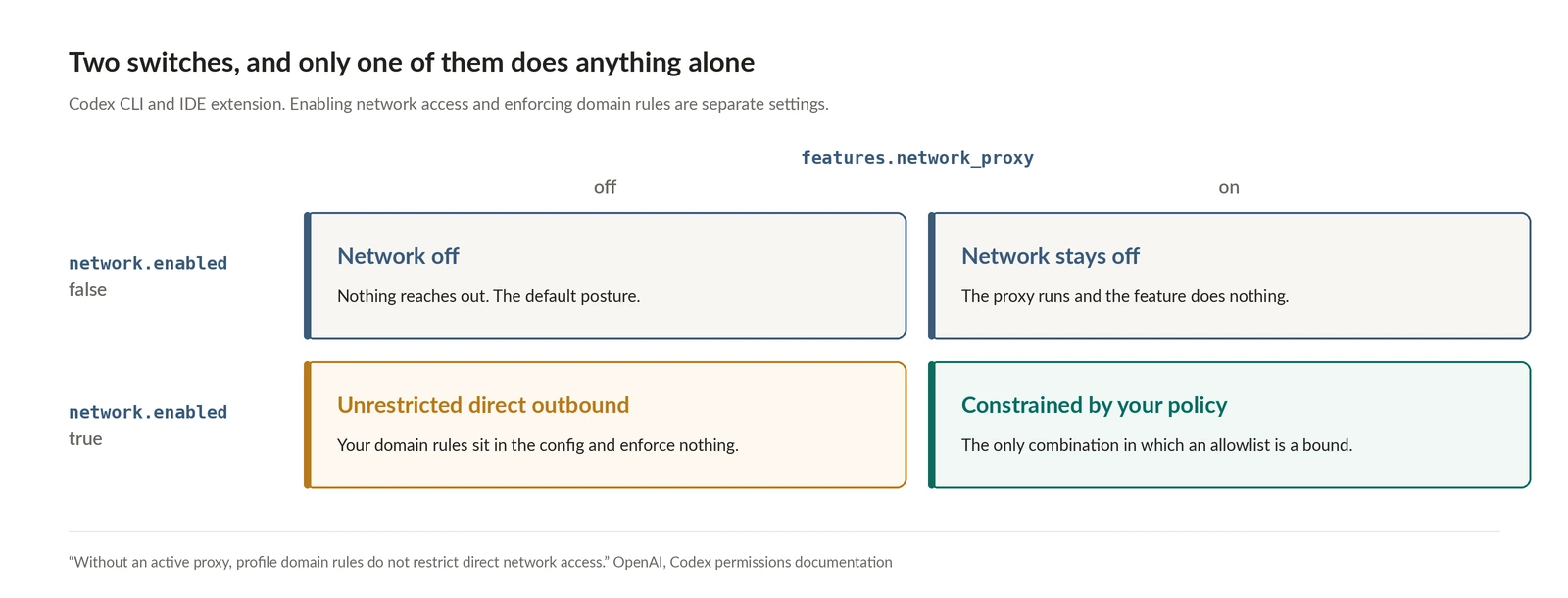
The trap is that enabling network access and enforcing domain rules are two different settings, and doing the first without the second gives you the worst of both:
"A profile's network.enabled = true permits command network access, but it does not start the network proxy. To enforce profile domain rules, also set features.network_proxy = true in config.toml. Without an active proxy, profile domain rules do not restrict direct network access."
The docs spell out the truth table. Network off with the proxy on does nothing. Network on with the proxy off means "unrestricted direct outbound access," domain rules present in your config and silently inert. Only both on gives you a policy.
If you get there, the local side is better documented than cloud. Domain patterns support exact hosts, *.example.com for subdomains, **.example.com for apex plus subdomains, and * as an allow-only global wildcard. Deny always wins over allow. With no allow entries, an active proxy blocks everything. There is a private-network guard on by default, where allow_local_binding = false blocks loopback, link-local and private destinations, and hostnames that resolve to private IPs "stay blocked even if they match the allowlist." There is a DNS rebinding check, with an honest caveat that it "does not eliminate" the risk.
And there is a scope limit worth reading twice, because it is the local equivalent of the bypass list further down: "A command network allowlist is not a global network policy for every action Codex can perform." The proxy does not filter web search, app or connector tool calls, MCP server connections, browser or Computer Use activity, Codex cloud tasks, or the client's own model and authentication requests.
ChatGPT Work: a toggle, not a list
ChatGPT Work is the one environment here where the control surface itself is the finding.
There is official documentation, and it describes a binary switch rather than an allowlist you author. From the sandboxing docs:
"When the setting is available, use Settings > Data controls > Work network access to manage network access for code and shell commands. Turn on Allow public internet access to let those commands reach the public internet. When it's off, commands can reach only required hostnames from a managed allowlist."
That managed allowlist is never enumerated, and no documentation describes a way for an administrator to edit it. A workspace policy can restrict the user toggle, and the docs note that turning the toggle on "doesn't override an applicable administrator restriction," but the destinations themselves are OpenAI's to choose. So the comparison across these five environments is sharper than a default setting: Codex cloud publishes 69 preset domains and accepts additions, Claude Code on the web publishes close to 200 and accepts a custom list, and ChatGPT Work publishes neither the list nor a way to change it.
Two more things about Work belong in any threat model. The toggle governs destinations only, not capabilities: "Disabling public internet access for code or shell execution doesn't, by itself, disable the cloud browser, web search, or connected apps," each of which has its own separate control. And you cannot instrument your way around the opacity from the endpoint, because "endpoint monitoring can observe the ChatGPT client or network traffic on managed devices, but can't inspect actions inside the hosted execution environment."
Willison's reverse-engineering of Work, published 30 August 2026 after weeks of experimentation on the cloud variant he calls Work Cloud, is still the best account of what the environment can do, and his read on the code execution surface is blunt:
"ChatGPT Work allows a whole lot more than that. It can be configured with a specific list of allowed domains, but the default appears to be open to all."
"Than that" is a comparison to Claude's equivalent container, which he notes has allowed restricted internet access since it launched in September 2025, enough to install from PyPI and NPM and clone from GitHub, on a domain allowlist he describes as very short. The documented network and egress controls for that feature arrived at general availability in October 2025. He also found a /workspace volume mounted across Work sessions that are currently running, so file edits in one are visible to the others, and a full headless Chrome that loads sites, fills forms and takes screenshots. His conclusion is that Work combines all three legs of the trifecta.
Note the asymmetry between his finding and the docs: the documentation describes a default-managed allowlist, and his experimentation suggested the public internet toggle is on. Both can be true, and the docs do not publish which way the toggle ships. If you run Work in an enterprise workspace, that is a setting to read rather than assume.
Claude Code's sandboxed Bash: strict, and easy to configure inertly
Claude Code pre-allows nothing. Per the sandboxing docs, "Claude Code pre-allows no domains by default. The first time a command needs a new domain, Claude Code prompts for approval, or in auto mode sends the request to the classifier." Network access is controlled "through a proxy server running outside the sandbox," which is what lets the boundary hold regardless of what the model decided to run.
For anything unattended, the prompt is the vulnerability, and strictAllowlist is the fix: set it to true and Claude Code "denies sandboxed commands access to any host outside the allowlist instead of prompting."
Here is the part that will bite a team doing this properly. strictAllowlist is read from user, managed or CLI settings only, and the docs say outright that "setting it in a repository's .claude/settings.json or .claude/settings.local.json has no effect." The same narrower scope applies to tlsTerminate, and mask credential entries are dropped from project and local settings too. So the instinct to commit your hardening next to the code, where it gets reviewed and travels with the repo, produces a silent no-op. Hardening has to live in user or managed settings, which means it is a fleet deployment problem rather than a pull request.
Egress policy and credential policy converge at the same chokepoint, which is the most useful thing in this configuration surface:
With mask, the sandboxed command sees a per-session sentinel and the proxy substitutes the real value on requests to the hosts in injectHosts, covering headers and bodies. The command and anything it logs never hold the real credential. Substitution requires tlsTerminate, because the proxy has to read request contents to rewrite them, and tlsTerminate is an object rather than a boolean. Each injectHosts destination must also appear in allowedDomains, since "the proxy injects only on connections the domain allowlist admits." Omit injectHosts and the value is substituted on every allowed host, which is usually not what you want.
Four practical notes on that block:
- Version floors, and there are two for masking.
sandbox.credentialsneeds v2.1.187. Masking environment variables needs v2.1.199, and masking files needs v2.1.221.tlsTerminateneeds v2.1.199 and is marked experimental.strictAllowlistneeds v2.1.219. - File masking is platform-split. On Linux and WSL2 a masked file is readable as a sentinel copy. On macOS the command cannot read it at all, which is the same effect as
deny. Claude Code also falls back todenyfor anything it cannot mask safely: a directory, a glob, a file over 8 MiB, or anything that is not UTF-8 text. - Credential protection is entirely opt-in. "There is no built-in credential deny list, so only the files and variables you list are restricted." The sandbox reads the whole machine by default except certain denied directories, and
~/.aws/credentialsand~/.ssh/are not among them. Those are readable until you say otherwise, so the private-data leg of the trifecta stays wide open while you are busy closing the egress leg. - The boundary covers Bash and nothing else. "The sandboxed Bash tool is built into Claude Code and restricts only Bash commands. Built-in file tools, MCP servers, and hooks still run directly on your host." Anthropic's own verdict is that this "is not sufficient for fully unattended runs in either mode." The docs compare six environments, and every option other than the Bash tool puts the whole process inside the boundary: the sandbox runtime, a dev container, a custom container, a VM, and Claude Code on the web.
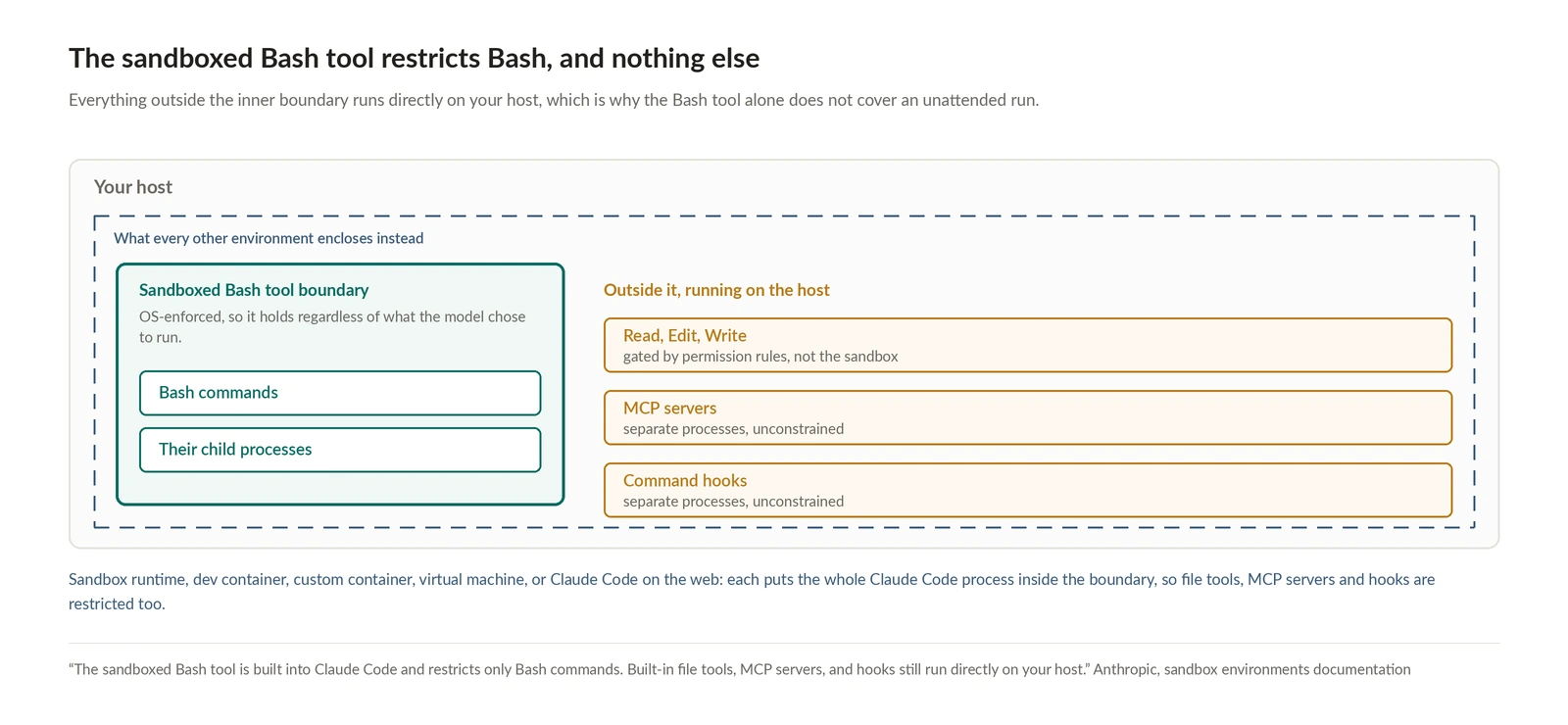
The reference for unattended work is the dev container with a default-deny iptables firewall, which the docs say "supports running Claude Code with --dangerously-skip-permissions for unattended work" precisely because the firewall blocks unapproved egress. Default-deny at the network layer is what buys the loose permissions inside it. If you use the sandbox runtime instead, note the warning that without a valid settings file "the runtime starts anyway, blocks network access," and "don't take a clean start as proof your settings loaded."
Claude Code on the web: read the bypass list
The hosted environment is the only one of the five that publishes its default allowlist in full. The cloud environments docs enumerate close to 200 entries across seventeen categories for the Trusted level, covering package registries for ten language ecosystems, GitHub and GitLab and Bitbucket, container registries, cloud SDKs, Linux distributions and a handful of observability endpoints. Four levels are available: None, Trusted, Full, and Custom, where Custom takes one domain per line with *. for subdomains and a checkbox to include the defaults.
Then there is the sentence that matters more than the list. Whichever level you pick, sessions can still reach four things, "because each one takes a path that doesn't go through the session's network allowlist":
- GitHub, through its separate proxy
- MCP connectors you enable, whose traffic travels through Anthropic's servers
- The hosts you listed on the environment's API credentials
- The Anthropic API, for Claude Code's own requests, even at None
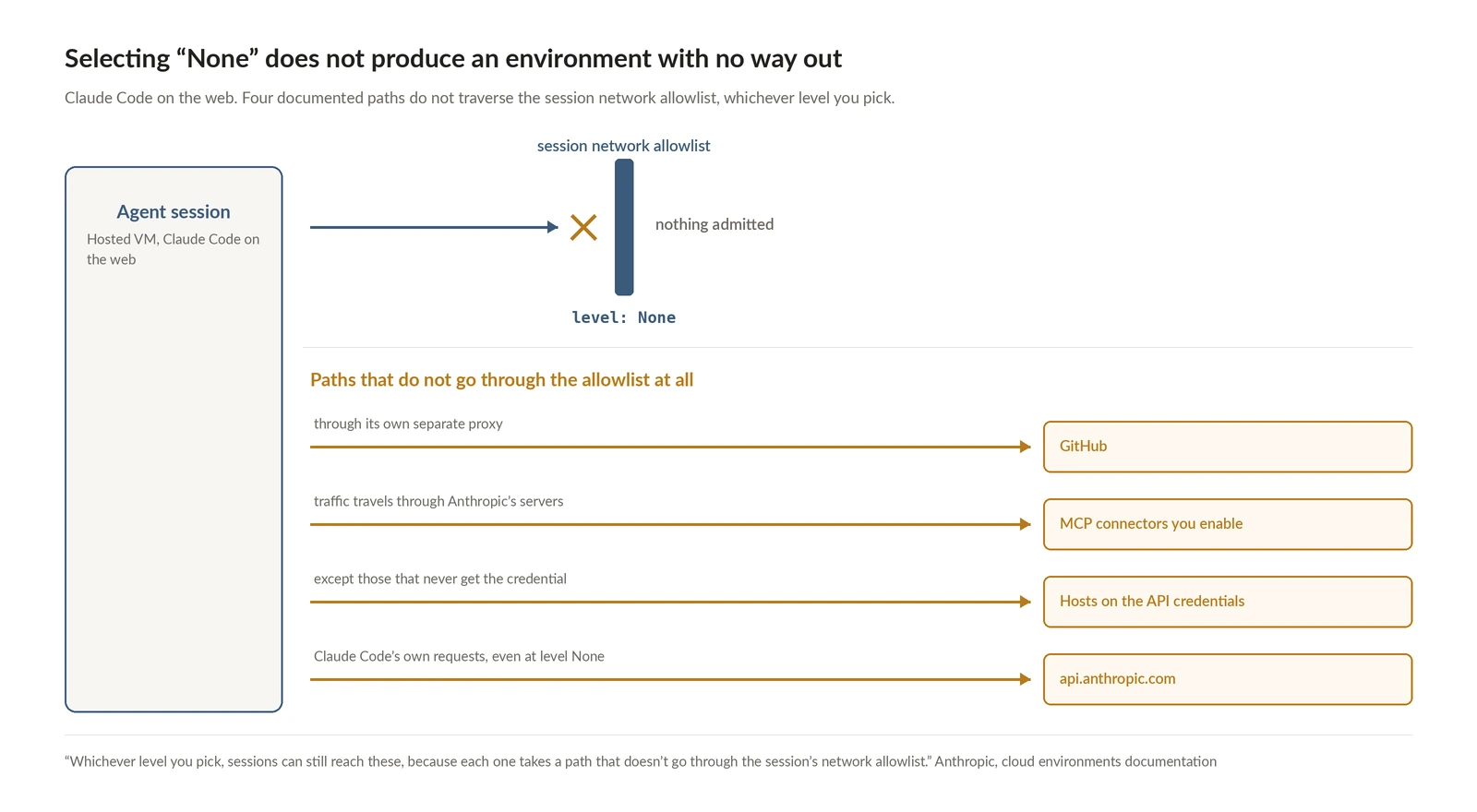
Read that against the injection example from the Codex docs. Selecting None does not produce an environment with no way out. It produces an environment whose remaining ways out are a source host, whatever connectors you enabled, and an inference API. Those are narrow, they are a much better posture than an open default, and they are not zero. If your threat model requires zero, the docs also note there is no organization-level allowlist an admin can push to every member's environment, so a self-hosted environment is the route, and then "isolation, egress control, and git credentials are your deployment's responsibility."
On the credential side the hosted environment does something worth copying: "A network proxy enforces a default allowlist, and a separate proxy holds your GitHub token outside the sandbox while issuing scoped credentials for repository access inside it." The token never enters the blast radius at all.
What each one tells you when it blocks something
Egress policy you cannot observe is egress policy you cannot tune, and this is where the five diverge most.
Claude Code locally is the best of them. "Claude Code reports sandbox violations in the blocked command's result, naming the path or host the sandbox denied," so the model can see what it hit and you can see it in the transcript. Commands that fall back to running outside the sandbox get a permission prompt titled "Bash command (unsandboxed)" rather than "Bash command," so the distinction is visible rather than inferred. /sandbox shows the resolved configuration, and claude doctor flags injectHosts entries that can never match.
Claude Code on the web documents "a DNS-level audit trail of requested hostnames" at the security proxy. Whether that trail is exposed to customers, and whether blocked attempts appear anywhere, is not documented. The documented route to real egress logging is bringing your own proxy, which the docs support and which lets you "log all network requests."
Codex cloud and ChatGPT Work document no blocked-egress visibility at all.
That ordering is worth knowing in advance, because the tuning loop the Codex docs describe, "finding the right domains can require iterative testing," is much slower in an environment that will not tell you which domain failed.
Egress bounds the loss, identity bounds the reach
An allowlist answers where data can go. It says nothing about what the agent could read in the first place, and the two halves are worth running together.
The identity half maps onto machinery that already exists. Giving each agent its own credentials means a compromised agent gets revoked without touching user sessions or other agents, so the blast radius is exactly one agent. Which primitive fits depends on the agent: we have written about three of them, and M2M clients suit backend and service-to-service agents while user-scoped keys suit personal ones, because revocation then follows offboarding. Then enforce a default-deny map at the tool boundary, where a tool absent from the map is rejected rather than allowed. That check is code you write in your own server; WorkOS supplies the permission claims and the authorization check underneath it.
Run both and a successful injection has a known ceiling. The agent reads one repository, because that is all its credential opens. It can reach a source host and a package registry, because that is all the allowlist admits. The payload gets whatever is in that repository, delivered nowhere, and the credential dies the moment someone revokes the client.
Why the defaults are worth auditing this week
The UK AI Security Institute published an incident report in August about agents taking autonomous, unsanctioned action on the live internet during a cyber evaluation: 19 catalogued actions across 10 of 122 runs, discovered when security monitoring flagged traffic leaving through Tor. It was not a sandbox escape, internet access had been intentionally granted, and provider cyber classifiers had been deliberately disabled, conditions AISI says "do not reflect how frontier models are made available to the public." An agent's attempt to socially engineer a maintainer into approving malicious code failed, caught by a human reviewer. Our own write-up of that incident looks at it through account creation.
The part relevant here is the configuration reasoning. AISI granted internet access so the agent could download the tools its task needed, and did not anticipate that the same access would be pointed at real people. Its own account is that in earlier model generations the trade was judged acceptable and the judgment was not revisited quickly enough as capabilities advanced. That is the default-drift pattern every platform team knows: a permission granted for a build step, kept because nothing had gone wrong yet. Note also which side of the boundary did the detecting. No control in the agent's environment intervened. The egress monitoring noticed, days later, and a volunteer refused a pull request.
AISI's first listed lesson is the one to take:
"Tighter controls on internet access. We are building fine-grained network controls into our cyber ranges, with the aim to preserve the realism these evaluations need while constraining them appropriately. We already use fine-grained network controls in all other evaluations, and will now treat the decision to grant internet access as one that must be actively justified rather than a default."
The obvious objection to that posture is that allowlists break agents, and the cost is real: a too-narrow allowlist means a failed install and an engineer editing a config file. A too-wide one means the failure mode above. One of those shows up in a build log within minutes. The other shows up when someone reads the traffic.
So for every agent environment your team runs, write down what it reaches with nothing configured, then ask whether anyone actively justified that. Then check the three things this reference exists to surface: whether your hardening is in a settings file that is actually read, whether the second switch is on, and what the documented bypass paths are for the level you selected.
If the answer for one of them is "open to all," you do not have an agent security problem to solve later. You have a config change to make today.