The self-driving codebase: Building Horizon at WorkOS
A detailed glimpse at Project Horizon: an internal code factory at WorkOS.


Software teams are already using AI to solve everyday problems and write code faster, but the limiting factor is still orchestration: deciding what to work on next, wiring together the right context, running verification, and getting changes safely into production.
Horizon is our attempt to turn that orchestration into a compounding loop: every run can ship work and feed improvements back into the platform, so the system gets faster and more reliable through use.
This post explains why we’re investing in a custom, in-house autonomous code factory called Horizon, what makes it meaningfully different from existing one-shot coding tools, and what we learned by turning real engineering work into an event-driven agent system. We were inspired by Ramp’s Inspect and Stripe’s Minions: both show the power of background agents that can take a request and drive it end-to-end. Our takeaway was that the pattern is real, but the details are company-specific.
We chose to build Horizon in-house because environment, security, and WorkOS-specific context are the product: agents need a secure place to run, first-class access to signals like logs, errors, and conversations, and a review-first loop that keeps humans in control. We were also able to tap into our existing WorkOS MCP auth and Pipes features. Below, we walk through the end-to-end workflow, break down the infrastructure that makes it possible, the challenges we encountered, and close with what’s next.
Event-driven AI software development
AI coding harnesses like Claude Code, Codex, and OpenCode have reshaped the software engineering industry. Manually writing code in your IDE already feels like a quaint anachronism. Coding agents running on our local machines can already grep, bash, and edit faster and with higher accuracy each passing week.
But the loop of moving from one task to another remains operated by humans. A common workflow is for humans to assign an AI agent to a ticket to push a PR—but after it's reviewed and merged, a human still decides what the agent should work on next. What if that flow, too, was automated by agents?
We set out to build our own internal autonomous agent code factory called Horizon. Like Cursor Automations, Horizon responds to external events, spawning long-running inference sessions in a secure cloud sandbox. Agents handle not just individual tasks but also complex features across multiple packages, verifying their work and doing initial validation of acceptance criteria along the way.
At WorkOS, where small product-minded teams own broad surface areas across enterprise auth and developer-facing APIs, the biggest bottleneck is weighing trade-offs on how to implement product features. An autonomous code factory changes that equation. Engineers describe what needs to be built, and a continuously running swarm of agents handles the implementation loop, freeing the team to focus on requirements gathering and user-acceptance testing.
What escalates a one-shotter script into a code factory? Webhooks. By feeding the webhooks emitted by the services we already use into a worker, we can trigger agents in the background to act on tasks and projects we care about.
What the flow looks like end-to-end
Consider a flow that starts in Linear, the popular project management tool. A human writes detailed product requirements in a new project, linking to Hilltop documents in Notion and mockups in Figma. When the human creates the first issue in the project and delegates it to Horizon’s “PM” agent, the agent divides the project into individual issues as logical units of work. Issues get detailed descriptions and, when they should be implemented in a certain order, are marked as blocking other issues to illustrate an implementation dependency chain.
Once the PM agent has carved out the issues, a human reviews each one and adds context as needed. To indicate that an issue is ready for an Implementation agent, it’s moved to the In Progress status to kick off the full implementation loop.
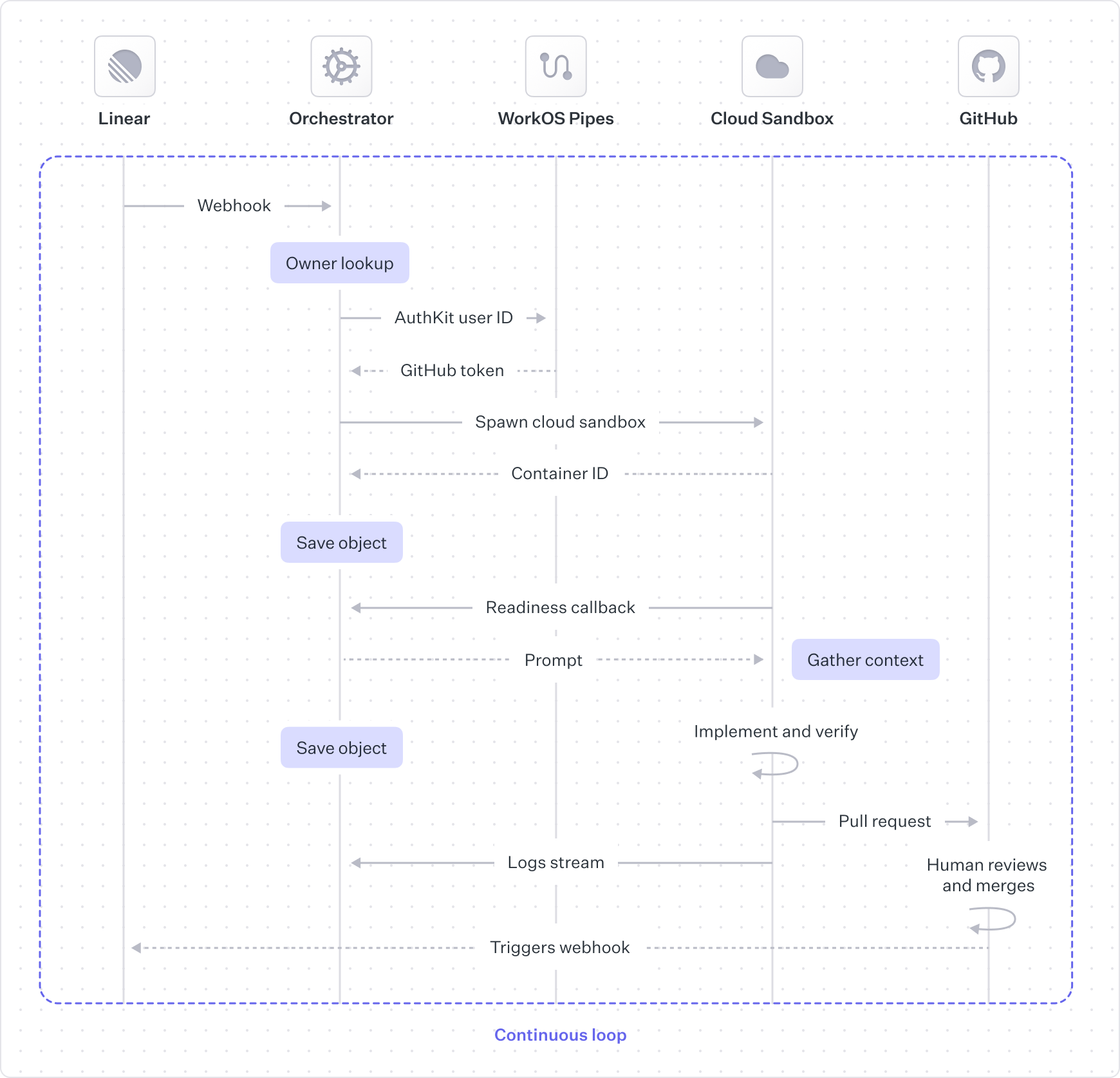
The orchestrator verifies the webhook signature, filters out events we don’t care about, and assigns the work to a cloud agent.
We want all pull requests to be attributed to the human who owns the Linear issue. For this we need a scoped, short-lived GitHub token for the user. To link user identities across platforms, we use our own WorkOS Pipes feature to avoid building or maintaining OAuth flows, token refresh logic, and secure credential storage. For git operations like cloning and pushing changes, we use a GitHub App token scoped only to our repository, and we co-author all commits with the human user and the agent.
The cloud sandbox boots up our Docker development container, with OpenCode inside. OpenCode is preconfigured with our custom MCP server to gather additional context like logs from Datadog, errors from Sentry, and conversations from Slack.
Agent sessions can run in two modes: semi-autonomous, where the agent produces an artifact with starting context, and interactive, where the human and agent chat back and forth. While the interaction is slightly different up front, the feedback loop concept is relevant in both modes.
A human is always in the loop when the agent hands off the pull request. The upside is that no code gets merged without explicit human approval, but the downside is that humans are frequently the bottleneck.
After GitHub merges the pull request, Horizon handles it as another webhook-driven entry point. Horizon marks the Linear issue(s) as done, then re-evaluates any issues that depended on the merged work. If a newly unblocked issue is eligible for automation, the orchestrator immediately starts the next implementation run so the dependency chain keeps moving.
Infrastructure
1. Execution engine: cloud sandbox
When we started tackling this project, we didn’t have existing cloud development sandboxes. Unlike companies with long-standing internal development platforms, our engineering workflow has primarily been local development and CI.
This worked for us when a single agent was iterating locally, but it becomes cumbersome with multiple agents running in parallel. Engineers needed to run and verify changes without contending for shared local resources (ports, databases, job queues) for different tasks. Non-engineers needed a reliable way to preview and validate changes without recreating a local setup.
That’s why we settled on a cloud sandbox: an execution environment built for agent workloads, where every run is isolated, reproducible, and independently verifiable. The cloud sandbox is a space for agents to autonomously prototype features end-to-end, diagnose issues, run builds and tests, and complete additional verification.
When building out our cloud sandboxes, we had three initial needs:
- Flexibility: must be able to run our full monorepository stack, not a partial environment, and evolve as our tooling evolves.
- Security: strong isolation and least-privilege access, with a major focus on egress controls to reduce prompt injection and exfiltration risk.
- Speed: boots quickly, caches well, supports multiple concurrent sandboxes, and can be paused/resumed.
One of the challenges we quickly encountered was packaging our local environment so it could be quickly spun up, paused, and resumed. Locally, developers typically had a long-running set of containers for databases and other cloud service mocks, plus a collection of Next.js apps and a Nest.js backend running in development mode. Sure, we could’ve set up and maintained a full Amazon EC2 virtual machine infrastructure, but since this development infrastructure didn’t exist for us in the first place, we decided this was a slow starting point. We could also have simply sandboxed the files in the repository alongside the agent, without enabling the apps to run, but this would have limited our ability to enable a proper end-to-end agent verification loop.
GitHub Codespaces as a stepping-stone
We learned quickly that we didn’t just need “a place to run code in the cloud.” We needed purpose-built agent infrastructure: a runtime we could control end-to-end, with explicit sandbox lifecycle APIs and egress controls designed for our threat model.
We started with GitHub Codespaces because it let us get to a working prototype fast. We reused familiar GitHub workflows, kept setup lightweight, and relied on prebuilds to boot quickly with dependencies installed and caches warmed. Codespaces also gave us access to beefier machines that could run our full development environment.
But once the sandbox became part of an agent system (not just a developer convenience) we hit the edges. Codespaces optimizes for developer-in-the-loop workflows (start a Codespace, edit by hand, stop when you’re done), not agentic workflows that need programmatic lifecycle control, predictable configuration, and stronger, more explicit egress boundaries. Those constraints pushed us toward a more purpose-built runtime.
Cloudflare Sandboxes
After weighing in the tradeoffs of functionality, existing internal tooling patterns, and roadmap alignment, we settled on Cloudflare for our self-driving codebase infrastructure. In addition to Cloudflare’s agent platform direction aligning to our needs, Cloudflare Containers with the Sandbox SDK provided a better path for stronger, more explicit egress controls. We’re able to proxy all outbound traffic through Workers so we can enforce allowlists, limits, logging, and inject necessary tokens without exposing them to the agent itself.
Cloudflare Containers also gave us the primitives we needed to run multiple sandbox flavors under a single control plane. We can spin up different environments for planning, code writing, and verification. We can also separate sandboxes for our main monorepo and our SDKs, with environments configured very differently, while still managing everything from one place.
Sandbox preview URLs and the ability to enable sandboxes to communicate with each other set us up to build stronger verification steps. While our initial verification — linting, building and running automated tests — fit nicely into our single cloud sandbox, we wanted the flexibility to spin up other purpose-built cloud sandboxes, separate from the code-writing sandbox. This way, the verification agent could run as a true client, and we can bake browser rendering tools into a separate, smaller cloud sandbox. We also hope to build other purpose-built verification agents, like a security testing agent. All of these would be deployed as Cloudflare Containers that can interact with the sandboxes where code changes exist.
2. Context engine: custom MCP server
LLMs are only as effective as the context they have access to. Once we had a place to run code, the next bottleneck was getting the agent to autonomously follow the same paved paths that engineers do.
Horizon’s MCP server aims to provide a single, shared toolbox and workflow surface for our internal agents. It stitches together our internal data sources so agents can make better decisions, without forcing every agent to run to carry a huge pile of bespoke, prompt-heavy instructions.
A key lesson from dogfooding is that MCP tuning is an iterative product, not a one-time integration. Agents can eventually “figure it out” with minimal context, but it’s slow and expensive: they spend tokens exploring, make wrong turns, and repeatedly rediscover the same conventions. We keep tightening that loop by codifying the patterns engineers already follow: standard tool shapes, consistent naming, and opinionated schemas for inputs and outputs. Over time, that means less agent fumbling and faster convergence on the right workflow.
Given the context engine is simply an MCP server, engineers can also use their identity to gain access to appropriate tools within the custom MCP server, instead of having to constantly reconfigure service-specific credentials and tools. This means we get more consistent behavior across the company, and we can improve it centrally.
3. Work orchestrator
Finally, to turn all of this into an autonomous agent, we needed API endpoints that connects the various entry points to the agents, and manages the lifecycle end-to-end.
The agent orchestrator normalizes inbound signals into work items, including specific feature requests and bug reports, plus wider project requirements. From there, the orchestrator manages the sandbox lifecycle: it creates sandboxes, pauses and resumes them, and destroys them when a run ends, while tracking sandbox state and artifacts. When work finishes or a human needs to weigh in, the orchestrator routes outputs back through Slack, Linear, GitHub, and the web UI.
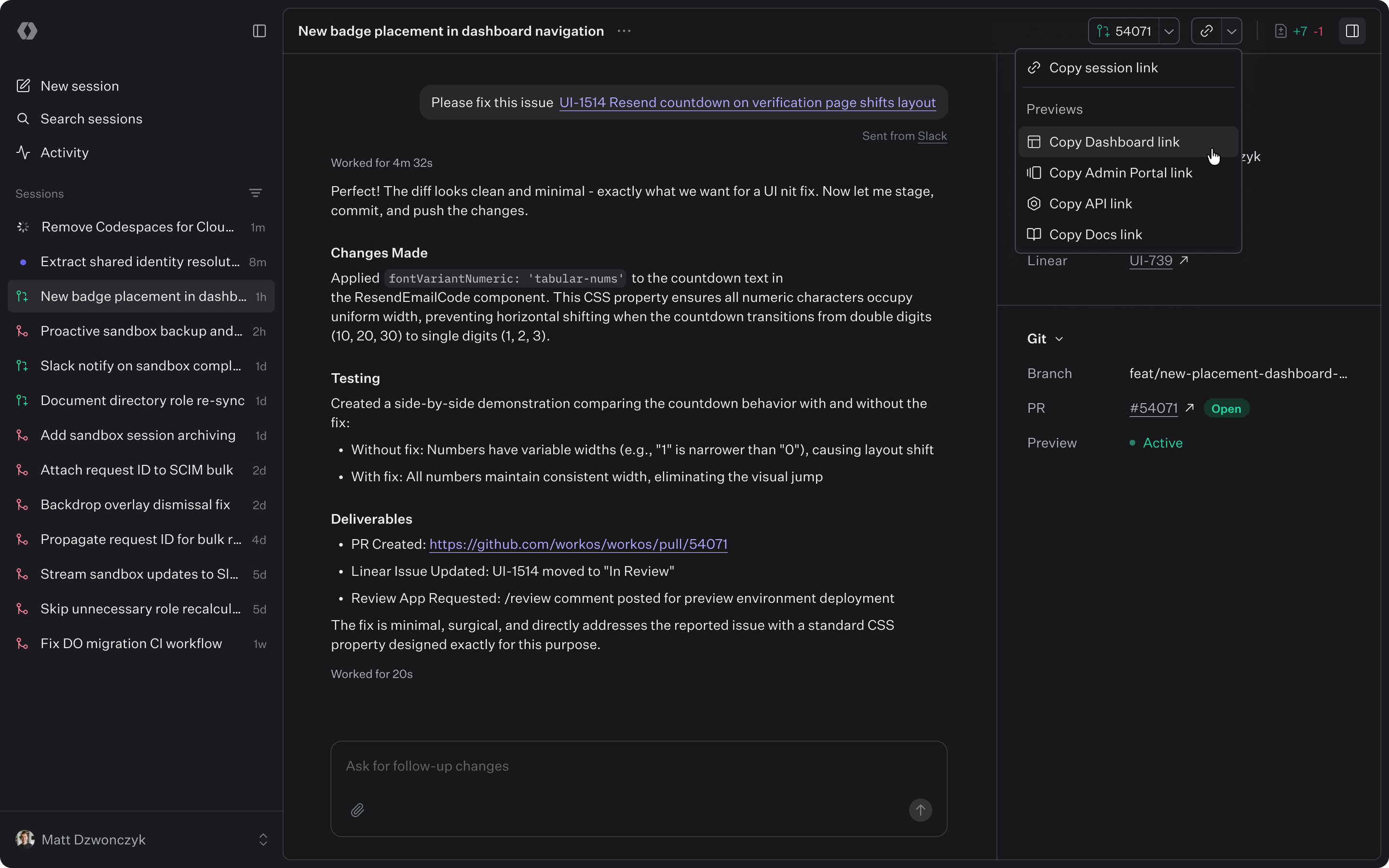
Each interface has its own use cases and nuances. For example, the web UI chat is designed to be more verbose than what is sent to Slack or GitHub, and the Linear integration emits additional signals we listen to in order to power the full project management workflow. The agent orchestrator layer manages all of these details and delegates work to agents.
It’s important that this orchestration logic lives outside of the sandbox. Sandboxes are an execution primitive: they should be disposable, tightly scoped, and optimized for running code safely. The orchestrator is the control plane: it’s where we unify all the different inputs we care about (Linear, GitHub, Slack, the web UI, and eventually more) into a single work queue with consistent routing, permissions, and lifecycle semantics.
That separation also lets us scale both axes independently. We can continuously add new signals and entry points without changing the sandbox runtime, and we can expand the variety of sandboxes (planning vs. code writing vs. verification, monorepo vs. SDKs, different sizes and security policies) without duplicating orchestration logic or coupling every new sandbox flavor to every integration.
Dogfooding: turning Horizon into a compounding system
Infrastructure is only half the story. The reason we care about a webhook-driven orchestrator, a shared MCP surface, and reproducible sandboxes is that they create a feedback loop where the system can improve itself.
When Horizon runs in production, it doesn’t just ship features. It also surfaces where the platform is brittle: a missing script, a flaky test, unclear conventions, or a tool that needs better context. Those papercuts become the next inputs to the same factory.
The loop looks like this:
- An agent hits friction while implementing a real task in the sandbox
- Another agent ingests the sandbox session logs and writes up a targeted fix or context improvement
- A human reviews and merges it
- The next run gets faster and more reliable because the platform learned
This is also where the separation of concerns pays off:
- Improvements to the sandbox reduce runtime failures and make verification more deterministic
- Improvements to the MCP reduce context fumbling by codifying usage patterns and schemas
- Improvements to the orchestrator reduce coordination overhead by standardizing signals, routing, and lifecycle
Examples of self-improvements we’ve already made
Here are the kinds of changes Horizon has been able to drive as we dogfood it:
- Speeding up iteration: caching dependencies, tightening prebuilds, and reducing sandbox boot time so agents spend less time waiting and more time iterating.
- Filling in missing paved paths: adding scripts, docs, and conventions that an agent, and a human, can follow consistently, and then capturing these in AGENTS.md and CLAUDE.md.
- Hardening the context surface: turning chains of tool calls into combined patterns so the agent stops rediscovering the same workflows.
Today, we still seed many “platform feature” tasks manually. The direction we’re heading is to hook up more internal signals, including team member feedback, so Horizon can automatically propose and queue these feature additions, with humans continuing to review and merge.
Why we chose to build this in-house
Off-the-shelf agent harnesses are getting better quickly, and we expect we’ll keep integrating more of them over time. However, we chose to build Horizon in-house, and instead drew inspiration from many of the existing tools, because we had a few non-negotiables about what the system needed to be.
First, Horizon had to run in an execution environment we could control enough to meet our security model, sandbox lifecycle, and verification constraints. Second, the workflow surface had to be collaborative by default, so planning and review could happen in a multiplayer loop instead of a single human ↔ agent chat. Finally, it had to be horizontal enough to span WorkOS’s surface area and internal processes, with the ability to be tailored for both engineering and non-engineering workflows. In particular, we wanted multiplayer support from day one, and most tools were still early there.
The landscape is moving fast, which is exactly why we built Horizon around a modular architecture where components can be swapped as the tooling evolves. The goal is a durable system that can absorb new capabilities over time without forcing a rewrite every time the market shifts.
What’s next
Horizon is less a single project and more a new development loop: one where “writing code” becomes the easy part, and the hard parts are correctness, context, and trust.
The version we have today already ships real WorkOS work, but it’s still early. Every run teaches us where autonomy breaks down: where verification isn’t strong enough, where context is too implicit, where the handoff to humans is noisy, or where the platform needs a clearer paved path. That’s why we’re committing to Horizon as a long-term investment: the system gets better the same way a team gets better: by doing the work repeatedly, learning from failures, and codifying what worked. Here are the next investments we’re planning on making:
Make correctness the default
To operate at scale, agents have to prove they’re right before they ask for human attention. Lint, builds, and automated tests are table stakes. Next we’re adding headless browser verification so agents can drive the UI, capture deterministic artifacts (screenshots and DOM snapshots), and attach them to pull requests so reviews start from evidence.
Make it more collaborative
As Horizon takes on larger projects, we want humans to stay in control without becoming the bottleneck. We’re building a multiplayer web UI for planning and implementation so multiple people can align on a plan, refine requirements, and guide execution in one place, instead of bouncing across scattered threads.
Make autonomy a platform other teams can extend
Horizon gets more valuable when more of WorkOS can plug into it their workflows. We’re expanding the set of supported events that can kick off work, and we’ll make it easier for teams to add new triggers and APIs.
Make the system learn faster than the failures repeat
Agents surface papercuts quickly: flaky checks, unclear conventions, missing scripts, slow feedback. We’ll keep tightening the loop with better diagnostics, stronger schemas, and platform improvements that reduce agent fumbling and shrink time-to-merge — so the same class of failure happens once, gets fixed, and disappears.
This space is changing quickly, and we expect Horizon to keep evolving as the models and tools change. But the bet we’re making is stable: event-driven agents, running in secure sandboxes, guided by a shared context surface, and operating in a review-first loop where humans stay in control.
The goal is a continuously compounding system: every run ships work and produces the next set of fixes — better verification, clearer guidelines, tighter paved paths — so the platform learns faster than the failures repeat.
We’ll keep sharing what we learn as we dogfood Horizon in production. And we’re hiring engineers to help build the self-driving codebase — especially if you want to work on agent infrastructure, verification, and developer tooling at WorkOS.