Audit logs for AI agents: Lessons from Claude's Compliance API
More than 100 security vendors now plug into the Claude Compliance API. Here's what it teaches any AI product selling to enterprises about audit logs: what to record, who can export it and where it goes.

On September 30, Help Net Security reported that more than 100 security and compliance vendors now integrate with the Claude Compliance API, which sends Claude activity and audit logs, such as sign-ins and admin actions, into the security tools a company already runs. CrowdStrike, Microsoft Purview, Splunk, Palo Alto Networks, Cloudflare and Zscaler are on the list. When Anthropic introduced the partner program in May, it launched with 28 integrations.
The number matters less than what it tells you about buyers. Security teams at large companies now expect the AI tools their employees use to send activity into the SIEM, DLP and identity tools they already run. Once one major vendor does this, the next vendor gets asked for it in the security review.
If you're building an AI product and selling it to enterprises, that next vendor is you. The good news is that you don't need 100 partner integrations to answer the question. You need a clear model of what you record, who can export it and where it goes.
What the Claude Compliance API exposes
Anthropic's design is a useful reference because it separates data types instead of shipping one firehose. Based on Anthropic's announcement and Help Net Security's reporting:
Two other details stand out. On Claude Enterprise, only the Primary Owner can switch the API on, and Admins don't see the settings page at all. And the partners consume the feed differently: Help Net Security notes that Salt Security and Torch Security read no conversation content, while Datadog ingests audit logs from Claude Platform.
Three design choices worth copying
1. Activity and content are separate
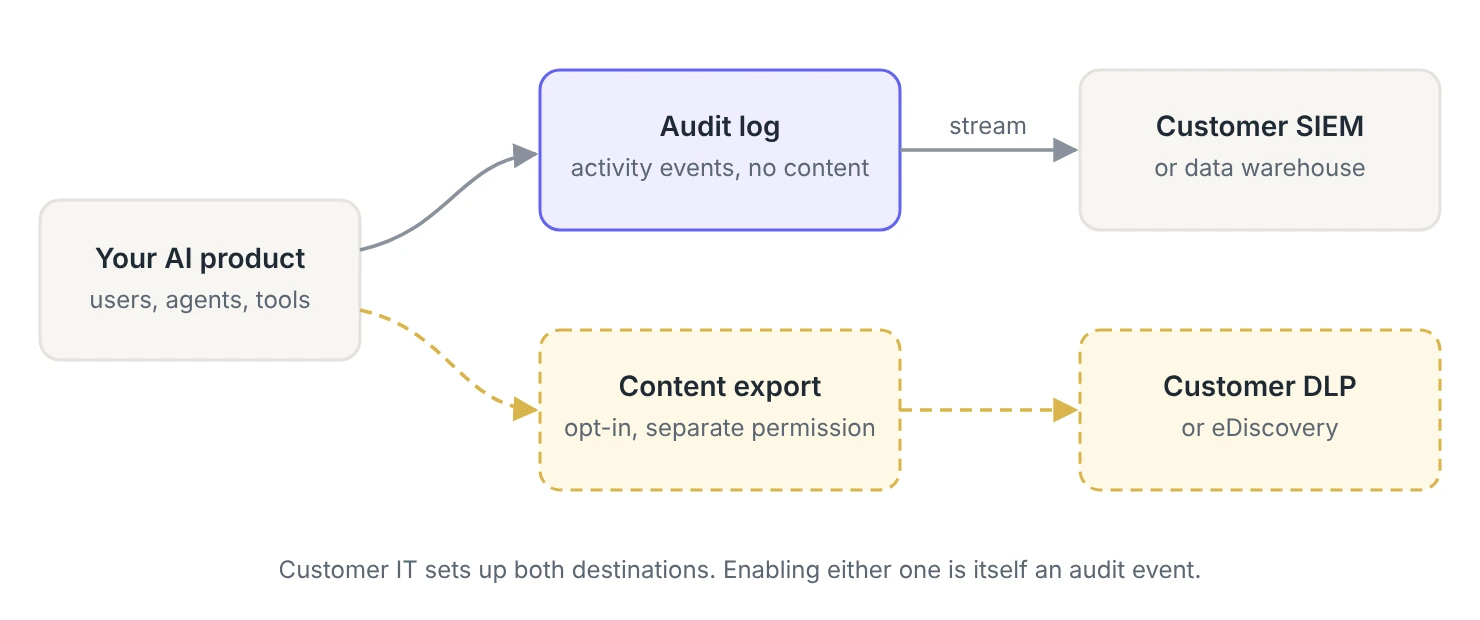
Some customers want to inspect every prompt for sensitive data. Others have policies that forbid sending prompt content to yet another system. Splitting activity events from conversation content lets both groups say yes.
For your product, start with activity events that carry no prompt or response content. They answer most security review questions on their own: who signed in, who changed a setting, which agent called which tool. Treat content export as a separate feature with its own permission and its own contract language.
2. Turning on the feed is a privileged action
A compliance feed can contain more sensitive data than any single user can see. Anthropic restricts it to the Primary Owner. Whatever role you choose, make it explicit in your role model, and record an audit event when someone enables, changes or disables an export. The export of the audit trail should itself be on the audit trail.
3. Data goes to tools customers already run
Security teams don't want another dashboard to check. They want events to land in the SIEM where their detections and retention policies already live. You won't build 100 integrations, but a handful of standard destinations plus a generic HTTPS option covers most of what customers ask for.
What should an AI product log for enterprise customers?
Regular SaaS audit logs cover sign-ins and settings. AI products add a new category: actions an agent took on someone's behalf. Here's a starting set. The action names are examples, so adapt them to your own schema.
Record the agent and the person behind it
Tool calls are where AI audit events get tricky. A useful event names the agent as the actor, records the user who delegated the work, identifies the tool as the target and captures the scope that allowed it. It doesn't need the prompt. Here's an example event for an agent that ran a CRM export tool:
A security analyst can alert on this in their SIEM without ever seeing what the user typed. If an agent starts exporting contacts at 3 a.m. under a scope it rarely uses, the event says so. For more on why these records need to live outside the agent's reach, see When the AI agent can edit the evidence.
Where WorkOS fits
WorkOS Audit Logs covers the activity path. You define event schemas in the WorkOS Dashboard, and WorkOS validates each event against them, so actions stay consistent as more teams start emitting events. Each event carries an action, actor, targets, context and metadata, which maps directly onto the agent example above.
For delivery, log streams send events to Datadog, Splunk, Microsoft Sentinel, Snowflake, AWS S3, Google Cloud Storage or any HTTPS endpoint. Your customer's IT admin can set up the stream through an Admin Portal link, so the setup doesn't become a support ticket. In the Admin Portal, they can also view and export events, and your team can generate CSV exports by date range, action, actor or target through the API.
To decide who can turn exports on, use the same role model you use for the rest of your product. WorkOS RBAC can gate that permission like any other.
A checklist before your next security review
- Activity events exist for sign-ins, admin changes, credential changes, data movement and agent tool calls.
- Agent events name the agent, the delegating user and the scope used.
- Activity events carry no prompt or response content by default.
- Content export, if you offer it, is a separate feature with its own permission.
- Only a clearly defined role can enable or change exports, and doing so creates an audit event.
- Customers can stream events to their SIEM without filing a ticket.
- You can answer "how long do you keep this, and can we get a copy?" in one sentence.
Anthropic built a partner ecosystem because its customers asked for one. Your customers will ask the same question, probably in a security questionnaire. If you design your audit events now, answering it takes minutes instead of a sprint.