WorkOS Audit Logs now capture sessions and membership changes automatically
WorkOS now writes Audit Log events for sign-ins and membership changes. What gets captured, what does not, and why turning it on is not retroactive.

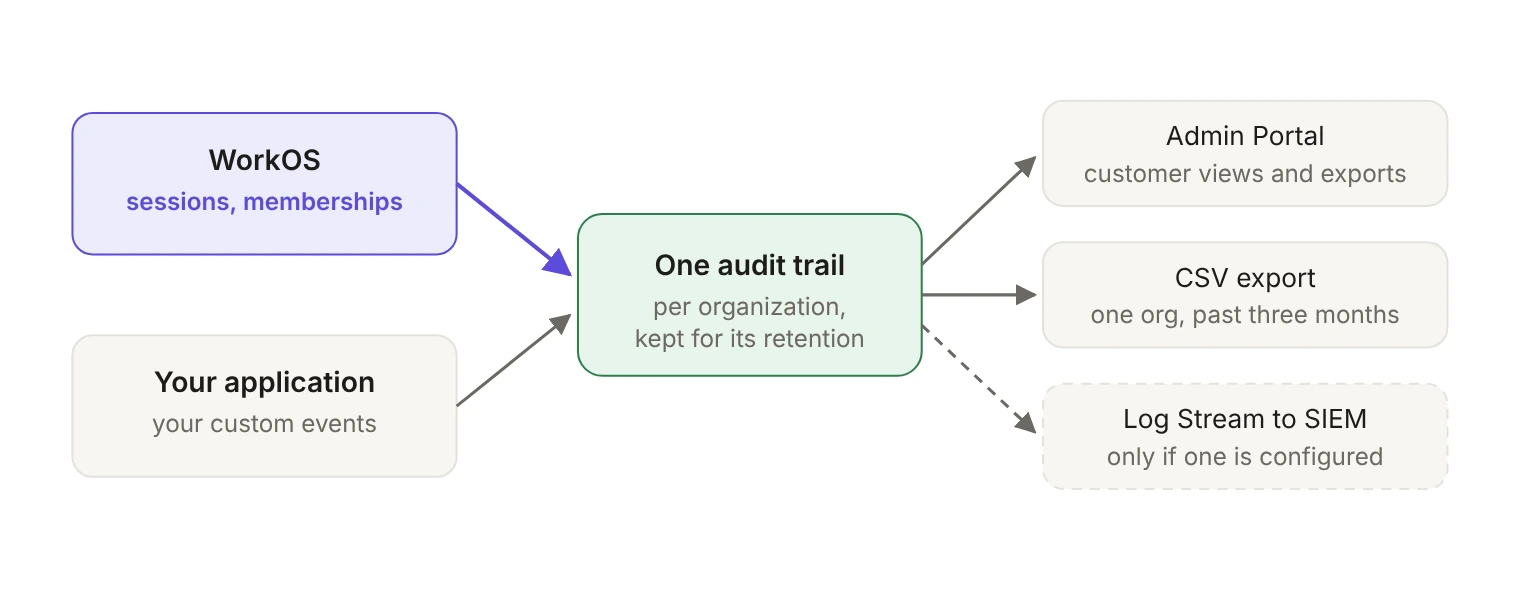
Platform audit log events are Audit Log events that WorkOS generates itself for actions taken on WorkOS, starting with sessions and organization memberships. Once you enable them, they land in the same audit trail as the events your application emits, so your customers can view them in the Admin Portal, export them as CSV, or stream them to their SIEM. They only record activity from the moment you turn them on.
A security reviewer asks for sign-in records. Not your application's domain events, but the authentication layer: who got a session, when, and who was added to or removed from the customer's organization last quarter. If WorkOS handles your auth, your application never saw most of those moments, so your Audit Logs never recorded them.
Since mid-October, WorkOS can record them for you. In the changelog's words, "You can now generate Audit Log events for actions taken on WorkOS, starting with session and organization membership events." The docs call the feature Platform Audit Logs, and the events go into the same trail your application already writes to, including the customer's SIEM if they have a Log Stream set up.
Which events does WorkOS record?
Five, today. The docs describe each one as happening "through a supported operation," and say more event types are coming; you can request one through support@workos.com or your team's WorkOS Slack channel.
Each event has the same shape as any other Audit Log event: who performed the action (the actor), which resources it affected (the targets), and when and where it happened. That's the point of the feature: a membership removed by an IT admin in their identity provider and one removed by an engineer through the API both produce a record in the trail, without you writing either one.
Bulk revocations, for example signing out an entire organization during an incident, are recorded as individual events, one per session, rather than as one summary line.
Where do the events go?
Platform events sit next to the custom events your application emits and leave through the same three exits.
- The Admin Portal. You generate a link through the API with the organization ID and the
audit_logsintent, and the customer can "view and export Audit Log events just as can be done through the WorkOS Dashboard." - CSV export. An export covers one organization and a date range, can reach back over the past three months, and returns a download URL that expires after 10 minutes. Fetching the export again regenerates the URL.
- Log Streams to a SIEM. Log Streams support seven destination types: Datadog, Splunk, AWS S3, Google Cloud Storage, Microsoft Sentinel, Snowflake and a generic HTTPS endpoint. You can set one up in the Dashboard, or let the customer's IT contact configure it through the Admin Portal (with the separate
log_streamsintent). Without a stream, nothing is lost: the events are still in the trail and the Admin Portal. They just don't reach the SIEM.
One detail matters if a customer's compliance story depends on the stream. A stream is Active, Inactive, Error or Invalid, and the docs are explicit that "Streams never transition from Error or Invalid back to Active on their own." Exhausted delivery retries move it to Error; a destination rejecting its credentials or configuration, such as a rotated Datadog API key or a revoked Splunk token, moves it to Invalid. Once the configuration is fixed and validates, delivery resumes from the last successfully delivered event, for events still within the trail's retention period. So retention is also what bounds how long a broken stream can be recovered.
Is turning it on retroactive?
No, and this is the part to internalize before you promise anything to an auditor.
Platform Audit Logs are off by default. You turn them on per environment: open Audit Logs in the Dashboard, select Platform schemas, review the event types, and select Enable platform schemas. Capture "applies to all organizations in that environment," so there's no per-organization switch.
And in the docs' own words: "Enabling Platform Audit Logs does not retrieve past activity." Capture starts the moment you turn it on. Yesterday's sign-ins aren't reconstructed, because WorkOS wasn't writing those events into the trail yesterday.
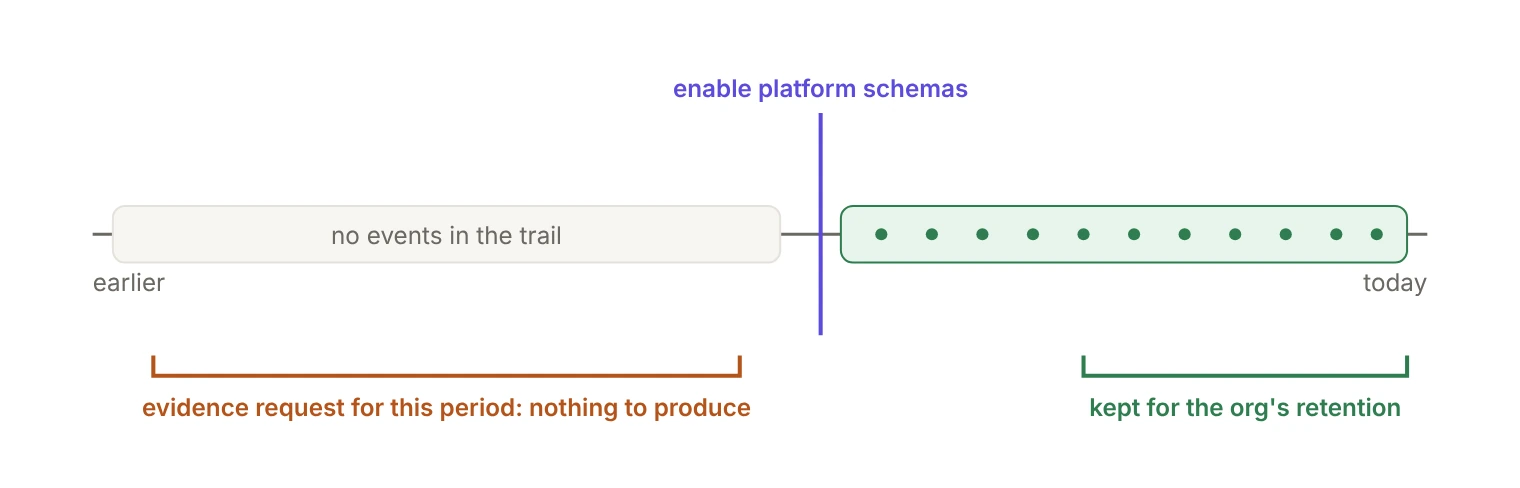
Two clocks matter, and they run independently. The first is the enablement date, which fixes the earliest event you'll ever have. The second is retention: Audit Log events "are retained for 30 days by default and permanently deleted when the retention period ends." Retention is configured per organization, in one-month steps from one to eleven months or one-year steps from one to ten years. You can increase it, but reducing it isn't currently supported, and platform events follow whatever each organization already has.
If a customer's evidence request covers the last two quarters and you enabled capture in October, there's nothing to produce for the third quarter. The fix is cheap and only works in advance: enable capture in each production environment now, and raise retention to match the longest look-back you expect to be asked for. For anyone with a recurring audit, the 30-day default is almost certainly too short. Raising retention protects events recorded from then on; it doesn't bring back events that were already deleted.
What doesn't it cover?
- Standalone SSO, or Directory Sync without AuthKit. Those integrations don't create WorkOS sessions or organization memberships, so there's nothing for these five events to describe. For login and logout in a standalone SSO flow, you still emit your own Audit Log events.
- Custom-attribute changes on a membership. They don't trigger
organization_membership.updated. - Sessions outside the supported set: no organization, internal, or already expired.
- Everything your application does. A deleted record, a changed billing setting, an exported report: those are still yours to emit. As the docs put it, Audit Logs "exist as a paper trail of potentially sensitive actions taken by members of an organization," and most of those actions happen in your product. Choosing which ones to log is its own design problem, covered in Audit logs for AI agents and why agent audit logs differ from application logs.
- History. No backfill, in any form.
What does it cost?
There's no separate line item. "Captured events count toward your Audit Logs usage and billing," at the rates on the pricing page, so check your current Audit Logs usage before turning it on across production. Capture applies to every organization in the environment, and session events will far outnumber membership events: every sign-in produces one, while memberships change a few times a quarter.
What you get is one trail that covers both who signed in and what they did next, without stitching your application's logs to WorkOS session data by hand. The remaining setup, the Log Stream and the retention period, is work your customers can do themselves.
The one thing you can't do later is start recording earlier. If even one customer has an evidence requirement in their contract, enable platform audit logs in production today and let the trail start filling.