Send your own AuthKit emails: Invitations, Magic Auth, verification and password reset
Turning off AuthKit's default emails is one setting. The work is the four flows you then own: invitations, Magic Auth, email verification and password reset.

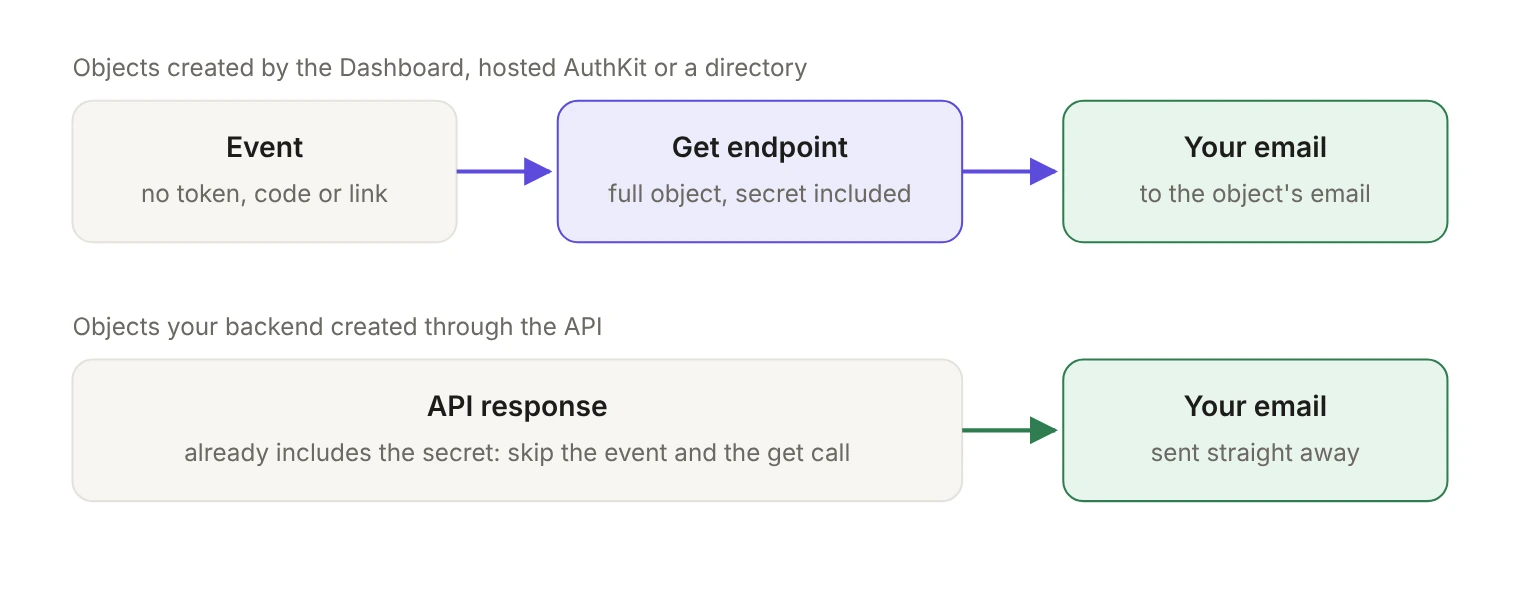
Sending your own AuthKit emails means turning off the default invitation, Magic Auth, email verification and password reset emails and sending those four yourself, which is what you do when you want your own email content or more control over deliverability. The switch is one environment setting. The work is the four flows behind it, and they share one shape: an event tells you something happened, a get endpoint gives you the secret the event deliberately left out, and your email carries that secret to the user.
Teams usually get here because the default templates don't match the product, or because outbound mail has to leave from a domain they already own. Either way, the same four flows arrive at once.
What changes when you turn off the default emails?
The setting lives in the WorkOS Dashboard under Emails, then Configuration. Select Manage to update it, with an Admin role on the team.
It applies to a whole environment, not to individual requests: once invitation emails are off, they're off for every invitation that environment produces. Flip it in staging first and run the flows there.
That includes invitations your application didn't create by hand. With Directory Provisioning, users whose email domain falls outside the organization's verified domains are invited by default, and this same environment setting is what stops those emails; it covers invitations you send yourself as well. One detail matters for your handler: when the directory provisions someone who already has a pending invitation to that organization, the existing invitation is reused and no new event fires, so a directory resync isn't a trigger for a fresh email.
What's the shared pattern for all four flows?
Every one of the four works the same way.
- Subscribe to the event, through webhooks or the Events API.
- Read the object ID out of the event payload. The payload is the object minus the part that matters.
invitation.createdarrives withtokenandaccept_invitation_urlomitted,magic_auth.createdwith thecodeomitted,email_verification.createdwith thecodeomitted, andpassword_reset.createdwith the token omitted. The omission is on purpose: events don't carry the sensitive values you need to send the email. - Call that flow's get endpoint with the ID from the event to retrieve the full object.
- Send your email to the
emailattribute on that object, carrying the link or the code.
There's a shortcut. When your own backend created the object through the API, the response already contains what the get endpoint would return, so steps 1 through 3 collapse and you send straight from the response. The event path exists for the objects you didn't create: an invitation an admin sent from the Dashboard, a password reset a user started in AuthKit, a Magic Auth code requested on a hosted sign-in page.
Most applications end up handling both. The events path is the one that can't be skipped, because the Dashboard and the hosted UI keep producing these objects whether or not your code asked for them.
How do you send your own invitation emails?
Invitations have one wrinkle the other flows don't: two events, not one. invitation.created fires when a user is invited to sign up or to join an organization, and invitation.resent fires when an invitation is resent. Both omit token and accept_invitation_url. Subscribe only to invitation.created and every resend from the Dashboard will quietly send nothing.
From either event, call the Get Invitation API, GET /user_management/invitations/:id, with the invitation ID. In the Node SDK that's one line:
What comes back is the full object, secrets included:
Address the email to email. For the link, accept_invitation_url is the right choice for most applications, and it already carries the token as an invitation_token query parameter. If you host your own acceptance page, build your own URL from token instead. organization_id and inviter_user_id are worth putting in the body so the recipient knows who invited them where. expires_at is sitting right there too, and telling people when the link dies saves a support ticket.
If your application creates invitations through the Send Invitation API, you can send from the returned object directly and skip the event for that path. You still need the invitation.created handler for invitations created manually in the Dashboard.
If you use AuthKit's hosted pages, the user invitation URL under Applications, then your application, then Redirects already defaults to the AuthKit URL for accepting invitations, and there's nothing to change. If you run your own authentication UI, your acceptance page has to capture the invitation_token query parameter (or the token you put in your own link) and pass it into one of the authenticate methods. That page can also look the invitation up directly with GET /user_management/invitations/by_token/:token.
What does a custom Magic Auth email need?
A code, and nothing else. magic_auth.created fires when a user initiates Magic Auth and a code is created, with the code omitted from the payload. Call the Get Magic Auth API with the ID from the event, then send to the object's email attribute with the code in the body. The recipient types that code into AuthKit or into your own authentication UI to sign in.
If your backend starts the flow with the Create Magic Auth API, the response has the code and no event handling is needed for that path.
There's no redirect to configure here, because the email carries a code rather than a link.
Where does email verification catch teams out?
Email verification is always on in AuthKit, across authentication methods including OAuth and SSO, so this handler sees more traffic than teams expect.
The mechanics match the rest. email_verification.created fires when a user is required to verify their email and a code is created, with the code omitted. Call the Get Email Verification API with the ID from the event, then send the code to the object's email attribute. If you authenticate through the API rather than the hosted UI, the email_verification_required error carries an email_verification_id you can pass to the same get endpoint.
The part worth reading twice is how invitations interact with this once you send them yourself. AuthKit treats an invitee as already verified when they sign up with the invited address within 10 minutes of WorkOS emailing the invitation. When WorkOS didn't send the invitation by email, that shortcut doesn't apply and the usual verification process runs. With default invitation emails turned off, that's every invitation.
So invitees who accept by signing up with a password go through email verification, and your email_verification.created handler has to cover them. Invitees who sign in with Magic Auth, or with an OAuth or SSO account whose email is already verified, skip the extra step; users signing in with SSO on a verified domain are considered verified without completing verification at all.
What does a custom password reset email need?
password_reset.created fires when a user requests a reset, with the token omitted. Call the Get Password Reset API with the ID from the event, then send to the object's email attribute with a link the user can reset through; password_reset_url covers most cases. If your reset page diverges from that pattern, build the URL yourself from password_reset_token. Resets your backend creates through the Create Password Reset API return the object directly.
Like invitations, this flow has a redirect setting under Applications, then your application, then Redirects. It defaults to the AuthKit URL for resetting passwords, and you change it only if you serve your own reset page, which then has to capture the token query parameter and use it to reset the password.
Which event maps to which endpoint?
The middle column is why this work has a shape at all: in every row the event is a notification, and the thing your email needs lives one API call away.
What should you check before you ship?
Four things catch teams out, in roughly this order.
Subscribe to invitation.resent alongside invitation.created. Skip it and here's the failure: an admin clicks resend in the Dashboard to unstick a new hire, your handler never fires, nothing arrives, and the admin clicks resend again.
Scope your email_verification.created handler wide enough to include invited users who sign up with a password. It's easy to build that path for cold signups and forget invitees land in it too once you send invitations yourself.
Check the redirect URLs for invitations and password resets if you host your own pages, and leave them alone if you don't.
Finally, the translations become yours. AuthKit's own emails take an optional locale on every API call that sends one, and when you send the email yourself that machinery is no longer in the path. If you support more than one language, localizing AuthKit end to end covers which surfaces WorkOS still translates and which strings you now own. If what you want is your own sending domain and provider rather than your own templates and logic, Custom Email Providers is a smaller job than all of this.
Build the event, fetch, send loop once and the other three flows are the same handler with different field names. Four flows, four get endpoints, and one rule to remember: the event will never hand you the secret.