Designing an MCP server from a REST API
How to design an MCP server from a REST API: choosing between tools, resources, and prompts, getting the granularity right, and curating endpoints for the agents that will call them.

You have a working REST API. You want to expose some of its functionality to an LLM-based agent through the Model Context Protocol (MCP). The naive approach is to write one MCP tool per endpoint, ship it, and move on. That approach almost always produces a bad agent.
The implementation of an MCP server is, frankly, the easy part. The official SDKs let you decorate a Python function and you have a tool. What's hard is deciding which functions to write in the first place, what they should do, and what they should not do. That's the part that determines whether your server is useful or noisy.
In this guide, we will see why a good REST API is not a good MCP server, the three MCP primitives, and a six-step process for designing your server. We'll work through a single running example end to end. In a follow up article, we will pick up the same example and turn the design into a working server in Python with the official SDK.
MCP is not an API wrapper
The single most common mistake when building an MCP server from a REST API is treating MCP as a thin wrapper layer. You enumerate your endpoints, you wrap each one in a tool, and you call it a day. The result is a server that technically works but feels frustrating to use through an agent: simple requests take five tool calls, the agent loses track halfway through, and the conversation history balloons with intermediate JSON the user never asked to see.
The reason this happens is that REST and MCP are designed for different consumers.
Who is your user?
A REST API is designed for a human developer. That developer reads the docs once, writes integration code, debugs it, and then runs it forever. They are happy to chain GET /users, GET /orders, and GET /shipments because they only have to figure out the chaining once.
An MCP server is designed for an LLM agent. That agent has no persistent memory of your API, no debugger, and a finite context window. Every tool description is part of the prompt, every intermediate response is part of the conversation history, and every extra round trip is a chance for the model to lose the thread.
This is the core mental shift: MCP is a user interface, and your user is an AI agent. Once you accept that, all the design choices follow. You don't expose every endpoint for the same reason a good app doesn't expose every database table to its users. You curate.
The three MCP primitives
MCP gives you three primitives, and choosing the right one for each piece of functionality is half the design work.
- Tools are functions the model decides to call. They are the closest analog to API endpoints, but they are typically more coarse-grained. Tools usually have side effects (creating, updating, sending) or perform actions whose result the model needs in order to continue reasoning. Think
plan_week_meals, notPOST /meal-plans. - Resources are data the model reads when it needs context. They are addressed by URI (for example,
recipe://1234) and they don't take parameters in the way tools do. Resources are the right primitive when the model needs to pull a piece of information into its context, but doesn't need to "do" anything. A recipe's content, a current pantry list, a user's preferences: these are resources. - Prompts are reusable templates that a user (or sometimes the agent) invokes to start a structured workflow. They are not called autonomously by the model the way tools are. Think of them as macros: the user picks "weekly meal planning" from a menu, and the prompt expands into a multi-step set of instructions for the agent to follow. They're useful when you want to encode a standard operating procedure that involves several tools used in a specific way.
A useful mental shorthand: tools are verbs, resources are nouns, prompts are recipes for using both.
The running example: Pantry
Throughout this guide we'll work with a fictional but plausible API called Pantry. Pantry is a cookbook and meal-planner backend. It has the usual REST surface you'd expect from a small SaaS product.
The endpoints
That's 24 endpoints. If we did the naive thing, we'd ship 24 tools. Let's not.
The agents we want to build
Before designing the server, we need to know what the agent is actually for. Here are the kinds of things a user might ask their cooking assistant:
- "Plan me a week of dinners using what I already have."
- "What can I make tonight with what's in my pantry?"
- "Find me a 30-minute vegetarian recipe."
- "I'm out of buttermilk, what can I use instead?"
- "Add the chicken curry to Wednesday's plan."
- "Generate my shopping list for this week's plan."
- "I bought groceries, here's what I got, update my pantry."
- "Save this recipe I just wrote down."
Notice that almost none of these map cleanly to a single endpoint. "Plan me a week of dinners" touches at minimum the pantry, the recipe catalog, the user's preferences, and the meal plan resource. That's the gap we're going to design across.
How to design the MCP server
Step 1: List the agent goals, not the endpoints
Start with the user requests, not the API surface. Write down five to ten things a user would actually ask the agent to do. These are your design targets. Each one is a candidate workflow.
For Pantry, our list above is the starting point.
Step 2: Group endpoints into workflows
Now look at each agent goal and trace which endpoints would be needed to satisfy it. Cluster the endpoints by goal.
For "plan a week of dinners using what I already have," the cluster is roughly:
GET /pantry(what do I have?)GET /users/{id}/preferences(what does the user like and avoid?)GET /recipeswith filters (find candidates)POST /meal-plans(create the plan)POST /meal-plans/{id}/recipes(add each recipe, repeated)
Five endpoints, one user goal. That's an N-to-1 candidate.
For "save this recipe I just wrote down," the cluster is just POST /recipes. That's a 1-to-1 candidate. Sometimes the simple mapping really is correct.
Step 3: Decide what's a tool, what's a resource, and what's a prompt
For each cluster, ask three questions.
- Does the agent need to act, or just to know? Acting (creating, updating, deciding) is a tool. Knowing (reading detail, fetching context) often belongs as a resource. "Add this recipe to the plan" is a tool; "tell me what's in this recipe" is a resource read.
- Will the user invoke this directly, or will the model decide? If a user is likely to pick a named workflow from a menu ("plan my week"), and that workflow has a standard shape, it's a prompt. If the model decides whether and when to call it as part of broader reasoning, it's a tool.
- Is this data that's better pulled by URI than fetched by parameters? Recipe details, pantry contents, the current meal plan: these are addressable, semi-static, and the model usually wants the whole thing. Resources.
For Pantry:
recipe://{id}becomes a resource. The model often wants to look at a full recipe; making that a tool call wastes a slot.pantry://currentbecomes a resource. Same reason.meal-plan://{id}becomes a resource.- "Plan a week of meals" becomes a prompt that invokes a tool, because the user often picks this as a named flow.
- The actual planning logic lives in a tool,
plan_week_meals, that the prompt (or the model on its own) can call.
A heuristic you'll see in older guides is "GET endpoints become resources, POST/PUT/DELETE endpoints become tools." It's tidy and it gets you started, but it's wrong often enough to be misleading.
- A
GET /recipes/search?q=...is conceptually a tool, not a resource, because the model is performing an action (searching) parameterized by intent, not pulling a known piece of context by ID. - A
POST /reports/generatethat just returns a computed report is closer to a resource read than a state-changing action.
The right question is "is the model fetching context it has in mind, or doing work?", not "what verb did the API designer pick?". HTTP method correlates with the answer often enough to be tempting, but the cases where it diverges are exactly the ones that decide whether your server feels good to use.
Step 4: Set the right granularity
This is the step where most servers go wrong, in either direction.
- Too granular and the model has to orchestrate. If
plan_week_mealsdoesn't exist and the model has to calllist_pantry, thensearch_recipes, thencreate_meal_plan, thenadd_recipe_to_planseven times, you've made the model do work that your server should be doing. Round trips are expensive. - Too coarse and the tools become opaque black boxes that do too much. A single
do_everythingtool with twenty parameters is unreadable; the model can't tell when to use it, and it's impossible to fail gracefully because there's nothing smaller to fall back to.
A useful rule of thumb is the five-tool test. If a typical user goal requires the model to call five or more tools to complete, you've sliced too thin. If a typical tool takes more than four or five parameters, or its description needs three paragraphs to explain, you've sliced too thick.
The Workato design guidelines suggest five to eight tools per server as a sweet spot, with twelve as a soft ceiling. For Pantry, we're aiming somewhere in that range.
Step 5: Design parameters and returns for an LLM
Tool parameters and return values are also part of the prompt. Every nested object is structure the model has to keep in its head.
- Prefer flat, top-level primitives. Strings, numbers, booleans, and short lists of those. A tool called
plan_week_meals(start_date: str, days: int = 7, dietary: list[str] = [], prefer_pantry: bool = True)is much easier to use correctly than one that takes a deeply nestedPlanConfigobject. - Use constrained types where possible. A
meal_slotparameter typed asLiteral["breakfast", "lunch", "dinner"]is far better than a free-form string, because the model gets the valid values directly from the schema. - Returns should be small and structured, with a clear summary the model can quote back to the user. Don't return five hundred lines of JSON when a short structured object plus a one-sentence summary would do. If a tool genuinely needs to return a lot, return an ID and a short summary, and let the model fetch the full thing as a resource if it needs to.
There's also a mechanical wrinkle worth flagging here. A REST endpoint typically scatters its parameters across path, query string, headers, and request body. An MCP tool has a single flat input schema, so you have to merge them. Most of the time this is straightforward, but two things bite:
- Naming collisions (a path
idand a queryidcan't both be top-level fields, so one needs renaming). - Shared schema components defined via
$refin your OpenAPI spec, which need to be inlined because tool schemas are self-contained.
We'll handle both in the second part of this article, when we will implement the MCP server we are now designing, but it's worth knowing they're coming so you can pick parameter names with the eventual flattening in mind.
Step 6: Plan for failure as a normal case
In a REST API, errors are exceptional. In an MCP server, errors are part of the conversation. The model will misuse your tools. It will pass the wrong type, look up an ID that doesn't exist, try to add the same recipe twice. How you handle these moments determines how well the agent recovers.
Two principles:
- Error messages are written for the model, not for the user. The model is the one reading them. A message like
"recipe_id 472 not found. Use search_recipes to find available IDs."is far more useful thanError 404: Not Found. The first one tells the model what to do next; the second one is a dead end. - Prefer recoverable failures over hard exceptions. If the user asks to add a recipe to a plan but doesn't specify which day, your tool can return a structured response asking for the day, rather than throwing. The model reads that response and asks the user. That feels like a conversation, not a crash.
The five mapping patterns
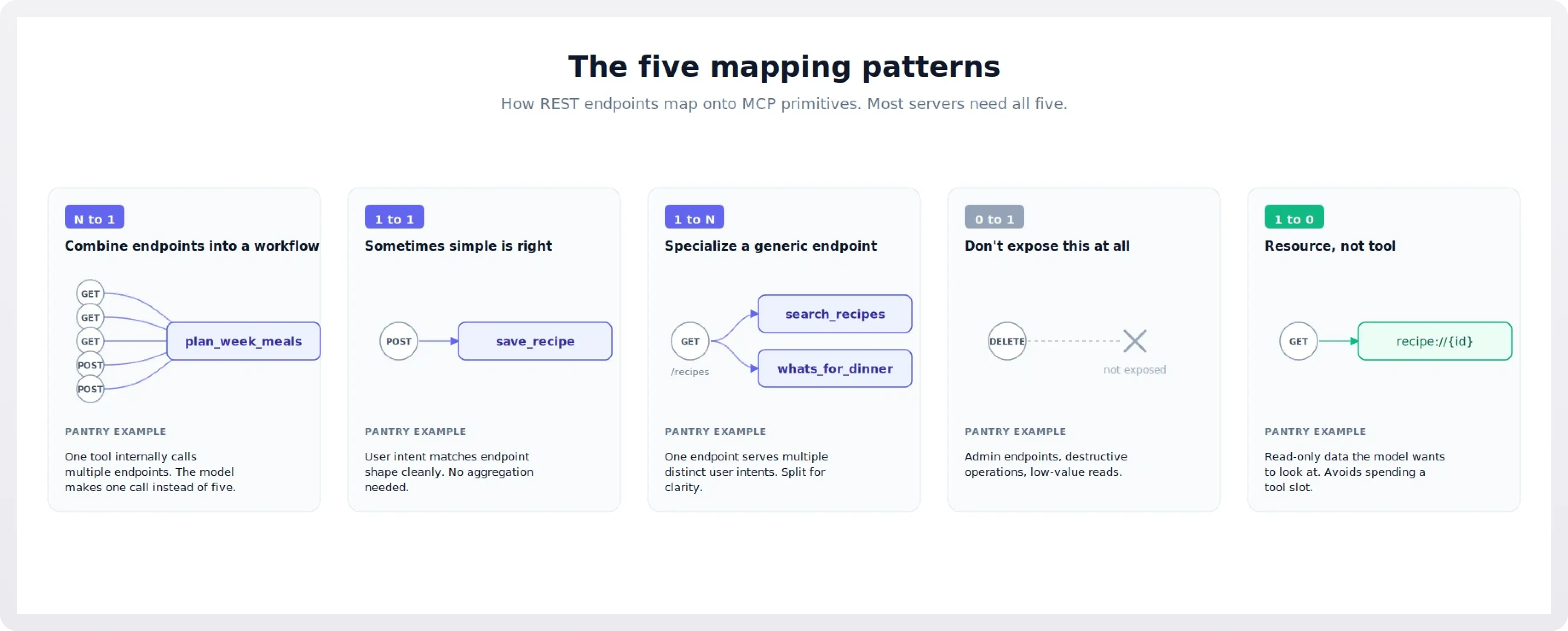
With those steps in mind, here are the five patterns you'll see when mapping endpoints to MCP primitives. Each is illustrated with a Pantry example.
N to 1: combine endpoints into a workflow
This is the highest-value pattern, and the one most often missed. When several endpoints together implement a single user-level intent, you ship one tool that calls them internally.
plan_week_meals(start_date, days, dietary, prefer_pantry) is the canonical Pantry example. Internally it reads the pantry, reads preferences, queries the recipe catalog with filters, creates a meal plan, and adds recipes to it. The model calls one tool and gets a finished plan.
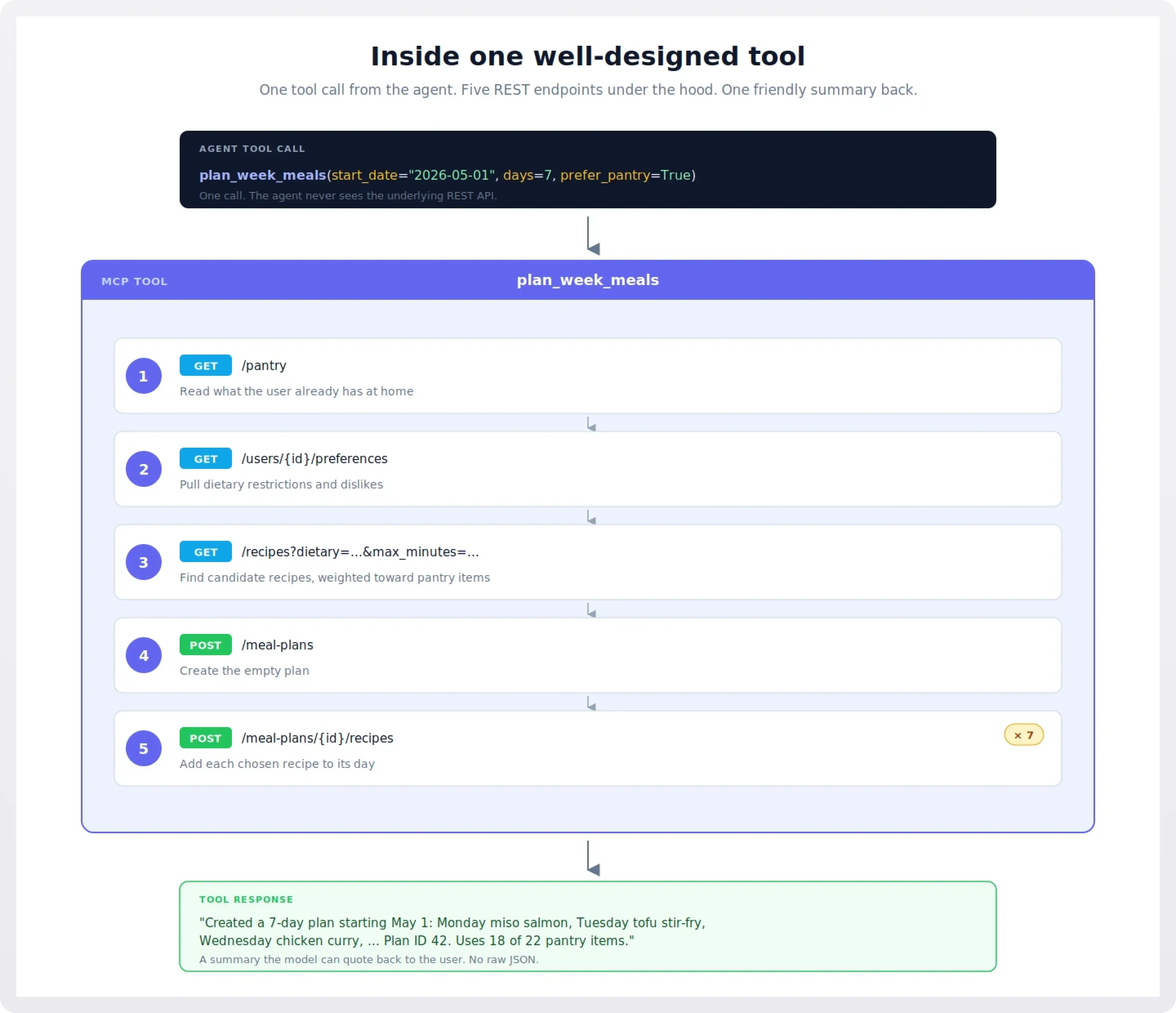
This is also where you often want to enrich the response. The raw API might return just {"plan_id": 42, "recipes": [101, 205, 309, ...]}. Your tool can return a friendly summary: "Created a 7-day plan: Monday miso salmon, Tuesday tofu stir-fry, ...". That summary becomes the model's working memory of what just happened, without needing another lookup.
1 to 1: sometimes simple is right
Not every tool needs to be a workflow. save_recipe(title, ingredients, steps, ...) is a fine 1-to-1 mapping to POST /recipes. The user intent ("save this recipe") matches the endpoint shape ("create a recipe") cleanly, and there's no useful aggregation to do.
The test is: would combining this endpoint with neighbors actually serve a user goal better? For save_recipe, no, so it stays as one tool.
1 to N: specialize a generic endpoint
Sometimes one REST endpoint serves multiple user goals, and the right move is to split it into multiple tools.
GET /recipes is generic: it accepts filters for cuisine, time, dietary restrictions, and ingredients. We could expose this as a single search_recipes tool. But two distinct user intents are buried in here:
- "Find me a recipe matching some criteria" (general search).
- "What can I make with what I have?" (pantry-aware search).
Both call the same endpoint, but the second one also reads the pantry first and weights results toward what the user owns. Splitting them into search_recipes and whats_for_dinner makes each tool's purpose obvious to the model. You'll find that splitting often produces better results than a single tool with a mode parameter, because the descriptions become much more specific.
0 to 1: don't expose this at all
Some endpoints simply should not be tools. The Pantry admin endpoints (/admin/stats, /admin/index/rebuild) have no place in an agent's surface. Neither does DELETE /recipes/{id} for a typical cooking assistant: it's destructive, it's rarely the right answer to a user request, and exposing it invites accidents.
Be aggressive here. Every tool you don't expose is a tool the model can't misuse, and every line of tool description you don't ship is context budget you don't spend. The Itential design guidelines put it well: the number of tools you don't expose matters as much as the ones you do.
1 to 0: resource, not tool
Some endpoints are best exposed as resources rather than tools. GET /recipes/{id} is a perfect example. The model often wants to read a recipe in detail. Exposing this as a tool means every recipe read costs a tool call slot; exposing it as the resource recipe://{id} means the model can pull it into context as needed without spending a turn.
Same for GET /pantry (becomes pantry://current) and GET /meal-plans/{id} (becomes meal-plan://{id}).
The general rule: read-only data the model wants to look at is a resource; everything else is a tool.
The Pantry MCP server, designed
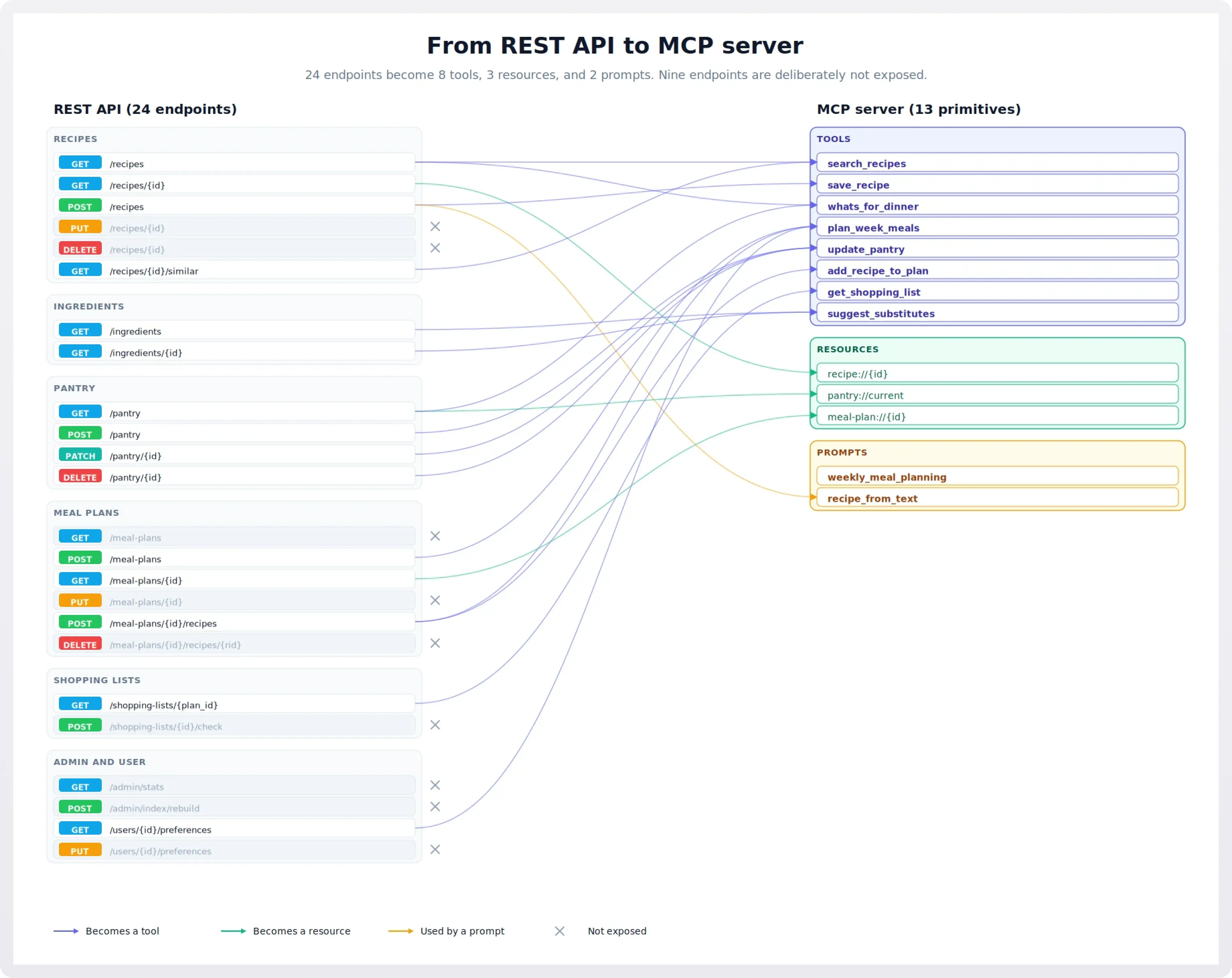
Putting it all together, here's the server we'll build in the follow-up post.
Tools (eight total):
search_recipes(query, max_minutes=None, dietary=None, cuisine=None). General catalog search. Maps mostly toGET /recipes.save_recipe(title, ingredients, steps, cuisine=None, dietary=None). The clean 1-to-1 case. Maps toPOST /recipes. Used directly when the user dictates a recipe, and called by therecipe_from_textprompt to persist what it parses.whats_for_dinner(meal=None, max_minutes=None). Pantry-aware suggestion. Reads pantry, then queries recipes weighted toward what's available.plan_week_meals(start_date, days=7, dietary=None, prefer_pantry=True). The flagship N-to-1 tool. Reads pantry and preferences, queries recipes, creates a plan, returns a friendly summary.update_pantry(changes). Bulk update with a single list of{action, ingredient, quantity}items. Replaces three endpoints with one tool. The model can say "I bought milk, eggs, and bread, and used up the flour" in one call.add_recipe_to_plan(recipe_id, plan_id, day, meal_slot). Targeted 1-to-1. Maps toPOST /meal-plans/{id}/recipeswith cleaner parameters.get_shopping_list(plan_id, exclude_pantry=True). Generates the list and excludes things the user already has, in one call.suggest_substitutes(ingredient, recipe_context=None). Maps toGET /ingredients/{id}substitutions, optionally aware of which recipe the substitute is for.
Resources (three total):
recipe://{id}. Full recipe detail.pantry://current. Current pantry contents.meal-plan://{id}. A specific meal plan.
Prompts (two total):
weekly_meal_planning. A user-invokable workflow that primes the agent to ask about dietary preferences, check the pantry, and callplan_week_meals.recipe_from_text. A user-invokable workflow that takes pasted text (a recipe from a website, a photo OCR, a friend's email) and walks the agent through structuring and saving it.
Endpoints we're deliberately not exposing:
- All
/admin/*endpoints. Internal operations with no agent use case. DELETE /recipes/{id}andDELETE /meal-plans/{id}/recipes/{rid}. Destructive, low value.PUT /recipes/{id}andPUT /meal-plans/{id}. Generic edit endpoints belong in the app UI; an agent silently mutating saved data is a bad default.PUT /users/{id}/preferences. Same reasoning. Settings live in the app UI.GET /meal-plans(list). Browsing past plans isn't an agent flow; the agent works with the current plan viameal-plan://{id}.POST /shopping-lists/{id}/check. Possibly useful, but the user does this in their phone while shopping; not an agent flow.
That's eight tools, three resources, two prompts. Comfortably inside the recommended budget, with a clear story for each one.
Common pitfalls
- Over-exposure. Shipping every endpoint as a tool. Symptom: thirty tools, the model gets confused about which to use, and the descriptions all start to sound the same. Cure: aggressive curation per Step 3.
- Under-specification. Tools with one-line descriptions and no examples. Symptom: the model picks the wrong tool, or passes wrong parameters, because it can't tell what each tool actually does. Cure: write tool descriptions like you'd write a function docstring, including when to use it and a one-line example.
- Errors written for humans. Messages like
Error: invalid input.Symptom: the agent fails and gives up rather than recovering. Cure: errors should tell the model what the problem is and what it could do next. - Resource dumps. Exposing
pantry://currentis great. Exposingentire-database://everythingis not. Symptom: tool calls cost thousands of tokens and the model loses the thread. Cure: resources should be specific and bounded. - Stateful coupling between tools. Designing
step_1,step_2,step_3tools that must be called in order. Symptom: the model skips a step, or repeats one, and the workflow breaks. Cure: make each tool independently callable, or combine the steps into one workflow tool. - Treating MCP like REST in disguise. This is the umbrella pitfall. Symptom: every conversation feels like it's translating between two languages. Cure: the entire process described above. Design for the agent, not the integrator.
What if my API is genuinely large?
Pantry has 24 endpoints. Aggressive curation gets us to 8 tools, 3 resources, and 2 prompts, comfortably inside the recommended budget. But what if your API has 200 endpoints? Or 800? At that scale, the advice "design eight thoughtful tools" stops being actionable, because no single agent persona could plausibly use a server that covers your whole surface anyway.
Three patterns help:
- Split into multiple domain servers. Instead of one MCP server for the whole API, ship one per coherent functional domain: a billing server, an inventory server, a customer-support server. Each one stays inside the 5-to-12-tool budget, and the host can load just the ones a given agent needs. This is the same instinct as splitting a monolith into microservices, and the same tradeoffs apply: more deployment surface, but each piece is comprehensible.
- Use dynamic tool loading or discovery tools. Some clients support exposing a small "meta" set of tools that, when called, register more tools on demand. A
find_tools(intent: str)tool can return the three or four real tools relevant to what the user is trying to do, and only those get loaded into the model's context. This is more complex to build and only works on hosts that support it, but it's the answer when no domain split is small enough on its own. - Generate first, curate second. For very large internal APIs where hand-designing every server is unrealistic, code-generation tools that turn an OpenAPI spec into a 1:1 MCP server are a legitimate starting point. They are not a good ending point. The output of a generator gives you a working baseline; you then do exactly the curation work described in this guide on top of it: collapse N-to-1 workflows, hide endpoints that shouldn't be exposed, rewrite descriptions for the model, and convert read endpoints to resources where appropriate. Treat the generator's output as a draft, not a deliverable. The teams shipping high-quality MCP servers from large APIs almost always do this two-step: generate, then curate hard.
The thing not to do is assume that because a generator can produce a 600-tool server in a few minutes, you should ship a 600-tool server. The same context-window and selection problems that make 30 tools hard make 600 tools impossible. Generators are an input to the design process, not a replacement for it.
Coming up: Building an MCP server from a REST API
The follow-up post takes this design and builds it. We'll cover:
- Setting up the project with the official Python SDK (
mcppackage, FastMCP framework). - Implementing the eight tools, including the multi-endpoint
plan_week_mealsworkflow. - Implementing the three resources, including a parameterized one (
recipe://{id}). - Writing the two prompts.
- Tool descriptions that actually work: how to write docstrings the model can use.
- Schema mechanics: flattening path/query/body parameters into a single tool schema, resolving
$refs, and handling naming collisions. - Error handling that helps the agent recover.
- Transports: stdio for local use, streamable HTTP for remote, and when to pick which.
- Authentication: bearer tokens and a brief look at OAuth 2.1, the current standard for HTTP-transport MCP servers.
- Running it locally with the MCP Inspector.
- Deploying a remote server and connecting it to a Claude client.
- Testing strategies for MCP servers, including a quick troubleshooting reference.
The full code will be available as a repository you can clone and run. By the end, you'll have a Pantry MCP server that demonstrates every pattern in this guide, and a template you can adapt for your own REST APIs.
Secure your server the easy way: WorkOS AuthKit for MCP
The follow-up post will cover bearer tokens and OAuth 2.1 in some depth, but if you'd rather not run an authorization server yourself, that's what we built AuthKit for. AuthKit is a spec-compatible OAuth authorization server for your MCP server: it handles client registration, the consent flow, token issuance, and the /.well-known/ metadata endpoints the MCP spec requires. Your server stays focused on tools and resources and just verifies the tokens AuthKit issues.
There are two ways to integrate with us:
- Standard AuthKit integration. AuthKit hosts the sign-in flow. Users authenticate through AuthKit, it issues tokens, your MCP server verifies them. The fastest path if you don't already have an authentication system in place.
- Standalone Connect. Keep your existing authentication system. AuthKit redirects users to your login URI, your app authenticates them however it normally does, and AuthKit handles only the OAuth authorization and token issuance. The right choice when you're adding MCP to an app that already has users.
Either way, you skip the part of MCP server work that's least fun: implementing OAuth 2.1, dynamic client registration, Client ID Metadata Document support, and keeping up with a spec that's still evolving.
Sign up free to get started.
Further reading
The design principles in this guide draw on patterns shared across the MCP community. Some particularly good sources: