Gemini agents in your SCIM feed: How to provision non-human users
Google's Gemini coworker agents get their own Workspace account and directory entry. Here is how they reach your app through directory sync, and the decisions your provisioning code owes them.

A Gemini coworker agent is an AI agent that Google creates inside a company's Workspace with its own account: an email address, a calendar, Drive storage, and an entry in the company directory. Because it lives in the directory, it can reach any app that syncs users from that directory, and nothing in a standard user record says it isn't a person.
On October 8, 2026, at Gemini at Work 2026, Google Cloud announced the Gemini agent, a universal agent for work. One line in the Workspace section creates work for anyone shipping a B2B application. In coworker mode, the agent receives its own Workspace account, with an email address, calendar, Drive, and a presence in the company directory.
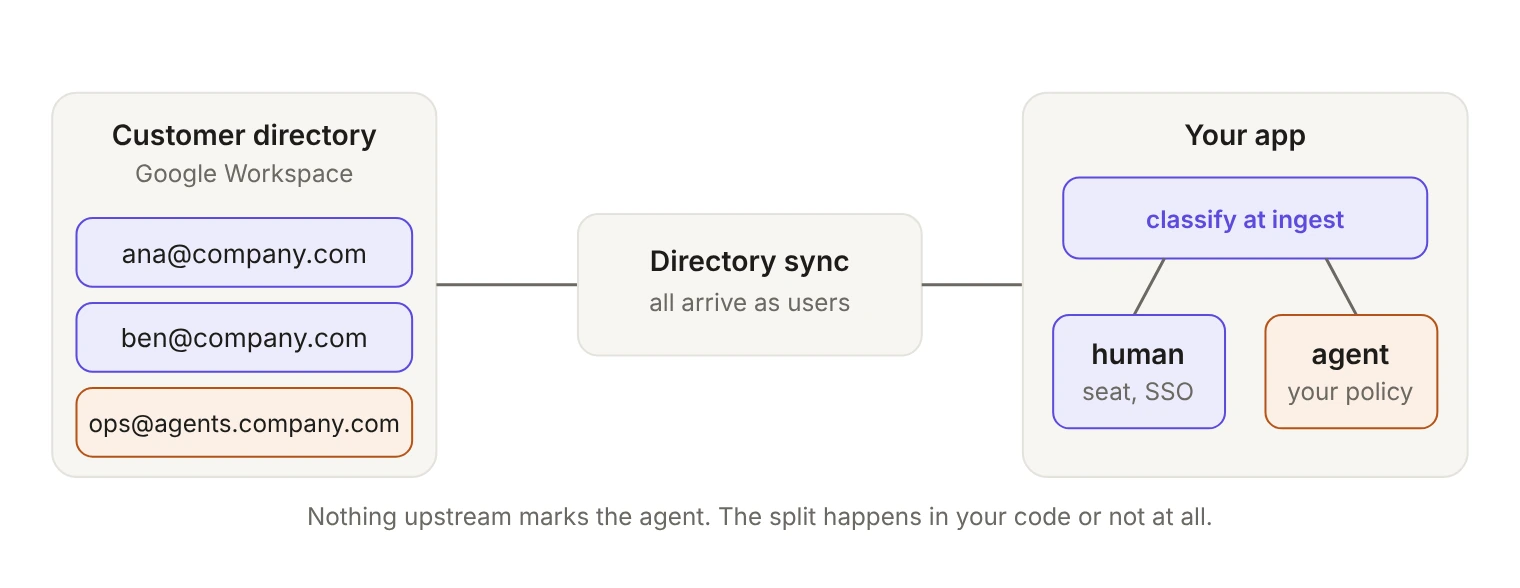
Your application doesn't learn about your customers' employees from Google's keynote. It learns about them from a directory sync feed. That feed is about to carry accounts that aren't people, and no field in a standard user record will tell you which ones.
What did Google actually ship?
A manager describes the role they want, and Gemini creates the agent. After that it behaves like a colleague with a desk. It acts under its own identity rather than an employee's, holds a persistent role across days and sessions, can be @mentioned in Chat spaces and Doc comments, and appears under its own name in version history. Coworker agents get their own @agents.company.com email addresses.
The governance model is specific. Every agent gets its own identity, "cryptographically attested and governed like an employee," and security admins approve role-based access for it. Its actions are written to an audit trail attributed to the agent rather than to a person. When it connects to an external system, its identity is passed along through standards such as OAuth. For multi-step jobs, Gemini can also create temporary sub-agents, each with its own identity.
Two things Google didn't publish. The agent is in private preview, with no published price and no general availability date. And as The Next Web observed, the announcement is detailed about granting access and silent about taking it away: "It does not say how you take any of it away."
Google's announcement says nothing about SCIM, license seats, or deprovisioning inside your application. Everything below is an implication of a directory entry existing, not a statement by Google.
How do coworker agents reach your app?
A directory entry is the input to user provisioning. Once a coworker agent exists in a customer's Workspace directory and falls inside the group or org unit scoped to your app, it's a directory user, and it flows to you like any other.
Google Workspace differs from the SCIM providers in one way that matters here. It doesn't push SCIM events; changes are pulled. WorkOS Directory Sync runs scheduled syncs for Google Workspace directories about every 30 minutes, alongside SCIM providers like Okta, Entra ID and JumpCloud, HRIS platforms, and SFTP uploads, and emits one event model for all of them. Two consequences follow: an agent created in Google shows up in your app within a sync cycle, and an agent removed in Google can keep its access in your app for up to one more cycle unless your handler acts on its own.
One event model is the right abstraction. It's also exactly why an agent reaches your handler in the same event shape as a new hire.
How do you tell an AI agent from a person in SCIM?
Check the schema before assuming a flag will save you. The SCIM core User singular attributes in RFC 7643 are userName, name, displayName, nickName, profileUrl, title, userType, preferredLanguage, locale, timezone, active and password. The closest thing to a type marker is userType:
Free text, optional, with no standard value for a non-human principal. active is no better: a Boolean for administrative status whose "definitive meaning" is determined by the service provider, which is to say by you. And a Google Workspace directory isn't SCIM at all, so even userType only reaches you if someone maps it.
The one documented signal available today is the email domain, since coworker agents get @agents.company.com addresses. Use it, but don't build your only branch on it. A domain convention published in a launch announcement isn't a contract. Customers rename domains, and the agent created outside that pattern is exactly the one you'll miss.
What decisions does your provisioning code owe an agent?
Your handler is already making four decisions about agents. It's just making them by accident.
Does an agent consume a seat?
If your seat count comes straight off your provisioned-user table, which is the common case, your invoice logic already has an answer to this question and nobody chose it. Google hasn't published pricing for the agent, so there's no upstream convention to copy. Pick one deliberately: agents billed as users, billed separately, or excluded. Then make sure the value driving the invoice is the classification rather than a raw user count. A customer who creates a roster of coworker agents adds rows to your billing table without adding anyone to their payroll, and the first person to notice will be their procurement lead.
Can it hold a session?
A coworker agent won't complete an interactive SSO flow. Google's model passes the agent's identity to external systems through OAuth, which is machine-to-machine access rather than a browser session. If your provisioning path creates a full user account for it anyway, you've made a principal that can be invited, password-reset and signed into, and that nobody will ever enroll in MFA. Decide whether agent principals can authenticate at all, and through which credential types.
What happens at deprovisioning?
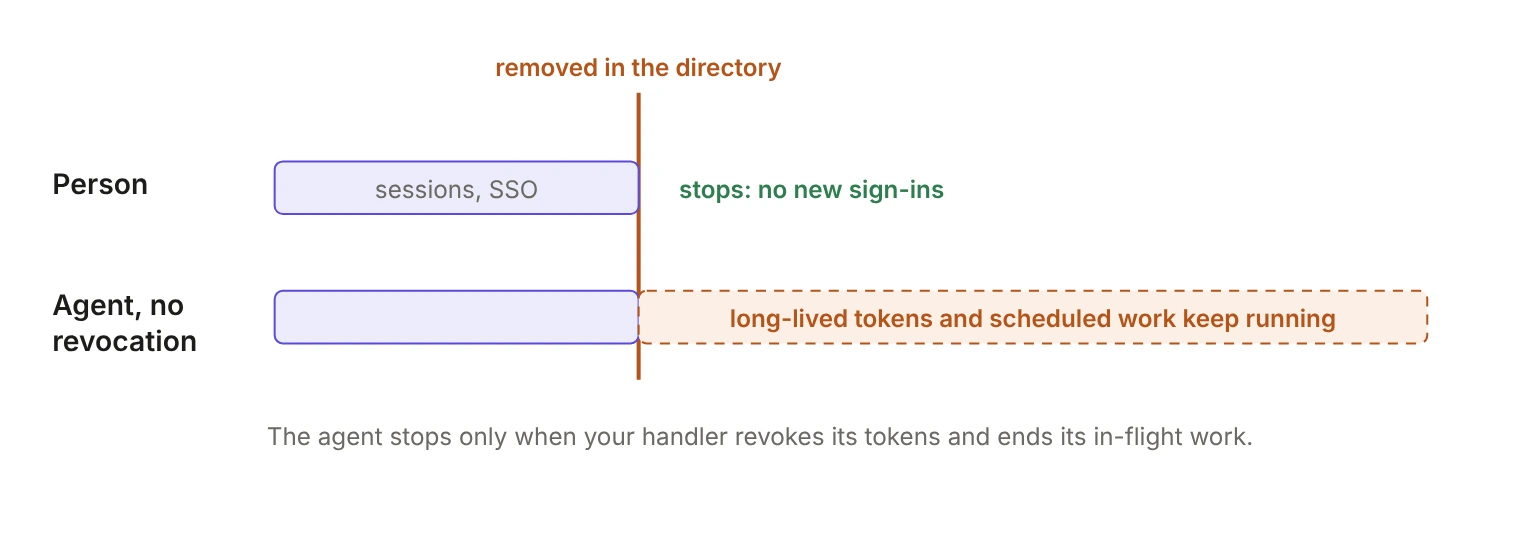
Removal reaches you in two ways. Most directory providers deactivate rather than delete, and WorkOS Directory Sync delivers that as dsync.user.updated with state set to inactive. A hard delete arrives as dsync.user.deleted, whose state field records the user's state at the time of deletion. A handler that only listens for deletions misses most removals.
Flipping a row is the easy part. As our deprovisioning deep dive covers, removal isn't finished until server-side sessions are deleted, OAuth access and refresh tokens are revoked, unexpired JWTs are handled, API keys and personal access tokens are revoked, and cached authorization decisions are cleared.
That list was written for people, and the agent case is worse on every line. Agents hold a role that persists across days and sessions. Without revocation, access ends when existing sessions expire, and for a principal holding a long-lived token to drive automated work, that's close to never. The agent's directory entry disappearing and its work inside your app stopping are two separate events unless your handler makes them one.
Which actor lands in the audit log?
Google attributes every agent action to the agent rather than to a person. If your app records the same action as a generic user, your customer's two audit trails disagree about who did it, and reconciling them falls to their security team, usually mid-incident.
SOC 2 auditors test access removal by sampling terminated employees and asking for evidence: this person, this date, access gone. Picture that sample landing on an agent row. There's no person to name and no termination to point at, and if your schema can't say what the row was, somebody explains it live, in the audit. Nobody has an established answer yet, which makes the record you write now the one that gets quoted later.
A classification checklist you can ship this quarter
- Classify at ingest, once. Derive a principal type when the directory event lands, store it on the user row, and let every downstream decision read the stored value. Classification scattered across the billing path and the auth path will drift.
- Match on the stable key. Use
idp_id, never email or display name. That's doubly true here, where the email domain is the thing you're inspecting and a rename would otherwise create a second principal. - Treat the signal as a hint plus an override: a domain match, a mapped attribute if the customer has one, and a per-organization admin override in your UI. Customers know which accounts are agents; give them somewhere to say so.
- Revoke on deactivation, not only on deletion. Handle
dsync.user.updatedwithstate: "inactive"the same way asdsync.user.deleted. - Carry the type into the audit record. An actor type on every logged action, written at the time, not inferred at query time.
- Make the seat policy explicit per organization. Whatever you choose belongs in the contract as well as the code.
unknown matters most. An account you can't classify shouldn't quietly default to human, because that default bills wrong, grants a session, and files the wrong actor in the audit log. Route it to the customer's admin and let them decide.
When a customer insists an account was provisioned or removed and your app disagrees, the WorkOS Dashboard has shown SCIM request logs since September 4, 2026, with full request and response payloads retained for 30 days. That's how you find out what a SCIM directory actually sent about an account instead of arguing about it in a support thread.
Why this isn't only about Google
Coworker agents are the visible case. Gemini also creates temporary, job-specific sub-agents, each with its own identity, and temporary identities at volume are exactly the population that escapes a manual review process.
Regulators are asking the same question. Responses to the UK Information Commissioner's Office call for evidence on agentic AI are due November 20, from a regulator that has already secured data protection changes from ten AI developers, Google among them. That inquiry asks at a policy level what your audit log has to answer one row at a time: was this done by a person. And in May, Gartner warned that up to 40% of enterprises may roll back autonomous agents by 2027 because of governance gaps.
Your customers will be asked which accounts in their organization are people and which aren't, and they'll ask you, because a meaningful share of their activity lives in your product. The fix is a column and a classification rule, plus an actor type on every logged action. Add it before the first agent arrives and it costs an afternoon. Add it after an auditor asks and you're reconstructing, from email addresses, the history of accounts nobody remembers creating.
You don't have to build all of this per provider. WorkOS Directory Sync turns Google Workspace, SCIM, HRIS and SFTP directories into one stream of user records and events, so the classification rule above gets written once. If a customer already marks agent accounts in their directory, their IT admin can map that field during setup with custom attributes, and it arrives in custom_attributes, ready for your rule. On the logging side, WorkOS Audit Logs records an actor with a type on every event, so what an agent does can be labeled as the agent's from the first action.