How WorkOS Vault's local encryption works
Envelope encryption, data keys, and why your sensitive data never has to leave your infrastructure

Most teams that need to encrypt sensitive data end up building the same thing from scratch: a key management layer, a way to isolate keys per tenant, and a plan for what happens when a key needs to rotate. WorkOS Vault handles that layer for you. This post walks through how its local encryption model actually works, the part where your data gets encrypted without ever leaving your own systems.
The core idea: You encrypt, Vault manages the keys
Vault uses envelope encryption. Instead of one long-lived key doing all the work, every encryption operation gets its own single-use data encryption key (DEK). That DEK is itself encrypted by a longer-lived key encryption key (KEK), which lives inside a hardware security module (HSM) and can never be exported in plaintext. It can only be used to generate or decrypt data keys, never read directly.
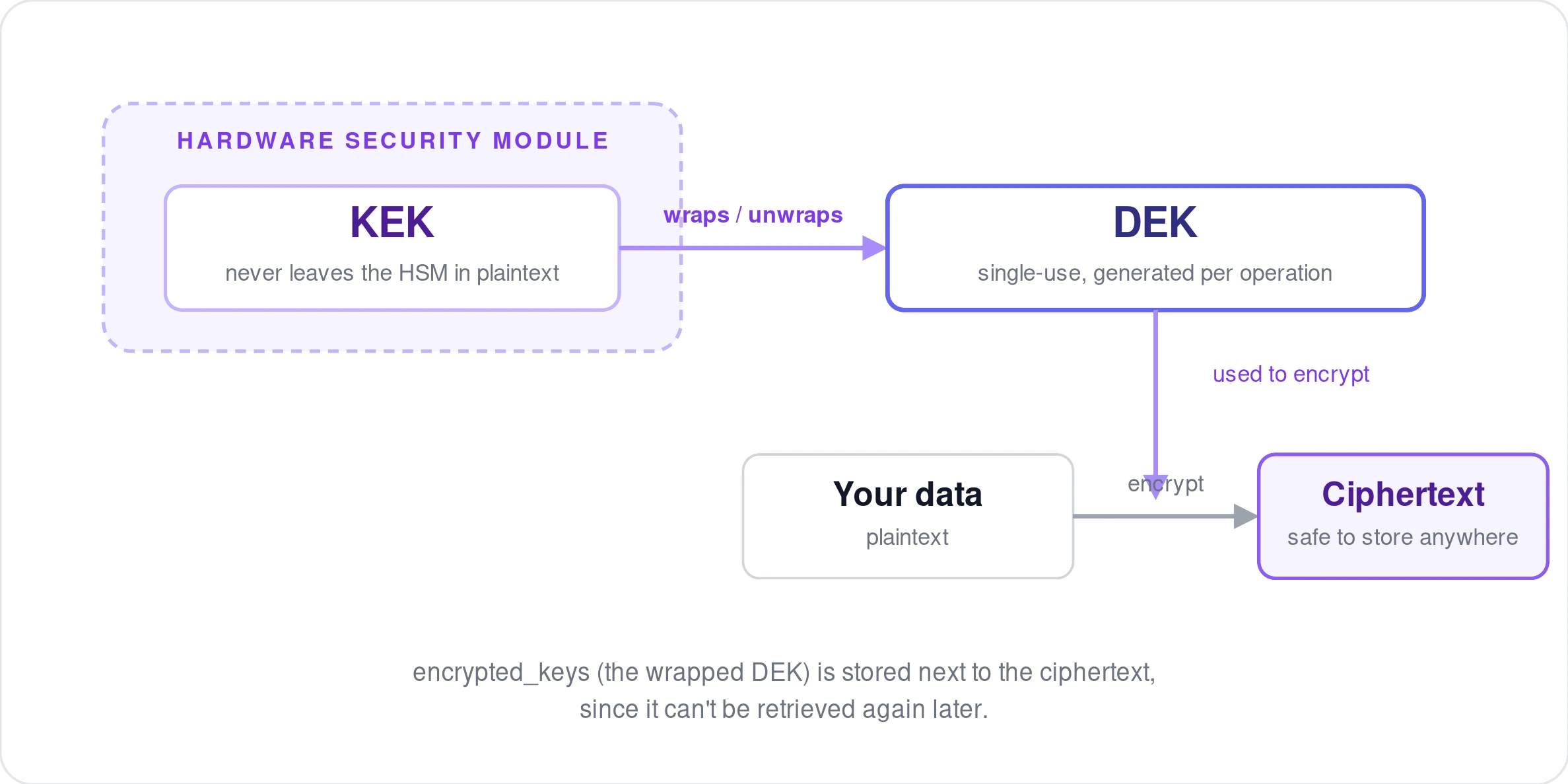
The practical effect: your actual sensitive data (a password, a token, a customer's PII) is encrypted locally, using a key that WorkOS generates for you but that you hold only for the moment you need it. Neither the plaintext nor the resulting ciphertext ever has to be sent to WorkOS. Only the small wrapped key does.
Key context decides which key gets used
Vault doesn't ask you to track key IDs. Instead, you provide a key context: a set of string key-value pairs, such as {"organization_id": "org_123"}, and Vault matches it to a KEK automatically. If no KEK exists yet for that context, one is created just in time, no advance configuration needed.
This is what gives you cryptographic isolation for free. Data encrypted under one organization's context can't be decrypted using another organization's key, without you having to manage that boundary yourself. If you're using bring-your-own-key (BYOK), the same context matching applies. It just resolves to your customer-managed key instead of a WorkOS-managed one.
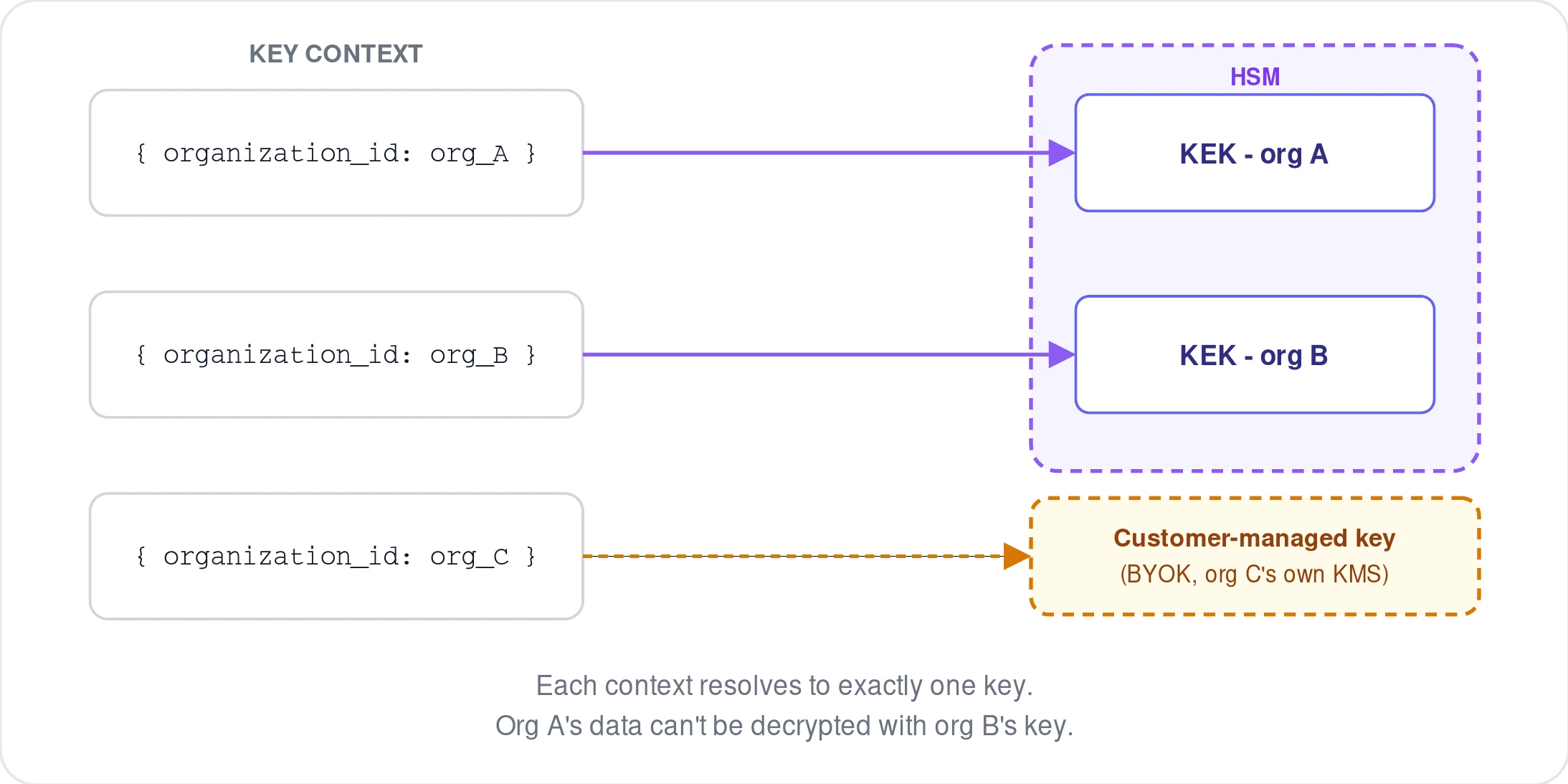
A few limits worth knowing: context values must be strings, a context can hold at most 10 items, and each environment gets up to 500 unique KEKs by default (raise it by contacting WorkOS support). Because the KEK count grows with the number of distinct contexts you use, not the number of records, it's worth choosing context values that map to durable boundaries, like an organization or tenant, rather than per-record identifiers that will blow through the limit fast.
The request flow
At the lowest level, local encryption is two round trips to Vault, with the actual cryptography happening on your side in between.
1. Create a data key. You send a key context; Vault returns a plaintext data key and an encrypted (wrapped) version of it.
The response includes data_key (the raw key, base64-encoded) and encrypted_keys (the wrapped version). You use data_key immediately to encrypt your data with a standard authenticated cipher, then discard it. You store encrypted_keys alongside your ciphertext, since it can't be retrieved again later.
2. Decrypt when you need the data back. You send the wrapped key, not your data, to Vault; it returns the plaintext data key so you can decrypt locally.
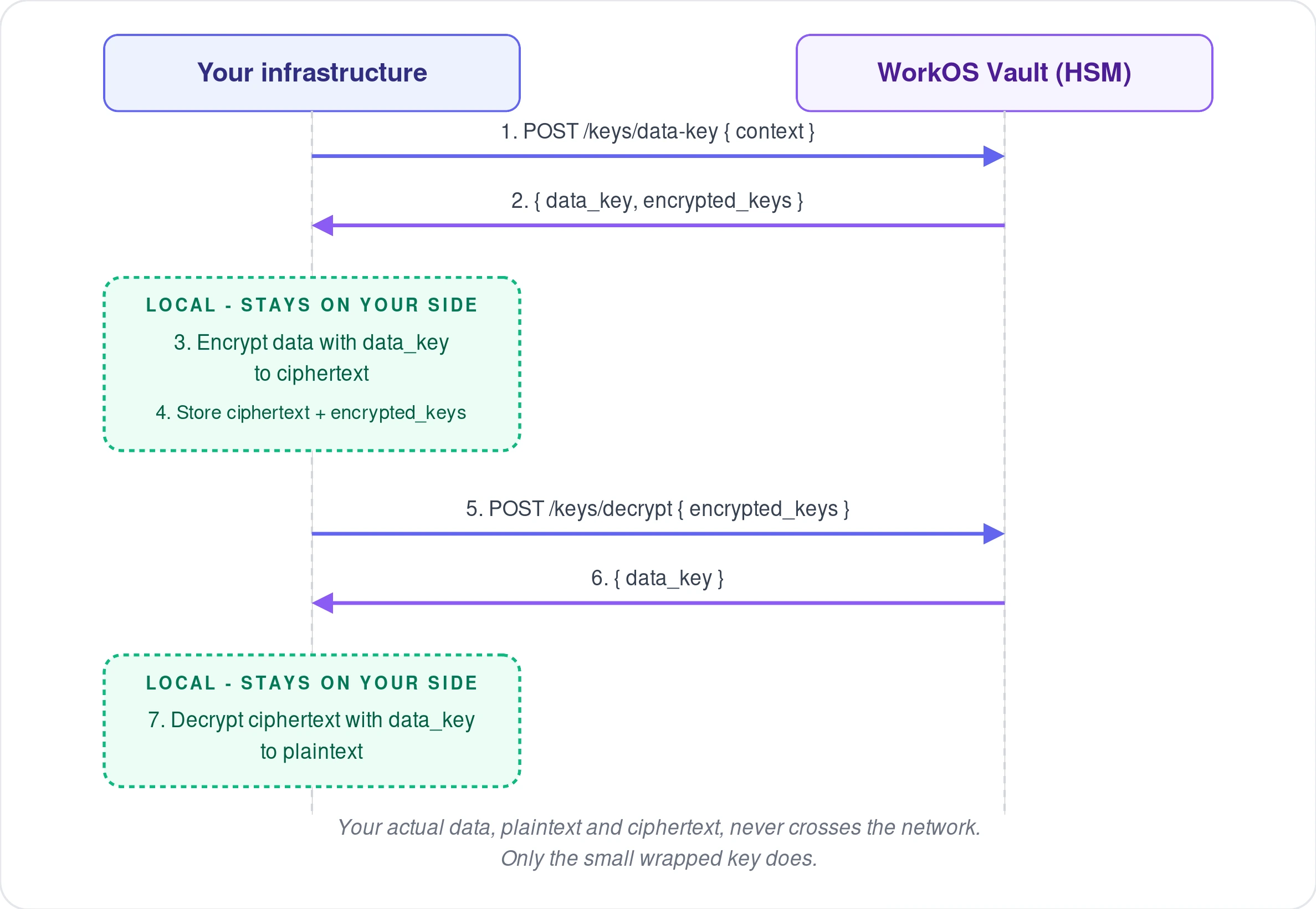
At no point in either call does your actual sensitive payload cross the network to WorkOS. Vault only ever handles the small key material.
The higher-level encrypt and decrypt helpers
In practice, most WorkOS SDKs skip straight past the two-step dance above with a single encrypt(data, context) / decrypt(ciphertext) pair. Under the hood it's doing exactly what's described above: generating (or unwrapping) a data key, running the cipher locally, and packaging the wrapped key together with your ciphertext into one blob you can store and pass around as a single value.
For most use cases, this is the version you want. Reach for the lower-level data-key endpoints directly only if you need to manage the encryption operation yourself, for instance, encrypting large files in chunks rather than a single call.
Local encryption vs. Vault's storage API
It's worth distinguishing this from Vault's other mode: the key-value storage API (createObject, readObject, updateObject, deleteObject). That API also uses envelope encryption under the hood, but WorkOS stores the encrypted object for you, versioned, durable, and queryable by ID.
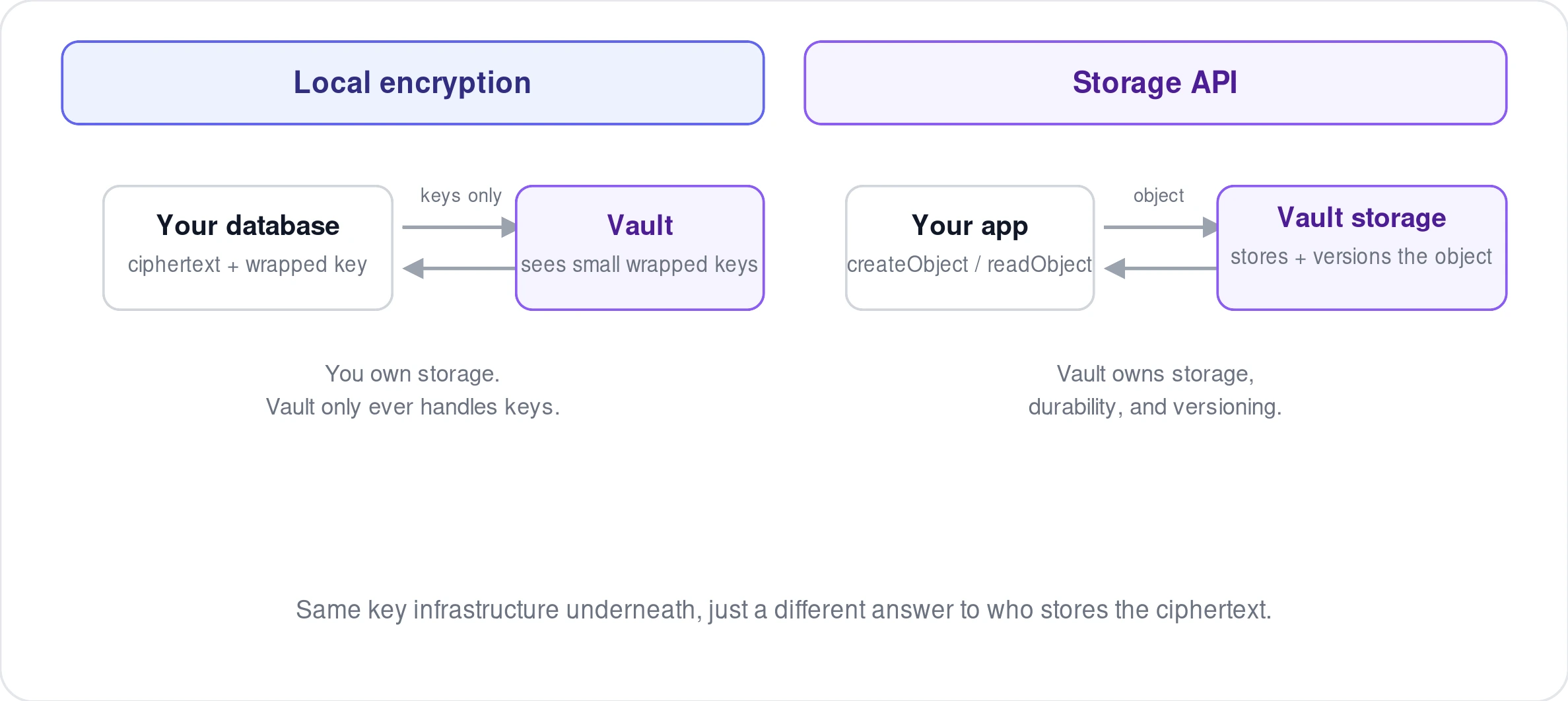
Local encryption is what you reach for when you want to keep full control over where your ciphertext lives, in your own database, your own cache, wherever, while still getting managed keys and cryptographic isolation. The storage API is what you reach for when you'd rather WorkOS also handle durability and versioning of the encrypted blob itself. Same key infrastructure underneath, different answer to "who stores the ciphertext."
Rekeying without touching your data
Because the context, not the data, determines which key is used, you can migrate encrypted data to a new key context without ever decrypting the underlying payload. The rekey endpoint takes an existing wrapped key and a new context, and returns a new wrapped key encrypted under the matching KEK for that context. Your ciphertext itself never moves. This matters for scenarios like splitting a tenant's data onto its own dedicated key boundary after the fact.
Why it's built this way
A few properties fall out of this design that are worth naming directly. Each encryption operation gets its own DEK, so a single compromised key doesn't expose everything encrypted under a given context, only what was encrypted with that specific data key. The KEK material itself never leaves the HSM in plaintext form, so there's no code path where a bug or a compromised process could exfiltrate the root key. And because local encryption only ever sends small wrapped keys over the wire, your actual sensitive data footprint with a third party is close to zero, even though the key management is fully handled for you.
That combination, real key management infrastructure without giving up control of where your data lives, is the specific trade-off Vault's local encryption is built around.
Further reading: Vault, key context, and the key management API reference in the WorkOS docs.