IdP-initiated SSO: How to turn a dashboard tile click into a normal sign-in
Configure a sign-in endpoint and WorkOS turns an identity provider tile click into a normal SP-initiated sign-in, handing your app the connection_id it needs.

IdP-initiated SSO is a login that starts at the identity provider instead of at your app. An employee opens their company's IdP dashboard, clicks your application's tile, and the identity provider begins the login on their behalf. With a sign-in endpoint configured, WorkOS doesn't hand that unsolicited response to your callback. Instead it redirects the user to your sign-in endpoint with a connection_id, and your app starts an ordinary sign-in from there.
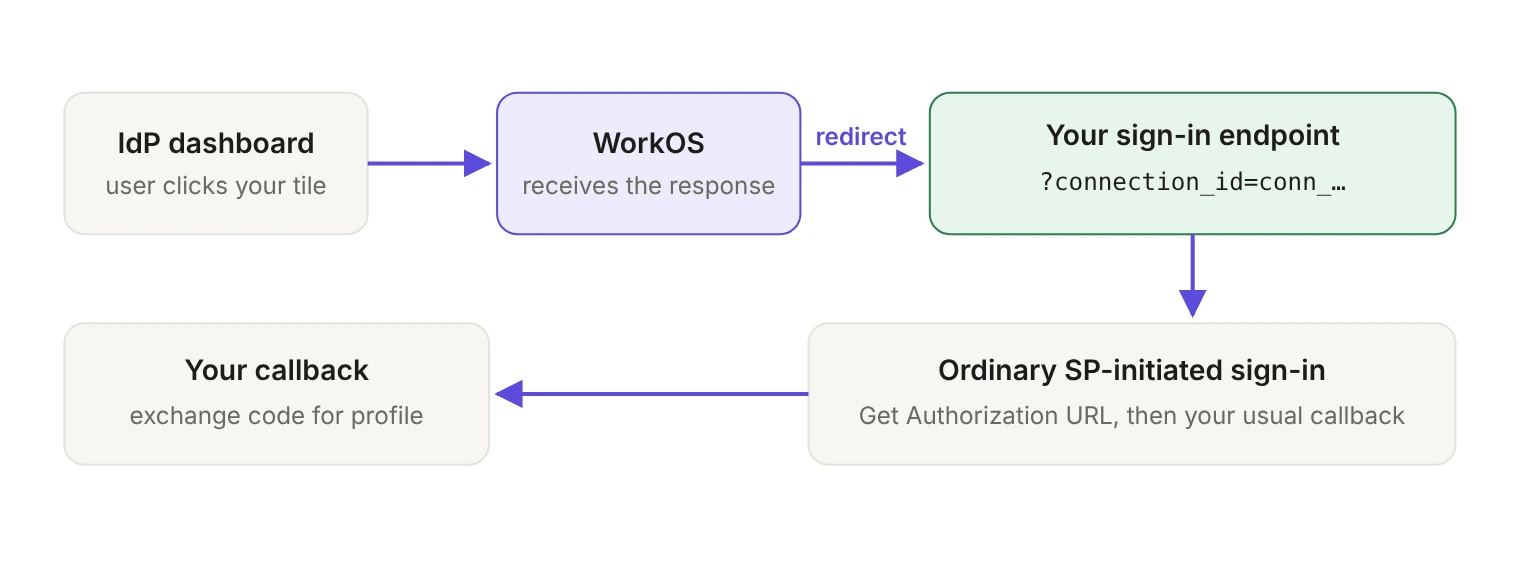
That one redirect is the whole trick. The rest of this guide covers where to configure the endpoint, what the endpoint code does, what happens if you skip it, and what RelayState can change.
What does a tile click actually do?
Organizations hand their employees a dashboard of every application they're entitled to open. Clicking a tile starts the login from the identity provider rather than from your application. Your app never issued a request, so there's nothing of yours to match the response against.
That asymmetry is why apps generally prefer SP-initiated flows. When login starts in your application, you control the process end to end, which gives you better session handling and verification and reduces risks such as replay attacks. Our explainer walks through the differences between SP-initiated and IdP-initiated SSO in more depth.
One scoping note before you plan work around this: IdP-initiated login applies only to SAML connections. OIDC connections are always SP-initiated.
Why does WorkOS redirect to a sign-in endpoint?
Because an unsolicited SAML response has no request of yours to match against. Redirecting to a sign-in endpoint removes that problem by making your app the initiator. In the words of the WorkOS docs:
A sign-in endpoint is just a URL in your application that starts the authentication process, the same way it starts for someone who clicked "Log in" on your site. The tile click becomes a request your app initiated, and the SAML exchange that follows is one your app asked for.
How do you configure it?
Open the Applications section of the WorkOS Dashboard, go to that application's Redirects, and set the sign-in endpoint there. The same tab holds your allowed redirect URIs, and those matter for this flow too: if the authorization request routes to a redirect URI that isn't defined for the application, you get an error and users can't sign in. In production environments the redirect URI can't use HTTP or localhost, though both are allowed in sandbox environments.
What does the endpoint code look like?
The endpoint calls Get Authorization URL and redirects the user to the URL it returns, exactly as it does for a user who starts sign-in inside your app. The only new input is the query parameter WorkOS appends:
Here it is in a Next.js App Router route handler:
And in Flask:
You don't need a second route for this. The connection_id parameter is only present on IdP-initiated logins, so when a user starts sign-in from your application the parameter is absent and your endpoint selects the connection however it normally does. If your normal selector is an organization, keep it: the organization parameter is the preferred one for SAML and OIDC connections, and the connection parameter is there for authenticating by connection ID. A connection_id present in the query string simply takes over for that request.
Does the callback need to change?
No. By the time the user reaches your redirect URI, this is an ordinary SP-initiated callback: exchange the authorization code WorkOS returned for the authenticated user's profile. The code is valid for 10 minutes.
Keep the organization check. Always validate the returned profile's organization ID, and don't validate on email domain instead, since organizations might allow email addresses from outside their corporate domain; guest users are the example the docs give.
What happens without a sign-in endpoint?
The flow still completes, but your app is no longer the one starting it. The default redirect URI configured for your application is used for identity provider-initiated sessions, because the WorkOS client isn't used to initiate the authentication flow. The authorization code lands at that redirect URI and your callback exchanges it for a profile as usual.
Routing is the practical cost. With no authorization request of your own, your app learns which tenant it's dealing with only after the exchange. The Profile object carries a connection_id identifying the connection it belongs to, and WorkOS recommends routing IdP-initiated requests on that connection information. Every customer's tile click lands at the same redirect URI, so anything tenant-specific has to wait until you've read that connection_id off the Profile. A sign-in endpoint gives you the connection up front, before any code exchange, which is why it's the recommended setup.
What can RelayState change?
The redirect to your sign-in endpoint isn't completely fixed. Your customer can configure a RelayState in their identity provider as URL parameters. A client_id value routes the user to a specific application, and therefore to that application's sign-in endpoint.
That's the lever to reach for when one WorkOS environment serves several applications and a customer's tile should land on a particular one. It's configured on the customer's side, in their SAML settings, so treat it as a support answer rather than something you ship in code.
How does the flow differ with and without a sign-in endpoint?
What should you check before you ship?
Test from a real tile. Signing in from your own login page never exercises the connection_id branch, because that parameter is only present on IdP-initiated logins.
Then watch the session. The WorkOS Dashboard tracks SSO sessions on the Organization → Connection detail page under the Sessions tab, going back up to 90 days and filterable by session ID, profile email, status, origin and timestamp. Filtering by origin is the fastest way to confirm a click really arrived as an identity provider session. Sessions that stall in progress time out after 5 minutes by default, which is usually how a misconfigured sign-in endpoint shows up: the redirect goes somewhere that never calls Get Authorization URL. If you want this in your own monitoring rather than the Dashboard, subscribe to authentication.sso_started, authentication.sso_succeeded, authentication.sso_failed and authentication.sso_timed_out.
A tile click is the first impression an enterprise user gets of your app. A small sign-in endpoint is what makes that first impression look like nothing special happened at all.