Resource Indicators in OAuth 2.0: A guide to RFC 8707
How audience-bound tokens work, and why they're required for secure MCP authorization

OAuth 2.0 is the backbone of modern authorization. At its core, it's about issuing access tokens, but a question that often gets overlooked is: what exactly is that token good for?
The answer, in many deployments, is "anything." A token issued to one application can technically be used against another. This is known as a confused deputy problem, and it's a real source of risk in multi-resource environments. RFC 8707 - Resource Indicators for OAuth 2.0 was designed to fix it.
The problem: Tokens without boundaries
Consider a typical OAuth setup with a single authorization server and multiple resource servers, say, an API for user profiles and a separate API for billing. When a client requests an access token, the authorization server issues one. But that token's intended audience is often implicit: it's valid for whatever resource accepts it.
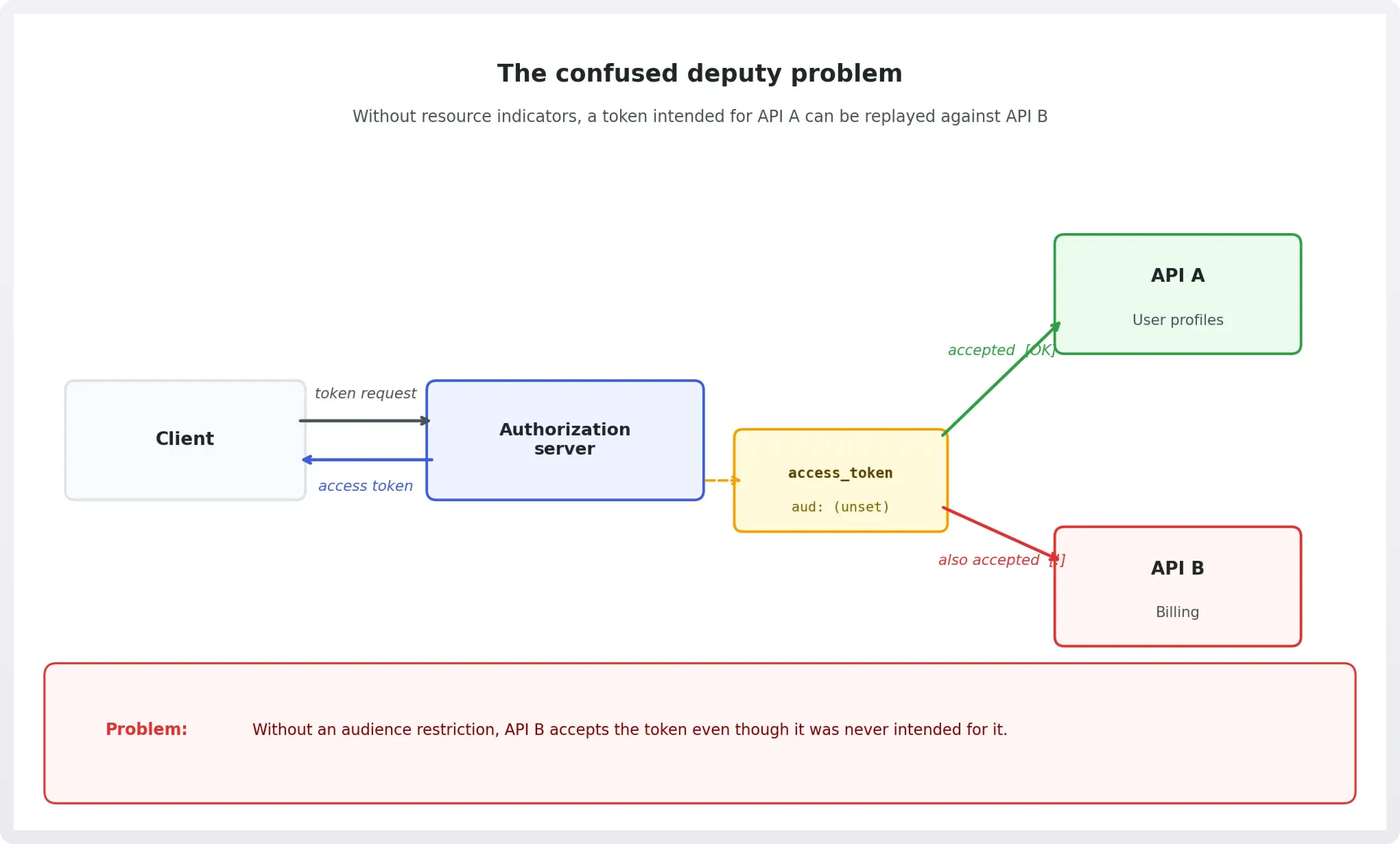
This creates two related problems:
Token misuse. A token intended for the user profile API could potentially be replayed against the billing API. If both APIs trust the same authorization server and don't enforce audience restrictions, they may accept each other's tokens.
Scope ambiguity. When scopes are shared across resource servers, a broad token can unintentionally grant access beyond what the client actually needs. The principle of least privilege is hard to enforce.
RFC 8707 solves both problems by giving clients a way to explicitly declare which resource server a token is intended for at request time.
How resource indicators work
The spec introduces a resource parameter that clients can include in authorization and token requests. Its value is a URI that identifies the intended resource server:
The authorization server uses this URI to:
- Bind the issued token to the declared resource. Typically via the
aud(audience) claim in a JWT, set to the resource URI. - Filter scopes to only those valid for that resource. Scopes that don't apply to the requested resource are excluded from the token.
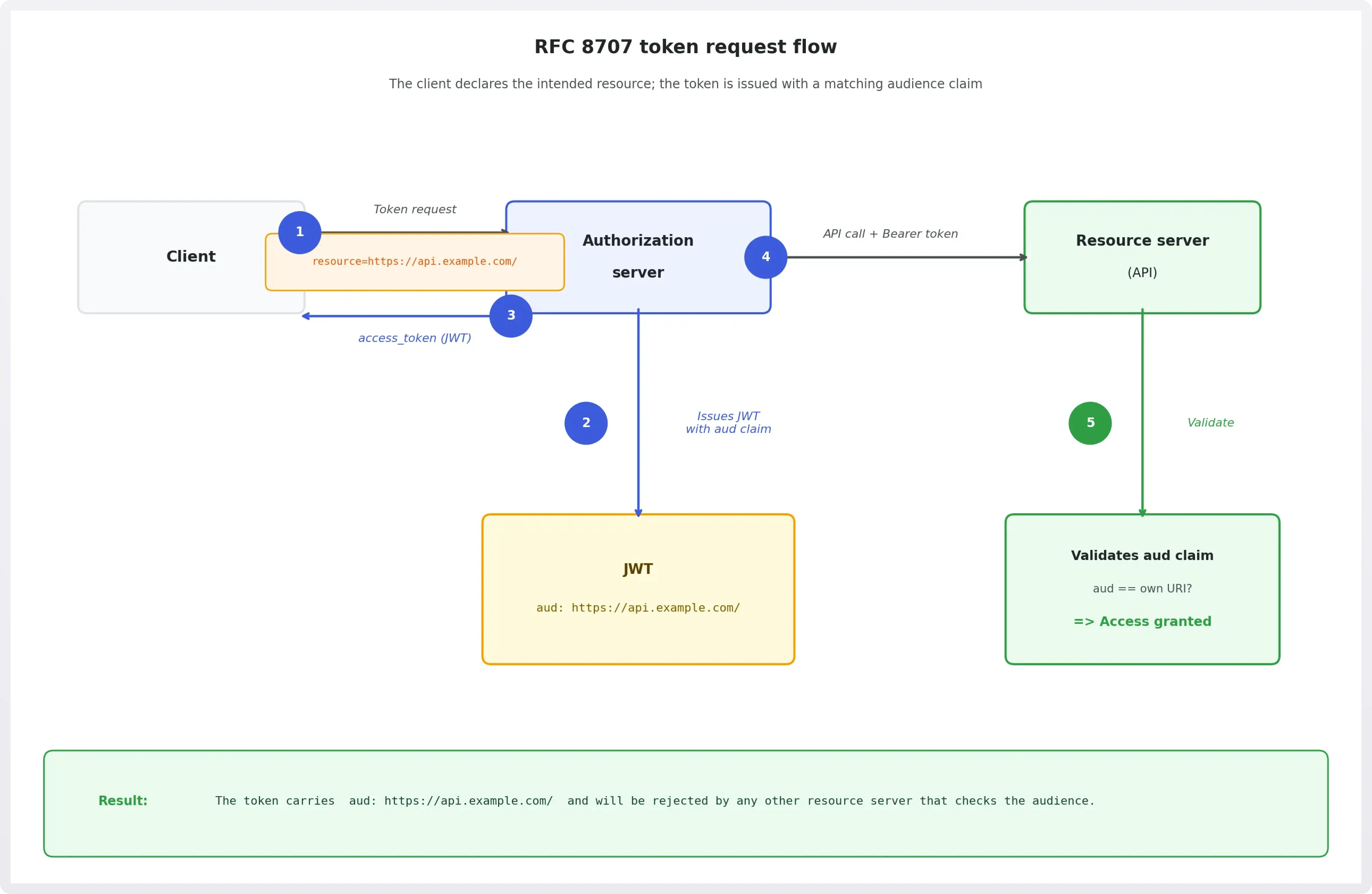
When the client later presents the token to the resource server, that server can verify that its own URI matches the token's audience, and reject it if there's a mismatch.
The resource parameter in detail
The resource parameter is a URI, but it has a few specific requirements:
- It must be an absolute URI (no fragments allowed).
- It should identify a specific resource server or logical API, not a client.
- Multiple
resourceparameters may be included in a single request if the client needs a token scoped to multiple resource servers, though authorization servers may choose to issue separate tokens instead.
When a token is issued without a resource parameter, the behavior is server-defined. RFC 8707 doesn't mandate rejection of such requests, so deployments can choose to remain backward-compatible.
Audience validation: The other half
Resource indicators only work when resource servers enforce audience validation. A token with "aud": "https://api.example.com/" should be rejected by https://billing.example.com/, even if both trust the same authorization server.
This is standard JWT validation and is covered by RFC 7519, but it's worth calling out explicitly: RFC 8707 is only as effective as the audience checks on the receiving end. Issuance and validation need to be paired.
It's also worth clarifying how the resource parameter relates to aud directly, since the two can look similar. The resource parameter is a request-time signal: the client tells the authorization server which resource server the token is intended for before it's issued. The aud claim is what ends up inside the token as a result. In other words, resource is typically what causes aud to be set correctly in the first place. You could set aud without RFC 8707 via static configuration or a proprietary parameter, but RFC 8707 gives you a standardized way to do it dynamically per request, which matters when a single client interacts with many different resource servers.
Why this matters for MCP
The Model Context Protocol (MCP) introduces a new class of OAuth client: AI agents acting on behalf of users, often interacting with many different resource servers in a single session. This makes the confused deputy problem especially acute.
The MCP Authorization specification explicitly requires authorization servers to support RFC 8707. When an MCP client connects to a resource server, it should request tokens scoped specifically to that server's URI, not a general-purpose token that could be replayed elsewhere.
This makes resource indicators foundational infrastructure for secure MCP deployments, not an optional enhancement.
Practical considerations
A few things to keep in mind when implementing RFC 8707:
- URI stability matters. The resource URI used at token request time must match what the resource server expects to see in the
audclaim. Consistency is key; changes to the URI are a breaking change. - Scope filtering requires coordination. Authorization servers need to know which scopes are valid for which resource URIs. This may require upfront configuration or a registration mechanism.
- Token caching becomes resource-scoped. Clients caching tokens need to key their cache on both the scopes and the resource URI. A cached token for
https://api.example.com/can't be reused forhttps://billing.example.com/. - Not all servers support it yet. RFC 8707 is a relatively recent addition to the OAuth ecosystem. When building integrations, check whether the authorization server you're working with has explicit support.
Building MCP auth with WorkOS
Implementing OAuth correctly for MCP, covering dynamic client registration, PKCE, authorization server metadata, and resource indicators, is a lot to get right. WorkOS MCP Auth is built on top of Connect and handles this infrastructure so you don't have to.
AuthKit stays aligned with the evolving MCP Authorization specification, which means as the spec adds requirements like RFC 8707 support, we absorb that complexity rather than passing it on as breaking changes. Resource indicators are fully supported: when setting up MCP Auth, you configure your MCP server's URI in the WorkOS Dashboard and AuthKit handles the rest, binding issued tokens to that audience and filtering scopes accordingly. The MCP setup guide covers the full configuration.
If you're building MCP-powered tools and agents, WorkOS gives you a spec-compliant auth layer without having to build it from scratch.