Deactivate or delete: What removing a member from an organization actually does
Your app's remove member button can make one of two AuthKit calls. What deactivate and delete each change, and the follow-up steps that finish the removal.

Removing a member from an organization in AuthKit means choosing between two operations with different outcomes. Deactivating an organization membership sets its status to inactive and keeps the record, so you can list former members and bring them back later. Deleting it removes the record permanently, and that cannot be undone.
Every B2B app has a remove member button, and it can make either call. Most of the bugs behind that button come from treating the two calls as interchangeable, or from assuming either one finishes the job alone. This post walks through what each call changes, what it leaves for you to do, and how to pick one model for your app.
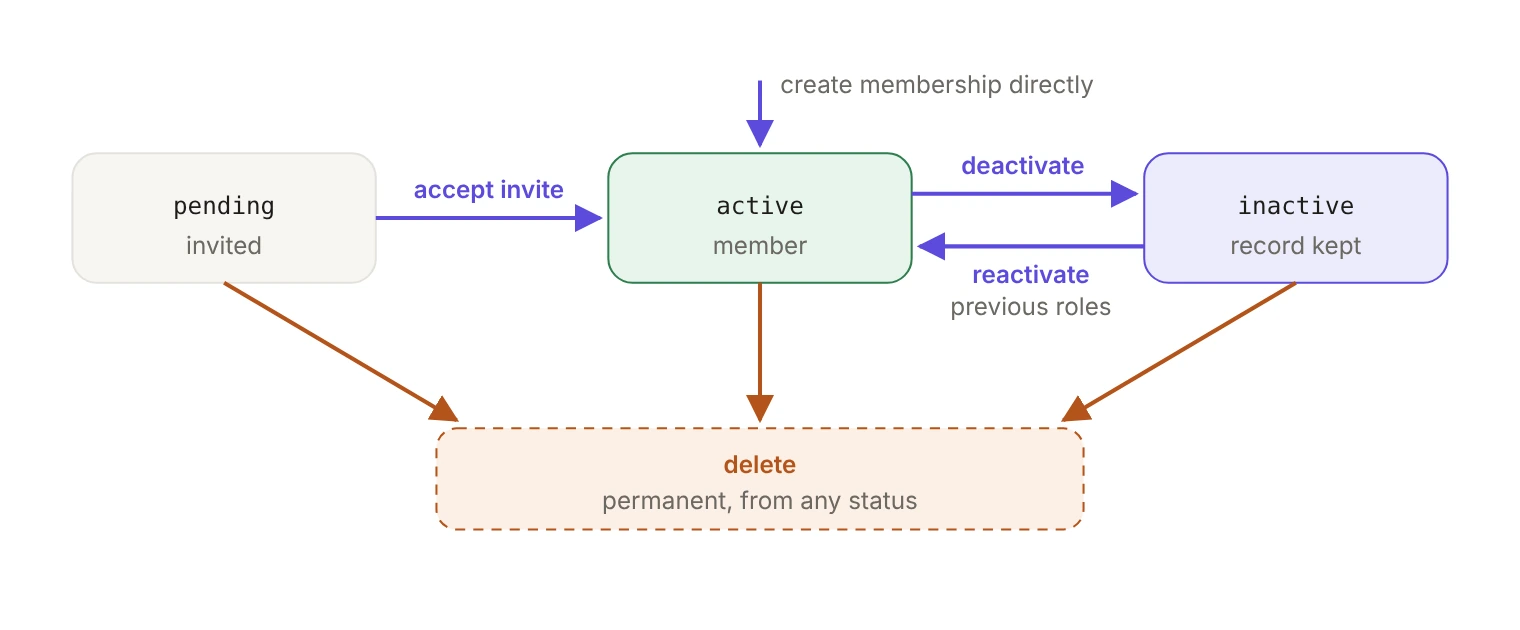
What are the three membership statuses?
An organization membership has three possible statuses: pending when a user is invited to an organization, active when a user is added as a member or accepts an invitation, and inactive when the membership is deactivated. Every membership object carries that status field alongside a directory_managed boolean.
One detail catches people building a former members screen: listing organization memberships returns only active memberships by default. Pass the statuses parameter, which accepts active, inactive and pending, to see the rest.
What does deactivate actually do?
Deactivation is a single call:
One request, four effects. It sets the membership status to inactive, revokes the user's sessions for that organization, and revokes pending invitations for that email. On success it emits an organization_membership.updated event. Afterwards, refreshing into that organization is blocked.
Deactivating a membership that is already inactive is a no-op and doesn't emit an event, so retrying a failed offboarding job won't produce duplicate webhooks for your consumers to deduplicate.
If you want the same user signed out of every organization and every device rather than just this one, that's a separate job for the Sessions API. We covered it in how to revoke sessions and sign users out everywhere.
What does deactivate leave for you to do?
Two things survive the call, and both need a follow-up step.
Access tokens that were already issued. They stay valid until they expire. Deactivation blocks the refresh, not the token the user is already holding, so your access token duration is also your removal latency. Keep it short, and check membership status directly for anything sensitive rather than trusting a claim in a token minted before the removal. Session length vs. access token duration vs. inactivity timeout walks through how to pick each setting.
Applications the member authorized through WorkOS Connect. Apps the member authorized, including MCP clients, keep their grants after the membership is deactivated. List the Connect applications a user has authorized, then revoke the ones that should go:
Make this part of the same offboarding job as the deactivate call, so it doesn't depend on someone remembering it. The broader sweep, including what else to check per app, is in our workforce identity offboarding checklist.
How do you bring someone back?
Reactivation is the mirror call:
Reactivate puts the status back to active, restores the role or roles the membership carried before deactivation, and emits the same organization_membership.updated event. Run it against a membership that's already active and nothing happens, including the event.
Restoring the old role is usually right for a returning employee and often wrong for a contractor coming back on narrower terms. There's no parameter for reactivating with a different role, so do it in two steps: reactivate, then update the role with PUT /user_management/organization_memberships/{membership_id}, passing role_slug or role_slugs. The create membership API gets you there in one call instead: calling it with an organization and user that match an inactive membership activates that membership with the roles you specify.
Why can't you deactivate a pending membership?
Because there's nothing to deactivate yet. Calling deactivate on a pending membership returns an error, and the docs point you to delete instead. Reactivate on a pending membership also returns an error, since the right path there is the invitation acceptance flow.
Withdrawing an invitation is therefore a delete, not a deactivate. Deleting the pending membership also revokes its invitations. The failure mode to avoid is revoking the invitation on its own, which leaves the membership sitting in pending and shows up later as a row in the member list nobody can explain. Delete the pending membership, then invite the person again when you mean to.
If a given flow doesn't need invitations at all, a membership can be created as active directly.
What does delete actually do?
Deletion is permanent and cannot be undone:
It removes the membership's roles, Connect consents, agent instances and pending invitations, then the membership itself, and emits an organization_membership.deleted event. Afterwards, refreshing into that organization fails. Access tokens already issued still live until they expire, and it's still worth revoking the member's authorized applications in the same job.
Delete is the right default when your app has no need to remember the membership, for example when members operate only on customer data and own nothing of their own. The WorkOS docs go further and note that an app in that position may want to delete the User entirely once the membership is deleted. Do that when the person belongs to no other organization and you don't need their data referenced anywhere.
Deactivation fits better when a member leaves data behind that still points at them, such as messages or documents, or when you want a former members list with a way to restore people.
What about members managed by Directory Sync?
Check directory_managed before you render a remove button. A membership with directory_managed set to true can't be deleted through the membership endpoint; the call returns a 422 with the code organization_membership_directory_managed. The directory is the source of truth for those members and keeps their memberships in line with it, so make both deactivation and removal changes there: the customer's IT admin deprovisions the user in their identity provider, and Directory Sync updates the membership.
Design for this rather than catching the 422. If a membership is directory managed, show the admin where the change belongs instead of offering a button that's going to fail.
Which call should you make?
Pick one model and apply it everywhere. Mix deactivate in the admin UI with delete in a bulk importer and you get a member who exists in one view but not the other, which is a bug report that takes an afternoon to trace back to two different offboarding paths.
The removal itself is one API call. What makes it complete is how long your access tokens live and whether the same job revokes the member's authorized applications, and both of those are decisions you make long before anyone clicks remove.
Further reading
- Users and Organizations: membership management
- Organization membership API reference
- Events reference
- How to revoke sessions and sign users out everywhere with the WorkOS Sessions API
- Workforce identity offboarding: A checklist to verify access removal
- Session length vs. access token duration vs. inactivity timeout