Projects and per-environment branding: Organize your products and brand them independently
Group your environments by product and give each one its own branding, without separate WorkOS accounts.




WorkOS has always had environments, but until now they all lived in a single flat list under one team, with one shared set of branding applied everywhere. For teams building a single product, that works fine. For teams building multiple products, it has meant awkward workarounds: separate WorkOS accounts, environment naming conventions, and a lot of manual effort to keep things organized. Today we are fixing both of those problems at once.
Projects
Projects are a new layer in the WorkOS hierarchy that sits above environments. A project is a logical grouping of environments, so your staging and production environments for one product live together in one place, separate from the environments for another product.
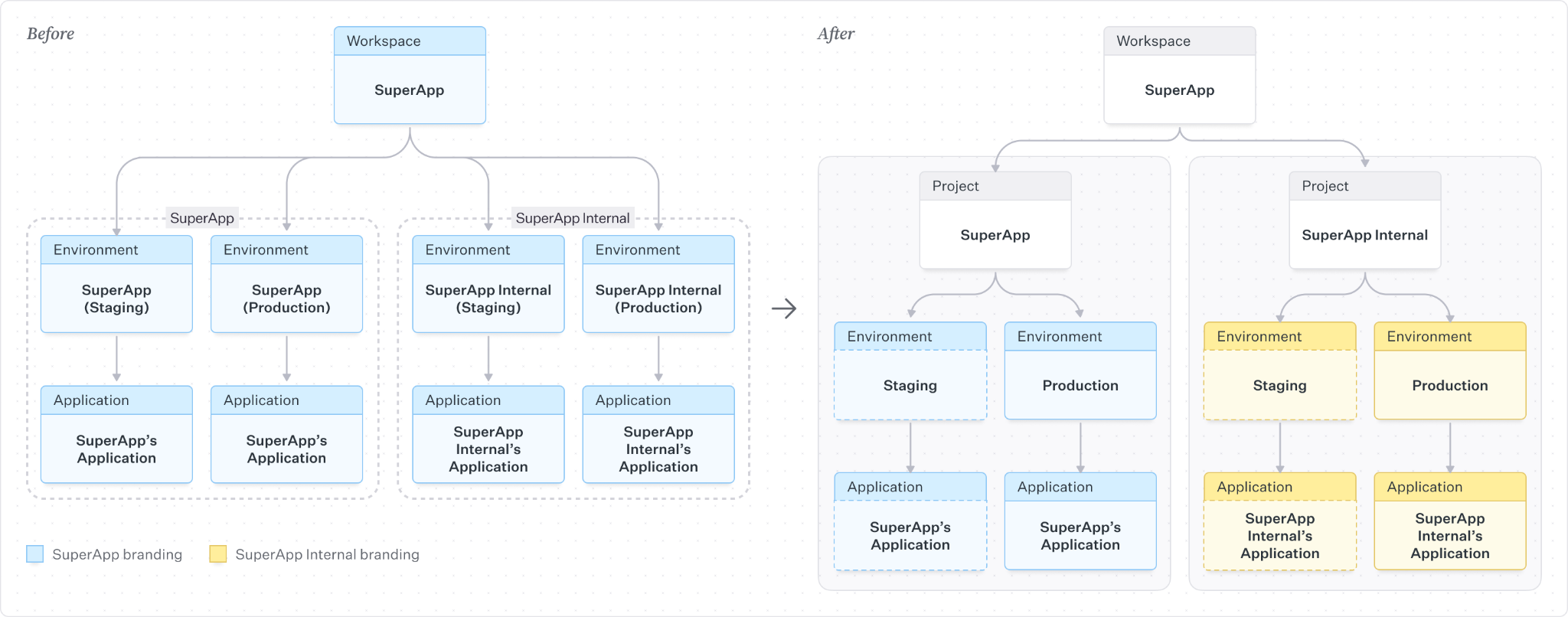
If you build a customer-facing app and an internal employee portal, those are two separate products with separate users, separate branding, and separate auth configurations. Today they share the same environment list. With projects, each one gets its own project, and the environments inside it stay organized around that product.
Projects, environments, and applications
It is worth clarifying where projects fit relative to environments and applications, since these serve different purposes.
- Applications are for multiple clients sharing the same user pool. If you have a web app, a mobile app, and a desktop client, those are three applications within one environment. Users are shared across all of them, and you can configure session lifetimes and redirect URIs independently per client. Applications are not the right model if your goal is separate products with separate user bases.
- Environments are isolated instances of the same product at different stages of development. A staging environment and a production environment have completely separate sets of users and organizations, so you can test safely without affecting real users.
- Projects are logical containers for environments. They do not change how users or data are isolated; they just give you a way to group the staging and production environments for one product together, and keep them separate from the environments for another product in the dashboard.
If you have been using applications as if they were separate products, reorganizing into separate environments within a project is the more accurate model.
What's changing for your account
Every existing WorkOS account is being automatically migrated into a default project. If you only have one product, nothing changes except the new project picker in the dashboard header. If you have multiple products, you can create additional projects and move environments into them.

Creating a new project gives you two options. You can start from scratch, which creates a new staging and production environment for you. Or you can migrate existing environments from another project into a new one during creation, which moves those environments along with their configuration.
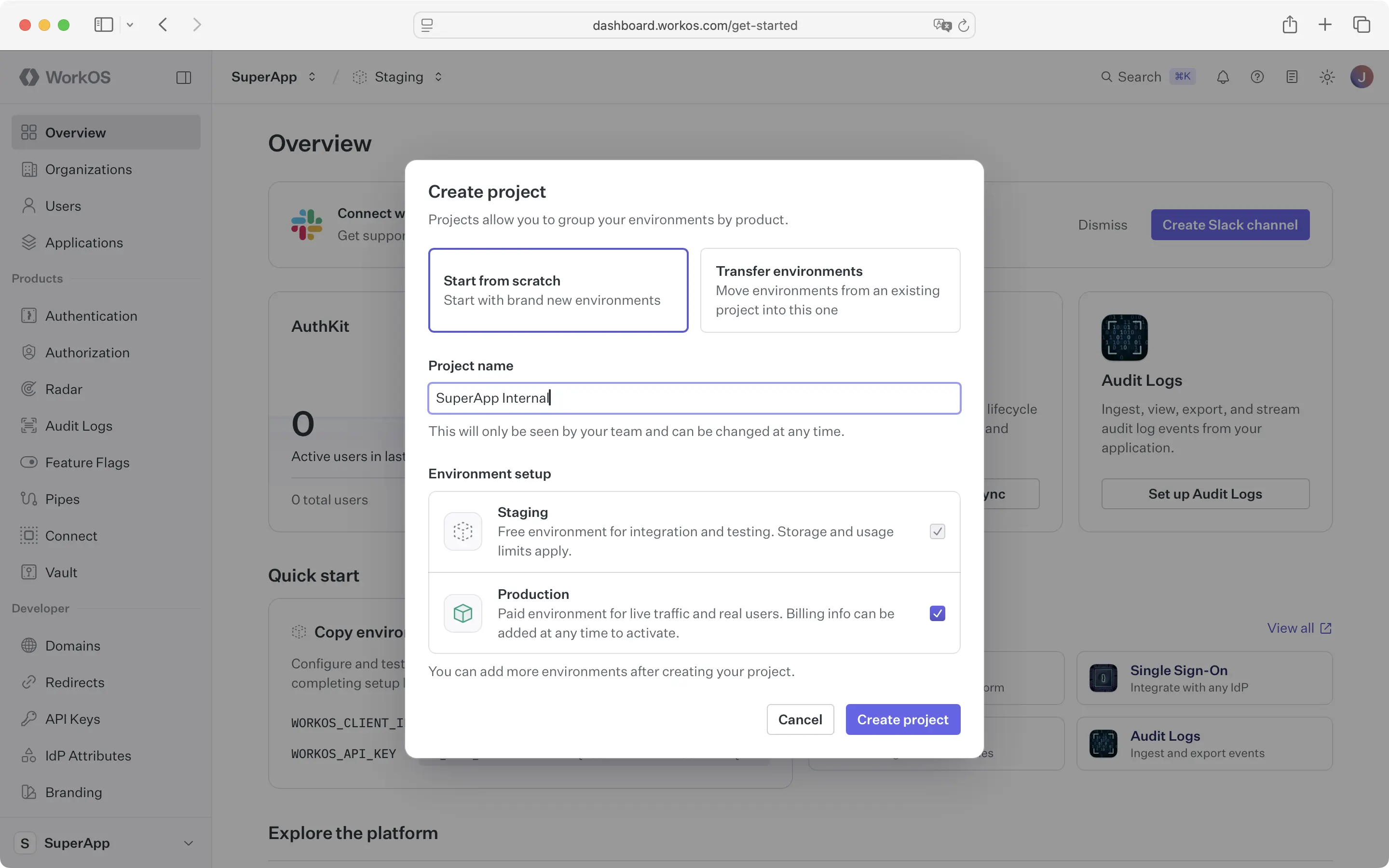
A few things to know about the initial release:
- You can create and rename projects freely, but deleting a project requires contacting support for now.
- Transfers are only supported into a new project during creation; transferring into an existing project is coming soon.
- Support for transferring environments from a project with existing feature flags, audit log schema, or custom email domain is also coming soon.
Per-environment branding
Alongside projects, branding is moving from the workspace level to the environment level. Previously, your logo, colors, and theme applied globally across every environment and application in your account. Now each environment has its own branding configuration, which means a staging environment can have different branding than production, and two separate products get their own look and feel.
This change is what makes projects genuinely useful for multi-product teams. Without per-environment branding, grouping environments into projects would still leave you with shared branding across everything.
Copying branding between environments means you never have to set up the same branding twice. Instead of manually recreating your production branding in a new environment, you can pull it in from another environment with a single action. The copied settings land in the editor before saving, so you can make adjustments before anything goes live. It is particularly useful when you want to test a branding change in staging before pushing it to production, which previously had no safe path.
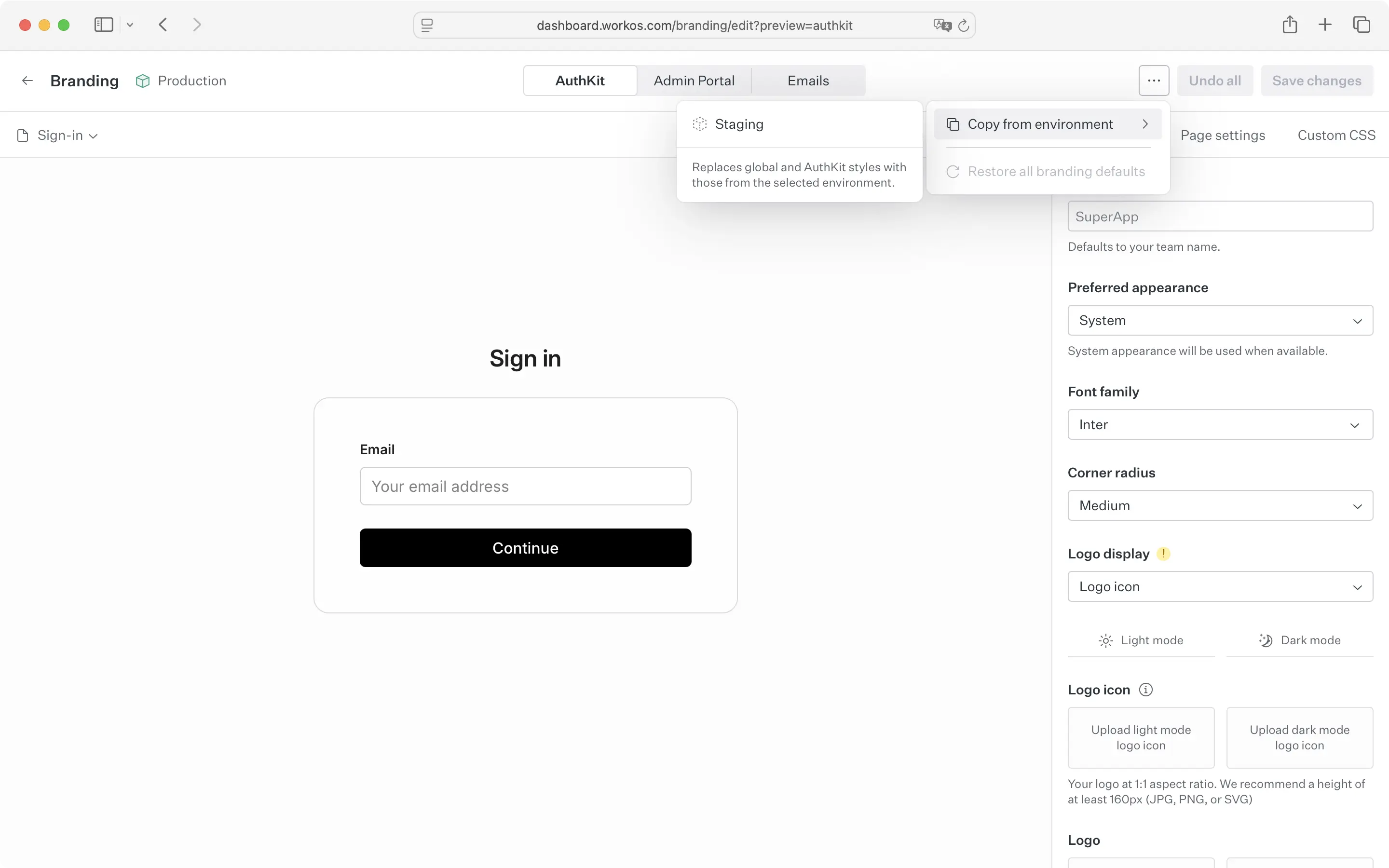
Custom display name is a new field in the branding editor that controls the product name shown in AuthKit, emails, and the Admin Portal. It defaults to your team name, but can now be customized to more accurately reflect your product name. With projects, you will likely want each project to have its own name in these surfaces, and the display name field is how you set that.
What this means for multi-product teams
Projects and per-environment branding make it possible to manage multiple products cleanly under a single WorkOS account. Each product gets its own project with its own environments and its own branding. Your dashboard stays organized, your branding stays accurate, and your product structure maps to how WorkOS is set up
Available now
Projects and per-environment branding are available in the WorkOS dashboard. All existing environments have been migrated into a default project automatically. No action is required unless you want to reorganize.