Retiring home-grown SCIM without anyone noticing
How SCIM Bridge moves live enterprise directories onto WorkOS Directory Sync with zero downtime, staged authority, and lossless rollback until the last step.

Somewhere in your codebase there is a SCIM endpoint you wrote years ago, when your first enterprise customer asked for Okta provisioning. It has grown with every deal since. It works, which is exactly why nobody wants to touch it, and it is now load-bearing for a hundred or two hundred live enterprise directories. Every hire, every offboarding, every group change at those customers flows through it.
Now you want WorkOS Directory Sync to own that problem instead. The question is how you get there, because provisioning is not something you can pause. If an offboarding event gets dropped mid-migration, a terminated employee keeps their access. If the migration asks two hundred IdP admins at your customers' companies to reconfigure anything, it will take a year of support tickets to finish.
SCIM Bridge is our answer: a reversible migration proxy you run in front of your existing SCIM endpoint. It dual-writes every change to both your app and WorkOS, lets you backfill and verify at your own pace, and makes cutover a deliberate final step, with lossless rollback at every point before it.
Why SCIM migrations are scary
Two things make this harder than a normal service swap.
The IdP holds the state. After creating a user, Okta or Entra keys every later operation on the id your system minted, PATCH /Users/{that-id}. You can't hand traffic to a new backend unless it answers to the same ids, and you can't ask the IdP to re-learn them. Any proxy in the middle has to translate ids in both directions, forever, without the IdP ever noticing.
Cutover is usually a leap. The naive migration changes three things in one moment: which system is authoritative, how your app receives writes, and whether your app depends on event delivery from the new provider. If anything is subtly wrong, a webhook consumer that mishandles deactivations, a group that never backfilled, you find out in production, after the switch, with no way back.

The bridge is designed to break that leap into small, individually reversible steps.
Where the bridge sits
Start from the architecture you have today: the IdP provisions your application's own SCIM endpoint directly, and your database is the only copy of the directory. Moving to WorkOS without a proxy means repointing the IdP and letting WorkOS mint new ids for people your database already knows.
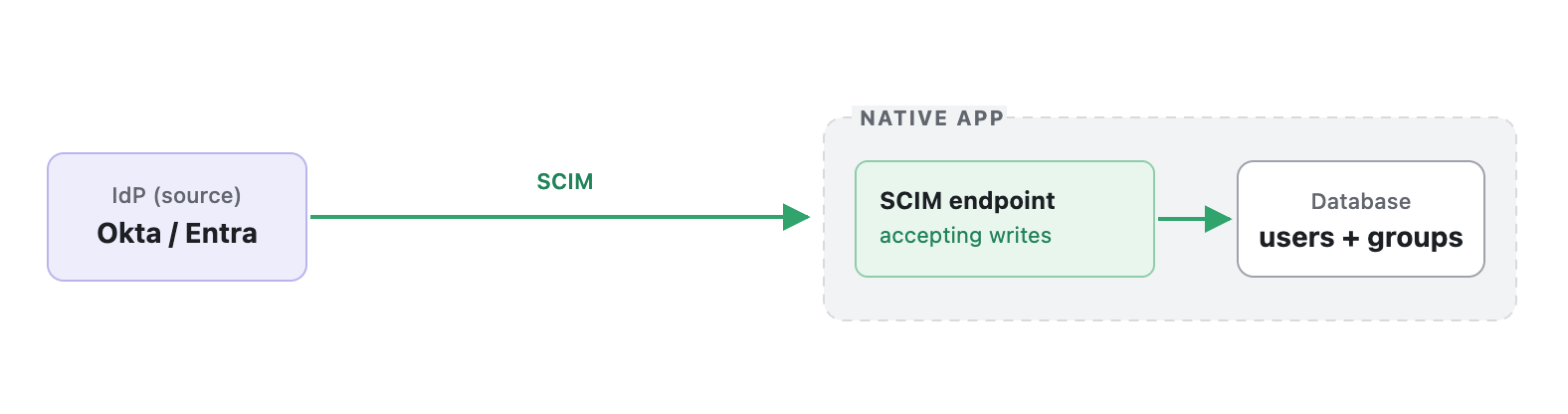
SCIM Bridge is a single container you deploy in your own infrastructure, and it sits exactly in the middle of that arrow. Your customers' IdPs point at it; it forwards SCIM traffic to your existing endpoint and, as the migration advances, mirrors that traffic into WorkOS. Writes hit the native SCIM endpoint first, then mirror into WorkOS under the migrated-id contract. WorkOS starts emitting DSync events immediately, and your listener ignores every one of them, because the proxy is already writing your app directly. Applying them too would write every change twice.
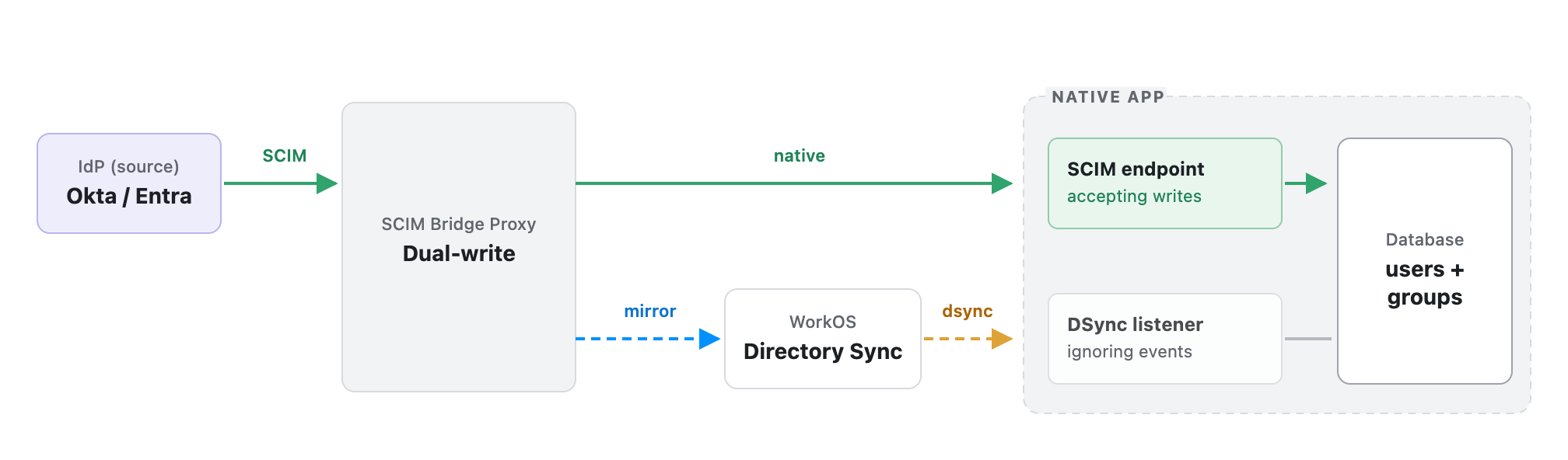
Those pictures are the same ones the bridge's control panel draws live: the topology view has a Before / With SCIM Bridge toggle, real user counts on each node, and legs that recolor as a directory's mode advances. The native app is drawn as three parts rather than one box — the endpoint the proxy writes and the listener WorkOS drives, both landing in the same database — because the whole migration is a handoff between those two writers, and a single box would hide it.
One instance serves all your directories, each with its own credentials and its own migration mode, routed by bearer token. The panel imports directories in bulk, holds their SCIM credentials (encrypted at rest; the IdP-facing tokens are hashed and can never be read back), flips migration modes per directory or in bulk, runs backfill, and shows a request log plus the id mappings the whole migration depends on. Underneath is a small SQLite or Postgres database on a persistent volume; those id mappings are the crown jewels. Run one instance: both the proxy and the listener protocol assume a single writer.
The bridge has no inbound dependency on WorkOS. Webhooks never target it. It only makes outbound calls, to your app and to api.workos.com.
How a migration runs end to end
Here is the whole journey, whether you are moving one directory or two hundred: WorkOS provisions your directories from one CSV and sends back one credentials sheet; you deploy the bridge and bulk-import that sheet; you repoint each IdP at the bridge; you stand up one Directory Sync listener for all directories, gated on the bridge; then you pilot one directory end to end and advance the rest in waves.
Step 1: WorkOS provisions the directories
You don't create anything in the WorkOS dashboard. You send your WorkOS contact one row per directory, keyed on your own identifier for it, the tenant or directory id your app already uses:
WorkOS runs an import over that CSV, creating an organization and a migrated Generic SCIM directory for each row, and stamps your external_id on the organization, so the two systems permanently share one key per directory. Back comes a sheet with each directory's WorkOS ids, SCIM endpoint URL, and bearer token:
That "migrated" marking matters: it activates the id contract that makes the rest of this work.
Settle one more thing while you are here. A WorkOS environment carries a user suspension soft-delete setting that decides what a deactivation looks like on the event stream: with it on, an IdP deactivation (active: false) emits dsync.user.updated and the user is retained as Inactive; with it off, the same deactivation emits dsync.user.deleted. The setting is per environment, covers every directory in it, and isn't self-service today, so ask your WorkOS contact which way yours is set. Both options are safe as long as your listener deactivates in place on dsync.user.deleted instead of deleting the row. A listener that deletes loses the user's id and memberships on every rehire when the flag is off.
Step 2: Deploy the bridge and import everything
The bridge needs to be reachable by your customers' IdPs over HTTPS, and able to reach both your app's SCIM endpoint and WorkOS outbound. The IdP-facing path is <PUBLIC_URL>/scim/v2; the container serves plain HTTP, so terminate TLS in front of it and set PUBLIC_URL to that external address. Keep /panel off the public internet. It renders every directory's upstream tokens, basic auth is required to boot, and you want APP_ENCRYPTION_KEY set.
Then you paste the sheet from Step 1, plus each directory's existing native endpoint and token, into the panel's bulk import, and every directory lands in passthrough mode:
One directory per native SCIM endpoint: that namespace rule is a deployment requirement, not a preference. And since the bridge is the single writer of those mappings, give it the uptime treatment your SCIM endpoint already gets.
Step 3: Repoint the IdPs
Each IdP's SCIM configuration gets a new base URL: the bridge's. Here's the trick that saves two hundred support conversations. The import accepts the bearer token each IdP already presents today as that directory's proxy token, so you change the URL and keep the credential. For many IdP setups that is the entire customer-facing footprint of the migration. Omit proxy_token and the bridge mints one instead, which is not displayed after import; press Rotate on the directory page to mint a token you can copy, shown once. And since every directory starts in passthrough, repointing changes nothing about behavior: requests flow through the bridge to your app unchanged, and you can watch them in the Activity log to confirm.
Step 4: One listener, kept inert
Before cutover, your app needs to consume Directory Sync events. That is how it will receive provisioning changes once WorkOS is the source of truth. You build one listener for all directories, not one per directory: every event carries its directory_id, and the bridge exposes a status endpoint (GET /status/directories/{id}) that tells the listener, per directory, whether to apply events yet. The field it reads is apply_dsync_events.
That gating is what makes the listener safe to deploy early and test under real traffic while it is still inert. It flips on per directory, exactly at cutover, driven by the same mode switch you use for everything else.
One transport note we learned the hard way: prefer polling the Events API over webhooks. Webhook deliveries are at-least-once and unordered. We have watched a stale user.deleted arrive 31 seconds late, after a newer membership event. The Events API delivers in order.
Step 5: The mode ladder
This is the heart of the design. Each directory climbs four rungs, and every rung is independently verifiable before you take the next.
workos-primary is the rung that earns its keep. The naive migration jumps from dual-write straight to cutover and takes all three of the risks above at once. workos-primary takes only the first: WorkOS starts answering the IdP under real production traffic, while the proxy keeps writing your native app directly, so native stays current by construction. You dwell here as long as you like. If anything looks wrong, rollback is a mode change and nothing else; your app never stopped being up to date. Before cutover, rollback needs no reconciliation first; after cutover, you run Reconcile from WorkOS if you aren't sure the listener kept up.
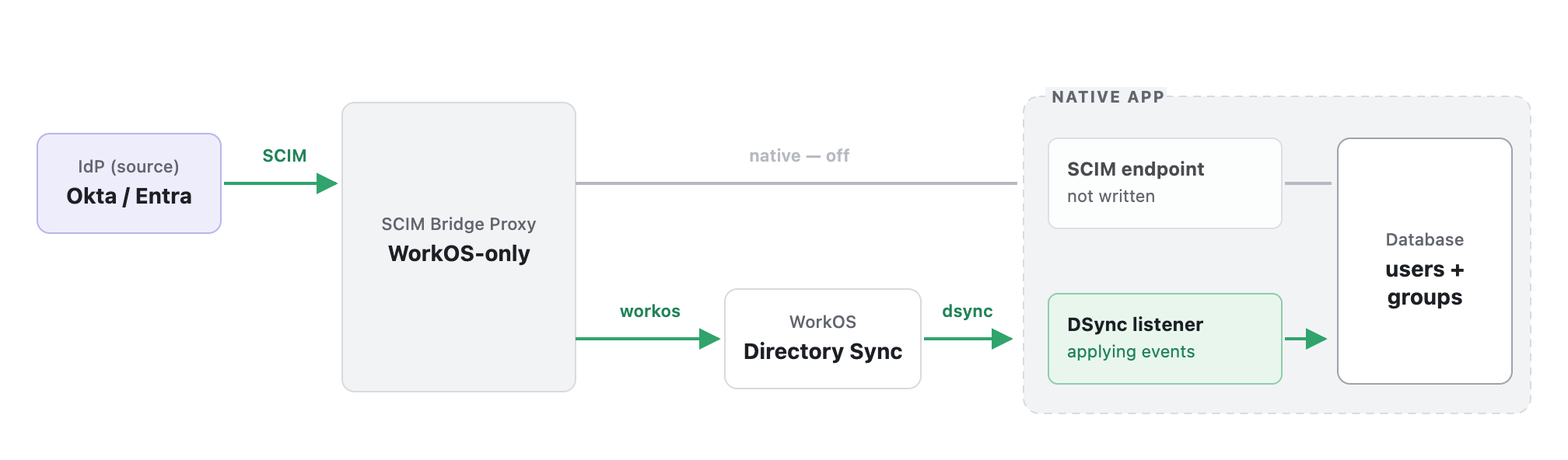
Only when WorkOS's answers have been trusted in production do you flip to workos-only, and the listener, gated all this time, starts applying events. That is the point of no return, and it is the only one in the whole process. At that flip, the proxy stops writing the SCIM endpoint in the same instant the listener starts applying events: both edges into the database change hands at once, which is why the handoff is one atomic mode switch instead of two steps. Run a reconcile immediately afterward.
You don't run this two hundred times by hand. Pilot one low-stakes directory all the way through (every integration surprise you will ever meet lives in that first pass), then advance the rest in waves with bulk mode changes, watching per-directory divergence counters to see which ones aren't ready.
The id problem, solved by contract
The reason all of this holds together is a small protocol between the bridge and WorkOS called the migrated-id contract.
For a migrated directory, WorkOS lets a create carry the id your system originally minted, via an X-WorkOS-Migrated-Id header, and adopts it as the resource's canonical id. Only POST can create; PUT, PATCH, and DELETE resolve strictly by id and return 404 on a miss, they never quietly create. The reasoning is straightforward: if PUT or PATCH could create on a miss, a failed lookup would silently duplicate a resource instead of failing loudly.
The bridge runs the standard dance on top of that contract: try PUT with the header; on 404 (an expected first touch, not an error), POST with the same header; if two requests race and the POST hits a 409, retry the PUT, which now finds the winner's row. The IdP sees none of this: a create answers 201, a replace answers 200, and the IdP never sees a WorkOS-internal id. One shared id ends up spanning the IdP, your app, and WorkOS, which is what makes rollback safe even after resources are born on the WorkOS side.
The seam we don't hide
One thing the bridge does not pretend to do: make a write to two HTTP services atomic. In workos-primary, if the native leg fails after WorkOS committed, the IdP is told the request failed and the resource is recorded in a failed-writes table that the panel surfaces. Nothing retries silently in the background. The repair is an explicit Reconcile from WorkOS, or simply the next write to that resource landing cleanly. Failing the request is safe precisely because of the id contract: the IdP's retry converges on the same ids instead of creating duplicates.
We think this is the right trade. If a migration tool hides its failure modes, you find out at the one moment you can't afford to.
Expect one more piece of arithmetic to look wrong after cutover: WorkOS may show more users than your app. WorkOS retains deactivated users as inactive records along with their memberships, so compare active users and their memberships rather than raw row counts.
Try it in ten minutes, with nothing
The bridge ships with a demo mode that mounts a simulated IdP and a simulated native app inside the container, so you can drive the entire migration, passthrough to cutover and back, against nothing but itself:
Open http://localhost:8080/panel, seed the directory, and watch the diagrams above come alive on the Live state tab: real user counts on every node, legs recoloring as you climb the ladder. Then read the migration guide for the real thing.
The best migrations are boring. This one is designed to be boring two hundred times in a row.
And if you are adding provisioning to an application you are building from scratch, you have no endpoint to retire: start with Directory Sync and skip the home-grown SCIM chapter entirely.