Sign in with ChatGPT: The scope that spends your users' plan
Sign in with ChatGPT adds a scope that spends a user's subscription allowance inside your app. What to model before you put that button on your login page.

Sign in with ChatGPT plan usage lets ChatGPT Plus and Pro subscribers spend their ChatGPT allowance inside third-party apps, through an OAuth scope named chatgpt.tokens.use.direct. The user controls the grant, the cap, and the disconnect from ChatGPT settings, and the app only finds out about most of those changes through its errors.
When a user connects an app to their ChatGPT plan, the consent screen asks for something no login button has asked for before: permission for the app to consume usage from the limits of their ChatGPT plan. In the OAuth request behind it, that permission is a scope named chatgpt.tokens.use.direct, sitting in the same space-separated list as openid, profile, and email.
Those are two different kinds of permission sharing one consent screen. profile grants read access to a bounded thing: a name, an email, a picture. chatgpt.tokens.use.direct grants draw-down rights on a balance that shrinks every time you use it, and that balance belongs to a consumer subscription held by one person. Accept it, and your application's cost of goods, its rate limits, and its failure modes are partly set by an individual's personal billing state: their plan tier, their remaining allowance, the caps they set, and the moment they decide to disconnect you.
How does Sign in with ChatGPT plan usage work?
OpenAI announced plan usage at DevDay on September 29, 2026, with 16 launch partners. Commercial products such as Devin, Notion, Vercel, Warp, Amp, and Conductor sit alongside open-source tools such as OpenCode, OpenClaw, Pi, and T3, with Lovable listed as coming soon.
Before you design anything, check whether you can use it at all. OpenAI's developer documentation for plan usage is written for open-source and locally hosted apps. If you run a paid or remotely hosted product, which describes most B2B SaaS, the docs point you to an interest form instead. The technical details below come from those docs, so read them as the shape of the contract you would be signing up for, not as an integration you can ship this week. They matter now because the tools already using them are the coding agents and CLIs your customers' engineers run on their laptops.
Signing in and spending are separate permissions. Identity sign-in works for any ChatGPT user whose organization allows it, and a user can complete sign-in without approving plan usage. Plan usage is narrower: only Plus and Pro subscribers can let an app spend their allowance.
When a user grants it, eligible requests from your app count against the ChatGPT Work and Codex usage already included in their plan. Connecting the app adds no new allowance. The user can set a weekly limit per app in Settings > Usage, expressed as a percentage of their overall weekly plan usage. OpenAI is explicit that this is a cap, not a separate pool of usage. It neither reserves anything for your app nor raises the ceiling, so your app can hit its cap while the user still has plenty of plan left. Plus users also share a five-hour limit across all connected apps, which means another app's activity in the same window can stop yours.
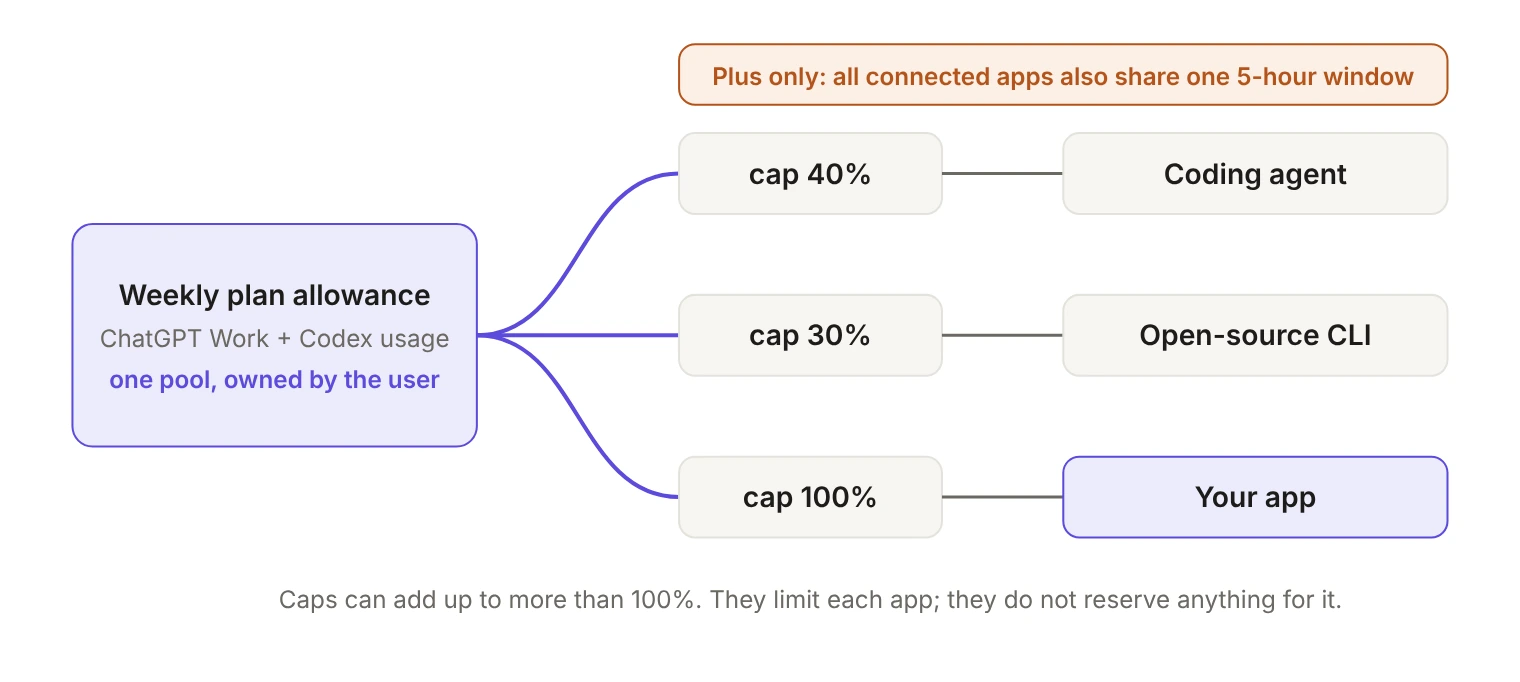
The whole arrangement travels in one parameter of the authorization request, with the identity scopes and the spending scope sitting flat against each other:
The token response echoes the granted scopes back in its scope field. Access tokens last one hour (expires_in: 3600), and refresh tokens last 30 days, with each successful refresh returning a replacement that starts a fresh 30-day lifetime. A valid ID token on its own authorizes nothing financial, which makes the scope check a hard gate in front of every inference call rather than a setup-time detail:
The grant has no administrator
Sam Altman's pitch on stage was about friction: "They're already paying for an AI subscription, and now you don't have to cover their token costs to get them going." That is true, and it is a real gift to anyone whose trial economics depend on inference spend.
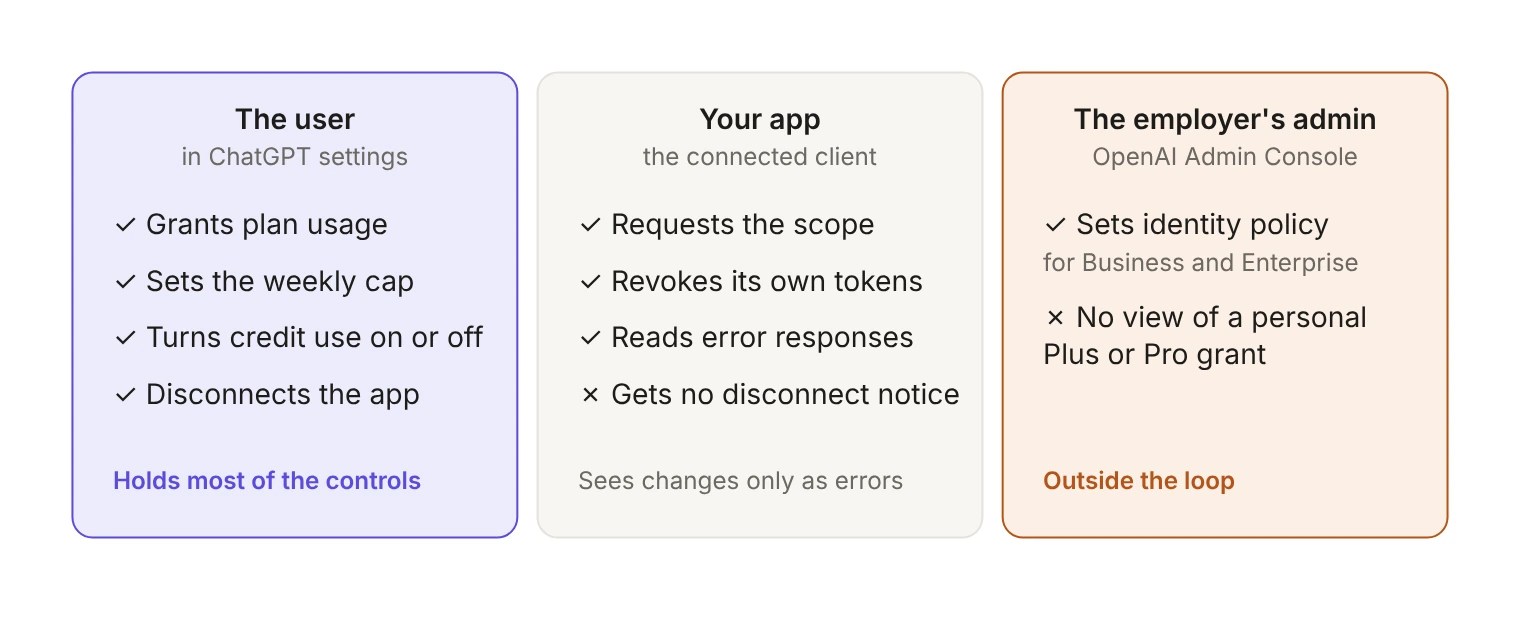
The question is who authorized it. For ChatGPT Business and Enterprise customers there is a real control surface: global admins manage organization-level application permissions under External access in the OpenAI Admin Console. Identity sign-in is enabled for organizations that have not set an explicit identity policy, with existing allow and deny lists still in force, and during the admin preview, delegated access for ChatGPT Sites and Ads is off by default and needs explicit admin approval.
None of that reaches the case this post is about, because plan usage is a Plus and Pro feature. Picture an engineer at a company with a locked-down Enterprise ChatGPT deployment who runs an open-source coding agent on their work laptop. Their Enterprise seat cannot fund it, so they sign in with their personal Plus account. The work happens on their employer's repositories, during their employer's sprint, and the admin console that could have governed the grant is attached to an account the grant never touches.
How do users revoke Sign in with ChatGPT?
Mostly in a settings page you do not control, and this is the detail most teams will get wrong. Signing out of a connected app is not the same as disconnecting it. Disconnecting happens in ChatGPT under Settings > Security and login > Login connections > Sign in with ChatGPT, where the user selects the app and removes it. Disconnecting does not reverse usage already recorded.
The developer docs are blunt about what you learn from that: "OpenAI does not currently notify your tool when a user disconnects the app in ChatGPT settings." You discover the revocation when a request or a refresh fails.
You do hold one lever. OpenAI's session guidance tells apps to call the authorization server's revocation endpoint with the refresh token on logout, before clearing local credentials. Do it. It makes the user's most intuitive gesture, logging out of your product, actually end your access to their tokens. It does not give you visibility into what the user changes inside ChatGPT, and the docs do not say whether it removes your app from the user's list of connections, so keep pointing users to ChatGPT settings when they want a full disconnect.
Even with that in place, the lifecycle of this grant is only half visible to you. If you have ever built a connection-health surface for OAuth integrations, this is the inverse problem: the connection can be dead without your app noticing, and the user can change its limits without telling you.
What happens when a user hits their limit?
Running out is a failure mode you now own. When your app cannot spend any more, the Responses API returns subscription_sharing_usage_limit_exceeded with HTTP 429. OpenAI's guidance is precise: "Do not assume the entire plan is empty or infer a reset time from this code alone; an app-specific limit can also apply." On a Plus plan, the shared five-hour window is a third possible cause. These states need different handling, and the error code alone will not tell you which one you are in. OpenAI's recovery guidance is to pause plan-funded requests and link the user to ChatGPT settings, which hands the diagnosis back to the user.
Nothing falls back on its own. "OpenAI does not silently switch the request to another billing path." If your product needs to keep working, you build the fallback. Devin did: usage in Devin counts toward the Codex and ChatGPT Work usage included in the plan, and if a user reaches the limit they set for Devin, "your sessions keep running on your Devin usage until it resets." That is the shape of a product that treated the grant as supplementary fuel rather than as its billing model.
Price in the request constraints too before you design around this route. Plan-funded requests over HTTP must set store: false and stream: true, explicit system-role message items are rejected, and sampling fields such as temperature and max_output_tokens must be left out. Image generation, file search, Code Interpreter, native computer use, hosted MCP connectors, and Responses tool_search are all unavailable.
Credits are a second grant with a trap in it
After included usage runs out, a connected app can draw on the user's purchased credits, but only if the user has turned that on. It is off by default, and it is a single setting that applies across every participating app. OpenAI's help center spells out the interlock:
"An app must have its usage limit set to 100% to be able to use credits after included usage runs out. Setting an app limit to 100% does not, by itself, turn on credit use. A lower app limit prevents credit use for that app."
Two independent switches, one of them global. And the warning on the same page is the part to read twice: "If automatic purchases are enabled, continued usage can result in automatic charges. You may not receive a separate notice when your included usage limit is reached."
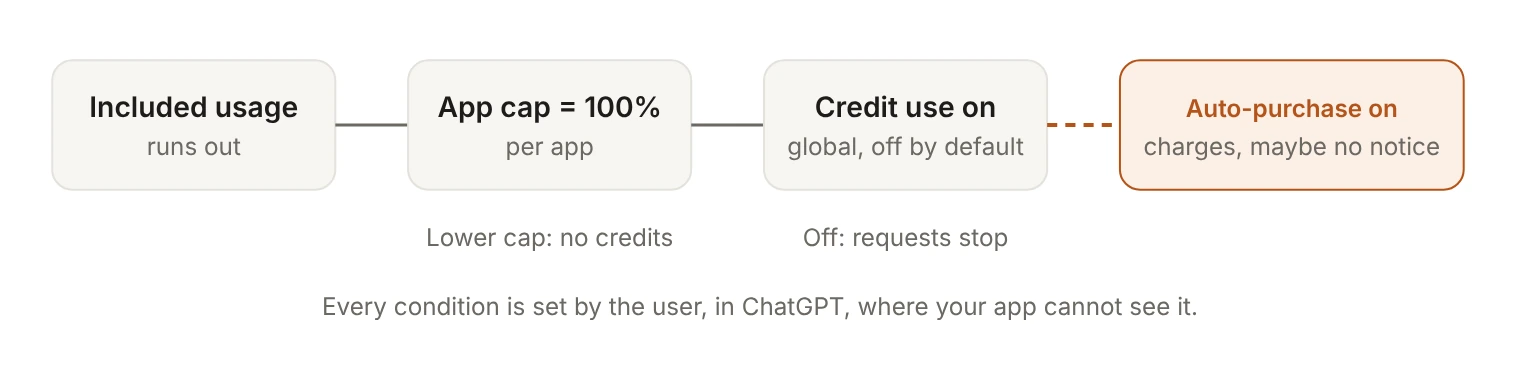
Chain those together and you have a path where your application's retry loop, running against a grant one engineer made on a personal Plus plan, triggers a card charge that nobody budgeted for and nobody was told about.
What to model before the button goes live
Six things, and none of them are in a quickstart.
- Treat plan usage as an attribute of the session, not of the account. Each issued
client_idis "bound to the authenticated user and the workspace selected during registration." Your tenant model has no say in it. Two engineers on the same customer account can be funded completely differently, and your usage reporting should say so. - Give every connection a health state you actively update. Since no disconnect notice exists, the only honest connection status is one derived from the last request outcome. Model
granted,capped_or_exhausted,not_eligible, andrevokedseparately, as in the table above. - Make your logout revoke the token. Call the revocation endpoint with the refresh token before clearing local state, so signing out of your product does what users already assume it does.
- Do not use the consent screen as a retry mechanism. OpenAI's guidance is to avoid forcing consent on routine sign-ins, to request the full scope set including
chatgpt.tokens.use.directwhen a user turns plan usage on, and to useforce_reconsent=trueonly after OpenAI confirms your deployment. A consent screen that keeps reappearing trains users to approve a spending grant without reading it. - Price the entitlement as a moving target. The denominator under your users' allowance is not fixed. On the same day OpenAI opened plan usage to Plus and Pro, it launched a $500 Pro plan at 25x Plus usage and announced that the $200 plan's included usage will drop from 20x Plus to 10x, with existing subscribers keeping their current limits through October 29.
- Check the host identity story if you run agents anywhere but a laptop. Clients send a stable
ext_agent_host_idper host, and one issuedclient_idcan be reused across hosts for the same user and workspace, sharing one set of plan usage settings and limits. OpenAI recommends deriving the ID from the host's public key as a JWK thumbprint URI, then adds: "A public-key-derived host ID is currently an identifier only. OpenAI does not verify possession of the private key as part of this flow." The host ID identifies; it does not authenticate.
The argument for taking it anyway
The strongest case against all of this is that it is a trial mechanic and nothing more. Users arrive with fuel, you convert them on the parts of your product OpenAI cannot turn off with a toggle, and the grant quietly stops mattering. If you are shipping a coding agent or an agentic CLI and currently paying API costs for every user who is only trying it out, the exact problem Devin's integration solves, that is close to free money. Refusing the button on governance grounds would cost you users your competitors are already winning.
The risk is not the first user. It is the twentieth, when plan-funded sessions are a material share of your inference, your support queue is full of 429s nobody can attribute, and a vendor repricing has just moved everyone's allowance. At that point the grant is load-bearing infrastructure that you never modeled and can only observe through its errors.
I would bet the pattern gets copied. Once one vendor shows that a subscription allowance can travel across sixteen other products, the shape is too cheap for a competitor to ignore, and every identity team ends up with a scope class whose cost is measured in dollars. We have spent two years moving consent decisions out of the user's hands and into an admin console for exactly this reason: an individual clicking allow is a poor place to decide what a company spends.
Draw-down scopes arrived going the other way. Build your connection model with that asymmetry in mind, and decide now, while it is still a trickle, whether a grant your users control, their employers cannot see, and you only observe through its errors is something your product should depend on or merely accept.