Securing the authorization flow
How WorkOS protects Pipes OAuth authorizations, and how to bind an authorization to the user's session.
A Pipes authorization flow begins with a URL that takes the user to the provider’s OAuth consent screen. That URL is tailored to a specific user and, optionally, an organization, but whoever opens that URL and signs in at the provider decides which provider account gets connected. If the URL ends up with someone else, their provider account could be connected to the user who started the authorization.
This guide only applies if you start authorizations from your own UI with the API. The Pipes widget manages the handoff for you. If you’re building your own UI, Pipes offers two ways to protect the authorization:
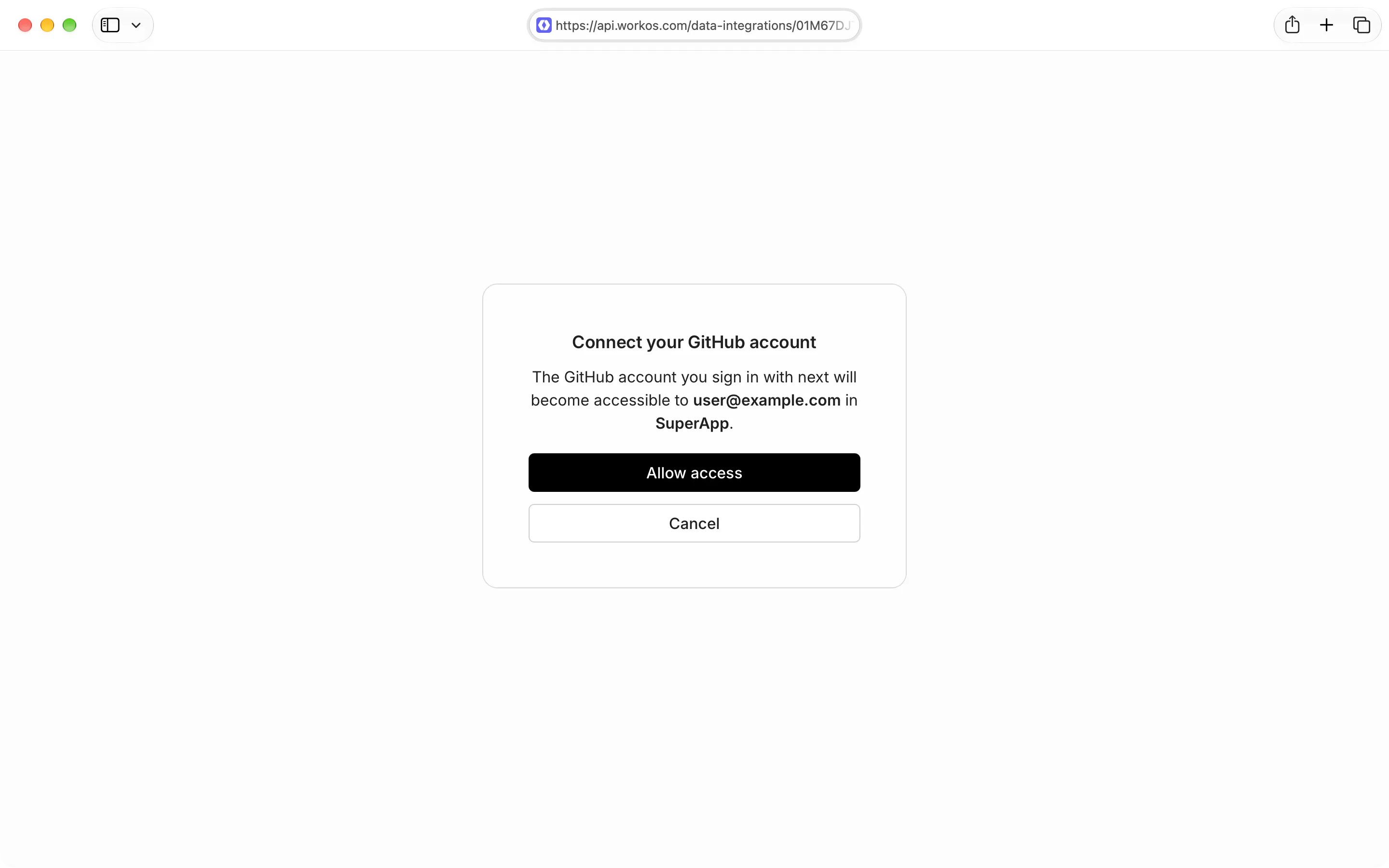
- The confirmation screen shows whose account the provider account will be connected to before the user reaches the provider. This is the default.
- Session binding lets your server send a
code_challengeand keep the matchingcode_verifierin the user’s session. Pipes only saves the connected account when your server finishes the authorization with that verifier. This uses the same verifier-and-challenge pattern as PKCE. It’s stronger than the confirmation screen and replaces it, so your users see one less screen.
When enabled, Pipes shows a confirmation screen before sending the user to the
provider. The screen says whose account the provider account is about to be
connected to: the user’s email address, your project, and the organization for
organization-owned providers. A user who was handed another user’s link can see
the mismatch and cancel. If they cancel, the provider is never contacted. When
the authorization included a return_to, Pipes redirects there with
error=access_denied; otherwise, Pipes renders its own canceled page.
Alternatively, you can send a code_challenge when you start the
authorization, and Pipes holds the result instead of saving it when the user
returns from the provider:
- Your server creates a random
code_verifier, keeps it in the user’s session, and sends a hash of it, thecode_challenge, to the authorize endpoint. - The user approves access at the provider. Pipes holds the result and sends
the user to your
return_toURL with a one-timeconnect_code. - Your server sends the
connect_codeand thecode_verifierto the finish endpoint, and Pipes saves the connected account.
The browser only ever sees the connect_code, and the code_verifier never
leaves your server. Neither one is enough to finish the authorization alone.
Unlike the confirmation screen, this protection doesn’t depend on the user
noticing that an authorization URL belongs to someone else. Authorizations that
send a code_challenge skip the confirmation screen: session binding replaces
it, so opting in means one less screen for the user.
Pipes only sends the connect_code to a return_to URL registered for an
application in the same environment. In the
Applications section
of the Dashboard, open your application and go to the Redirects tab.
return_tomust exactly match a registered redirect URI. A URI that only matches a wildcard entry is rejected.- Use HTTPS. HTTP is allowed only for loopback addresses such as
localhost, which match on any port. - Don’t include a query string or fragment. Pipes adds
connect_codeandstateas query parameters.
The examples show two route handlers from a hypothetical Express app, not a
complete application. They assume your sign-in and CSRF middleware already
protect the start route and your server-side session contains userId. Use a
secure, HTTP-only session cookie with SameSite=Lax, so the browser sends it
when the user returns from the provider. These excerpts keep one pending
authorization per session.
Generate a new verifier for each authorization: 32 random bytes, base64url
encoded. Hash it with sha256 and base64url encode the result. Send that
challenge with code_challenge_method: 'S256' and your registered return URL.
Before redirecting, check that Pipes returned completion: 'finish_required'
and a state value. Without that acknowledgment, Pipes could save the connected
account at the provider callback without waiting for your server’s proof. Store the
verifier and returned state in the user’s session before sending them to the
authorization URL.
Pipes returns the user to your registered URL with a connect_code or an
error. Before handling either result, compare the returned state with the
state in the user’s session. If it’s missing or doesn’t match, leave the
pending authorization alone: an unrelated request should not cancel an
authorization in progress.
Once state matches, clear the pending authorization. If the user canceled or
the provider refused access, redirect to your application’s error state.
Otherwise, finish immediately with the verifier from the session. Use an API
key for the same environment that started the authorization.
For the callback route:
- Redirect to an application URL that doesn’t contain
connect_code, even after an API or network failure. - Use
Cache-Control: no-storeto prevent caching of the callback response. - Use
Referrer-Policy: no-referrerto prevent the callback URL from being forwarded as a referrer. - Treat
connect_codeas sensitive information. Keep it out of application logs and analytics.
Pipes holds the result for about 90 seconds after the user returns from the
provider. After that, the connect_code no longer works and the user needs to
start over. On success, POST /data-integrations/finish returns the connected
account in the connected_account response field.
A held authorization finishes at most once. Treat every finish call as the only attempt:
- An incorrect
code_verifieruses up theconnect_code. Calling finish again with the right verifier fails. - A
connect_codethat’s already been used, has expired, or belongs to another environment fails withinvalid_connect_code. - Don’t retry a failed finish call, including after a network error. Check whether the user’s connected account exists, or start a new authorization.
Only act on a returned error when state matches the pending authorization
in the user’s session. If the error response has no matching state, the callback
uses the generic failure path and leaves the pending authorization alone.
| Code | Endpoint | Meaning |
|---|---|---|
connect_finish_unavailable |
authorize | Session-bound authorization isn’t available for your environment yet. |
return_to_requires_exact_match |
authorize | return_to only matches a wildcard redirect URI. Register the exact URL. |
invalid_return_to |
authorize | return_to is missing, doesn’t exactly match a registered redirect URI, isn’t HTTPS, or includes a query string or fragment. |
invalid_connect_code |
finish | The connect_code is unknown, expired, already used, or the verifier was wrong. |
All of these return a 400 status.
If the user approves access at the provider but the authorization is never finished, no connected account is saved in Pipes. The provider may still list your app in the user’s connected apps until the user removes it there.
Only store the code_verifier in the session of the user who started the
authorization. Don’t keep it anywhere another request could look it up, such as
a database table keyed by state. If any browser that returns with a matching
state can retrieve the verifier, another user’s browser can finish the
authorization, and the binding no longer protects anything.