How to evaluate an AI agent pilot with Airlock
Evaluate an AI agent pilot with a concrete email workflow. Test permissions and human approval, verify results, and measure time saved after review and rework.

An email agent that drafts faster but needs a person to review every send may simply move work into an approval queue. Letting every message through can expose confidential information to the wrong audience. A useful AI agent pilot shows which work the agent can finish under your policies and whether that actually saves your team time.
This guide turns Aaron Tainter's Agent Night demo into a practical evaluation: test routine sends, blocked content, and human approval, then compare the effort with doing the work manually. WorkOS Airlock evaluates agent calls against their intent and your policies. It is available in early access if you want to run this kind of pilot.
Choose one task you can check from start to finish
Use the first task from Aaron's demo: read the planning issues in Linear and email an update to the manager. Define a successful result before running it: the summary accurately reflects the issues, reaches the intended recipient, and excludes information your policy prohibits.
In the demo, WorkOS Pipes supplied the Gmail and Linear connections and managed their OAuth credentials. Airlock governed the calls using a token tied to the agent's declared intent; the provider credentials stayed behind the gateway.
For your pilot, use test accounts and controlled recipients. Route the calls through Airlock, enable policy enforcement and the required runtime checks, and choose who can approve an exception. Keep direct provider credentials out of the agent's environment so it cannot bypass that route.
Test three outcomes under the same email policy
Aaron allowed ordinary messages, prohibited financial information in outgoing email, and required IT admin approval for a distribution list the sender had not used before. Those rules give you three concrete pilot cases:
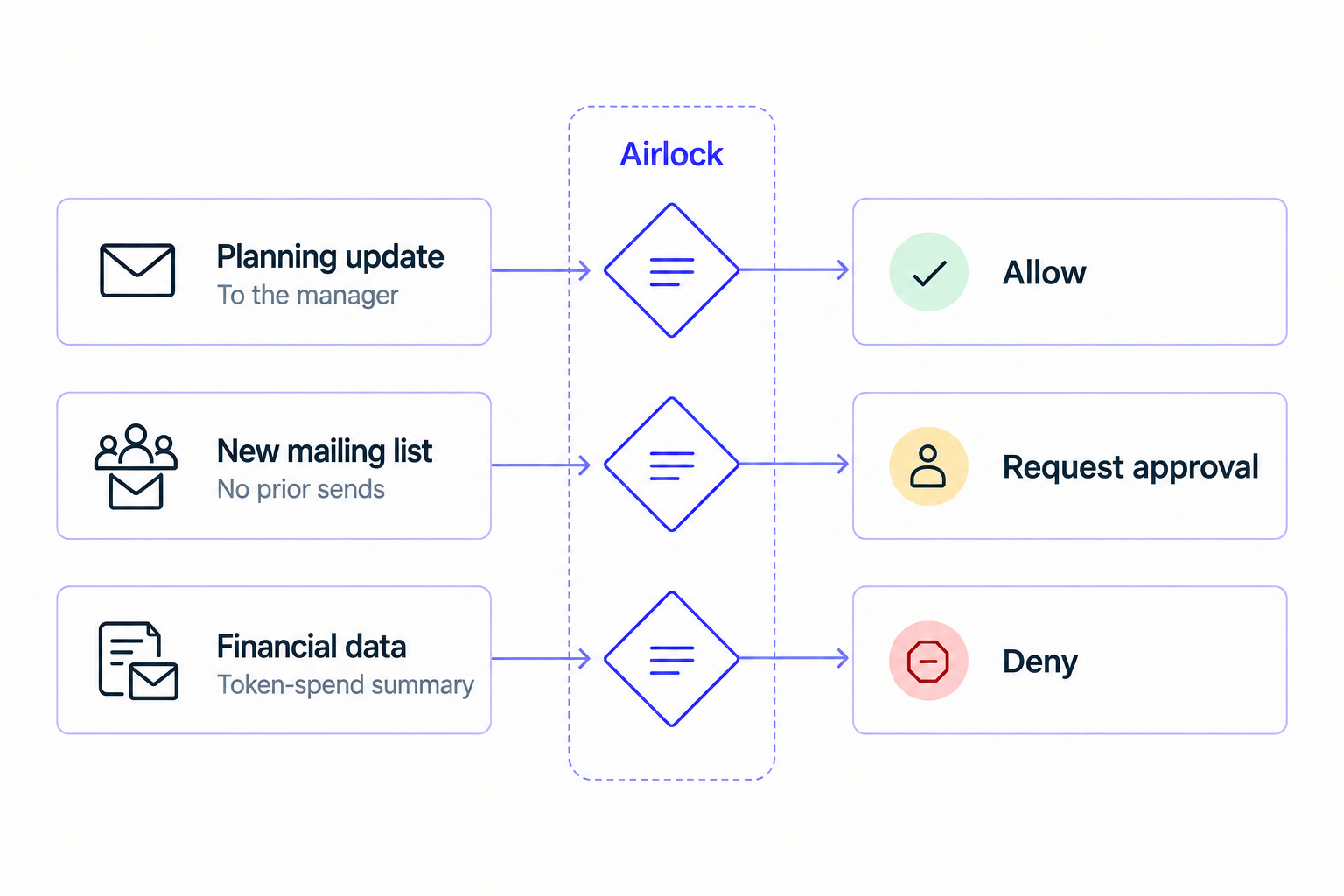
Routine work should finish. Send a clean planning update to the manager. Check that the agent retrieves the right issues and sends the intended summary without requiring someone to approve every step.
Prohibited content should stop. Keep the recipient and task the same, but include synthetic token-spend figures in the source material. If the agent attempts to send those figures, the email policy should block the call. If it omits them, record that separately: you have checked its drafting behavior, but have not yet exercised Airlock's denial.
A new audience should trigger review. Use a clean message and a test distribution list the mailbox has not used. Verify that the send waits for the configured approver. Aaron demonstrated this with a staff announcement approved in Slack; the email approval workflow guide explains how the client resumes the approved call.
Verify the result in Gmail
For each attempt, compare the proposed call, Airlock's decision, and the provider result. An allow decision establishes permission; it does not prove that Gmail sent the message. Check the sent-mail record and the controlled recipient's inbox.
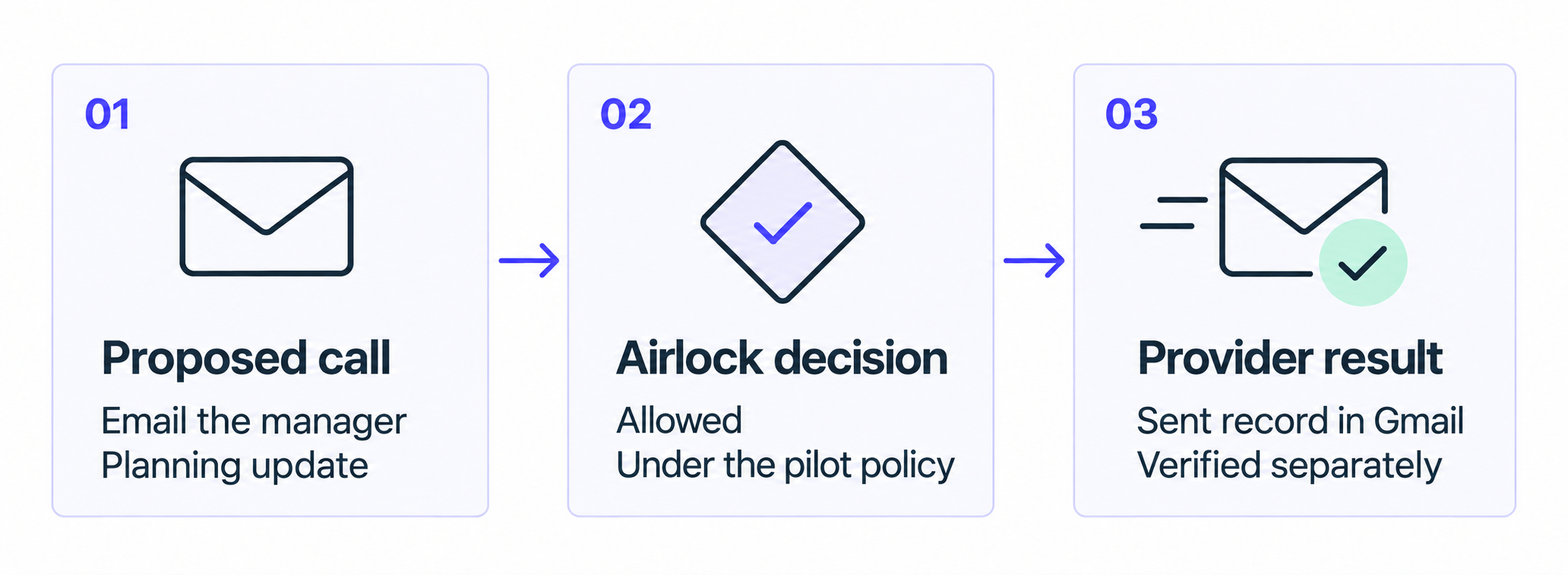
Record whether the task completed correctly and how much human time it took.
Check that nothing is sent while approval is pending or after rejection. On one run, approve the unchanged call and confirm the send. On a separate run, approve a call, change its recipient, and retry using that approval; the changed call must be refused. The agent policy-testing guide covers additional cases.
Use enforce mode for these tests. Monitor mode can record a would-be denial while forwarding the call, so a blocked verdict in a log does not establish that the email was stopped.
Measure AI agent time savings after review and rework
Time the same kind of work manually, then count all human effort in the pilot: reviewing messages, making approval decisions, correcting summaries, and recovering failed runs. Track elapsed completion time separately so a long approval wait remains visible even when it takes little active reviewer time.
For an illustrative example, suppose ten manual updates take eight minutes each. The agent's ten updates require twenty minutes of review and ten minutes of corrections:
Manual: 10 × 8 = 80 minutes
Reviews and fixes: 30 minutes
Time saved: 80 − 30 = 50 minutes
If setup takes another hour, the first batch consumes ninety human minutes and saves no time. Later batches can repay that setup cost if the same savings hold. Include model usage and service charges alongside labor when estimating AI agent ROI.
Decide what to expand
Repeat the cases with different messages and recipients. Expand this workflow when ordinary work finishes correctly, prohibited sends are stopped, required approvals hold the call, and the remaining human effort is worth the time saved. A high completion rate does not compensate for a prohibited email reaching its recipient.
If routine updates constantly need approval, inspect the policy and the evidence available to its checks. If summaries need heavy correction, improve the agent's task or source material. If the workflow passes, add another narrow task and evaluate it separately.
Request Airlock early access and bring one workflow you want to put through this test.