Assign roles to groups, not people, with WorkOS User Groups
Create a group in WorkOS, give it a role, and every current and future member inherits it. How group roles resolve in single-role and multiple-roles mode.

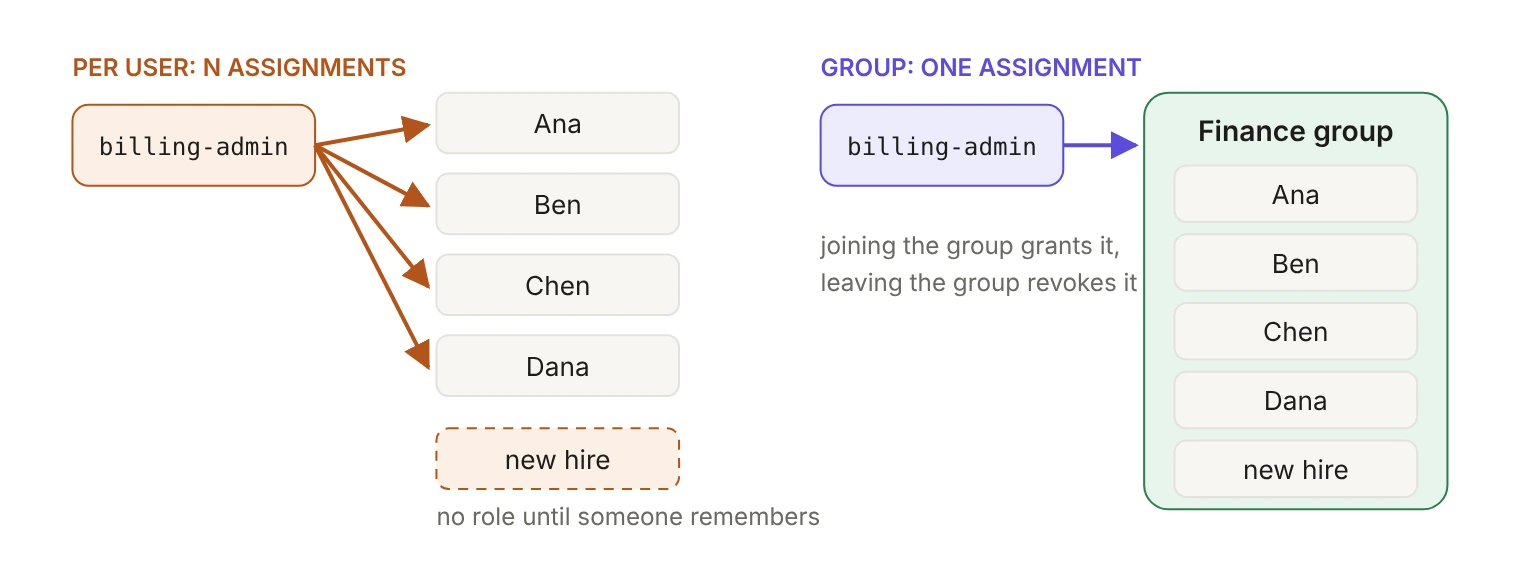
A group role assignment gives a role to a WorkOS group instead of to individual users: every current and future member of the group gets that role automatically, and loses it when they leave the group. You set it up once per group, in the WorkOS Dashboard or through the API, instead of once per person.
A customer's new finance hire shows up in your app, someone opens the user list, picks a role from a dropdown and moves on. Months later nobody can explain why two of those people can issue refunds and one can't. Per-user role assignment is the part of onboarding that drifts, because the system records the role but never the reason.
Groups move the decision up a level. Since August 26, 2026, every organization in the WorkOS Dashboard has a Groups tab where you create groups, add and remove members and delete groups, and assigning a role to a group gives every current and future member that role automatically. This post covers wiring that up through the Dashboard and the API, choosing between a WorkOS group and one synced from your customer's directory, and what a member's permissions resolve to in each role mode.
What is a WorkOS user group?
A group organizes organization memberships into a named collection inside a single organization, and a user can belong to zero or more groups. The unit is the membership, not the user: an organization membership is one user's access to one organization, and a group is a logical subset of those members. The object itself is thin: an id, an organization_id, a name, an optional description and timestamps.
These groups are native to WorkOS and managed by your application through the API or in the Dashboard. They aren't directory groups, which an external identity provider provisions over SCIM. Same word, different plumbing, and the distinction decides everything that follows.
Should you use a WorkOS group or a directory group?
Ask who owns the roster: your product, or your customer's IT team.
Directory Sync treats the customer's directory provider as the source of truth for their users and groups, and sends updates to your app as they change. A directory group is mapped from a group that already exists there. That's the right model when the customer's IT team maintains the roster and expects a change in their directory to show up in your app without a support ticket.
A WorkOS group is the right model when the grouping is a fact about your product rather than the customer's org chart: a beta cohort, an escalation rotation, the three people allowed near billing at a startup with no identity provider at all. Your app creates and edits these through the API, so group management can live in your own admin UI.
Mixing sources on one organization gets complicated quickly, so WorkOS recommends using only one role assignment source per organization. Directory group role assignments take precedence over SSO group role assignments, and SSO can't override a directory-provisioned role. Manual overrides don't stick either: directory provisioning reapplies its roles on the next sync, and SSO role changes take effect when the user next authenticates. If an organization's roles come from its directory, keep them there.
How do you create a group and give it a role?
In the Dashboard, groups and their members live on the organization's Groups tab. Open a group and its Roles tab is where you assign and remove the group's roles, one role at a time.
Through the API it's three calls. Create the group inside the organization:
Add a member by organization membership ID, not user ID:
Adding someone who's already in the group is a no-op: the API returns successfully without creating a duplicate, so a job that replays group membership doesn't need to diff first.
Then attach the role. Group role assignments live under the authorization API rather than the organizations path:
In the Python SDK, creating the group and assigning the role are one call each:
What comes back is a group_role_assignment: a gra_ ID, the group_id, the role slug and an optional resource, which stays empty for an organization-wide grant like this one.
If you sync a group's roles from somewhere else in your own system, use the declarative form: a PUT to the same role_assignments path sets the group's full list and removes any existing assignment that isn't in it, so running it twice is harmless. Deleting by criteria instead returns a 404 when there's no matching active assignment, which a cleanup job that runs twice needs to expect.
What role does a group member end up with?
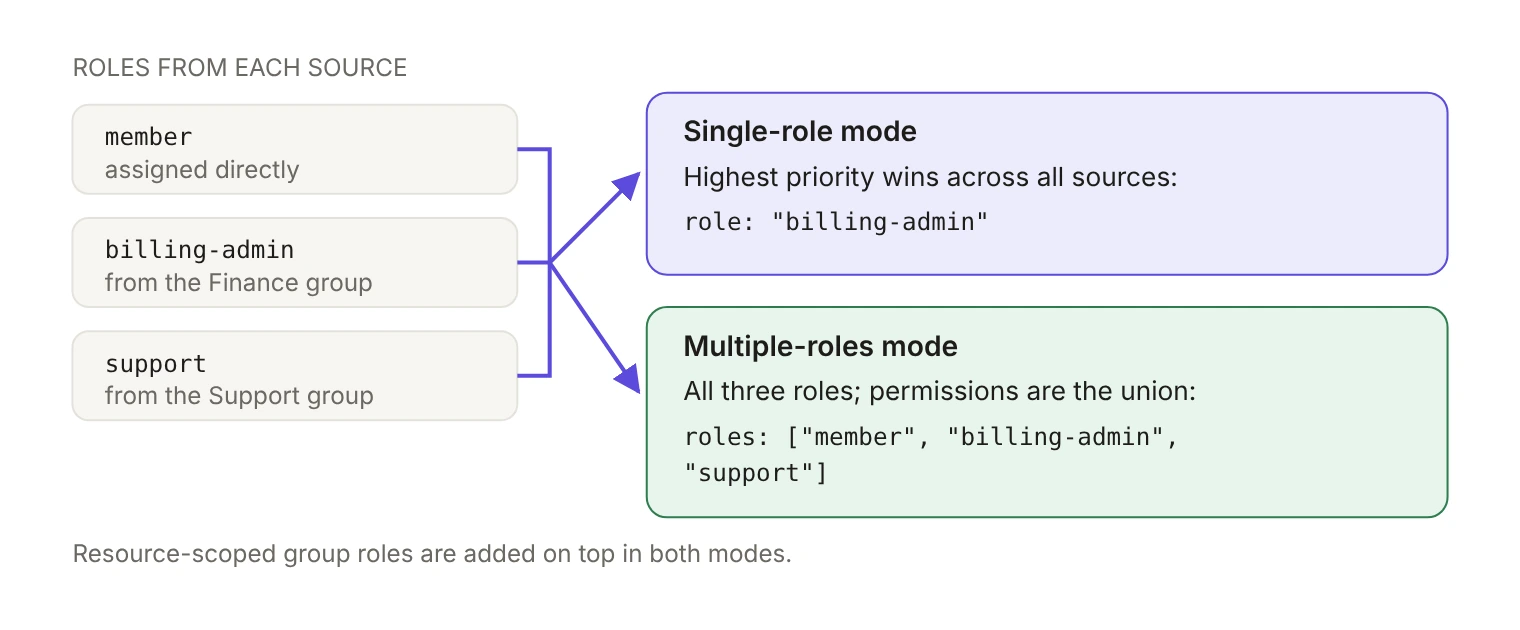
The same group role assignment produces two different answers, depending on one environment-level setting.
By default, an organization membership has exactly one role, and every user gets the default role when they're added to an organization. Each environment ships with a member role as that default; it can't be deleted, but you can make any role the default. Multiple roles is off unless you turn it on, and it applies to every organization in the environment.
That setting changes what a group role means:
- Single-role mode. The highest-priority role wins across all sources, direct and group. A group role only takes effect if it outranks what the member already has. Priority order also decides which role each member keeps if you ever move an environment from multiple roles back to a single role.
- Multiple-roles mode. Group roles add up. A member's effective permissions are the union of every role from direct assignment and group assignment. The session JWT carries a
rolesarray alongside the originalrolefield, and API responses return both for backward compatibility.
A group-sourced role isn't a second-class role. According to the group role assignment docs, it behaves the same as a directly assigned role: it appears in the session token and is enforced through standard RBAC.
The cost of the union is token size. Permission slugs are included in the session JWT claims inside a cookie, and many browsers cap cookies at 4KB. A member who collects roles from several groups, each with its own permission slugs, is how you find that ceiling, so keep slugs short. The WorkOS docs recommend starting with single-role relationships for simplicity and predictability, and turning on multiple roles when overlapping permission sets become common.
Can a group role apply to just one resource?
Yes. A group role assignment can target a specific resource, identified either by resource_id or by resource_type_slug plus your own resource_external_id. That's how you give a whole team a role on one workspace or project instead of across the organization:
The assignment object then carries the resource it points at:
Permissions propagate down to child resources through permission inheritance, the same as a directly assigned resource-scoped role. Worth remembering: resource-scoped roles are always additive, whether the environment runs in single-role or multiple-roles mode. Single-role mode limits the organization-wide role, not the resource grants layered on top of it.
When do group role changes take effect?
It depends on what changed:
- Assigning or removing a role on a group reconciles every member asynchronously, so there can be a short delay before the role lands on all members.
- Adding or removing an individual member reconciles that one member synchronously: their roles are updated before the response returns.
In practice, a UI that adds a user to a group and immediately re-reads their roles is safe. A migration script that attaches a role to a large group and immediately checks a member's permissions isn't. Group lifecycle changes emit group.* events, which you can see on the Dashboard events page or receive over webhooks, and per-member role changes show up on the organization membership.
What does removing a group or a member revoke?
- Removing a member from a group revokes the roles they got from that group's assignments. Roles from other sources, direct or another group, stay.
- Removing a role assignment from a group takes that role away from every member, and leaves roles from other sources intact.
- Deleting a group removes all of its role assignments and revokes those roles from every member.
- Deleting an organization membership removes its group memberships. Deleting a user removes all their memberships, and deleting an organization removes group memberships before the groups themselves.
One asymmetry to design around: in single-role mode, if the group role was the winning role and you remove it, the member falls back to the organization's default role, not to whatever they had before the group granted it. If your product treats the default role as meaningful access, revoking a group role is a bigger event than it looks.
How do you move an existing organization to group roles?
The documented example is deliberately simple: create a Finance group, add the finance team, assign billing-admin to the group, and from then on joining the group grants the role and leaving it revokes it. The value isn't the clicks it saves. The group is a statement of intent a reviewer can read six months later, where a dropdown choice on a user's detail page isn't.
Adopting this on a live organization takes one extra pass. Group assignments and direct assignments are separate sources, and removing one leaves the other in place, so the roles you already set per user stay exactly where they are until you clean them up.
The decision to make before any of that is narrow: for each organization, which system owns the roster? If it's the customer's directory, map directory groups to roles and leave WorkOS groups out of it. If it's your product, create the group in WorkOS, assign the role to the group, and stop assigning that role to individuals.