Which test email domains pass AuthKit's deliverability check?
AuthKit rejects sign-ups and invitations at domains that can't receive mail. The reserved test domains that keep seeded environments and CI suites green.

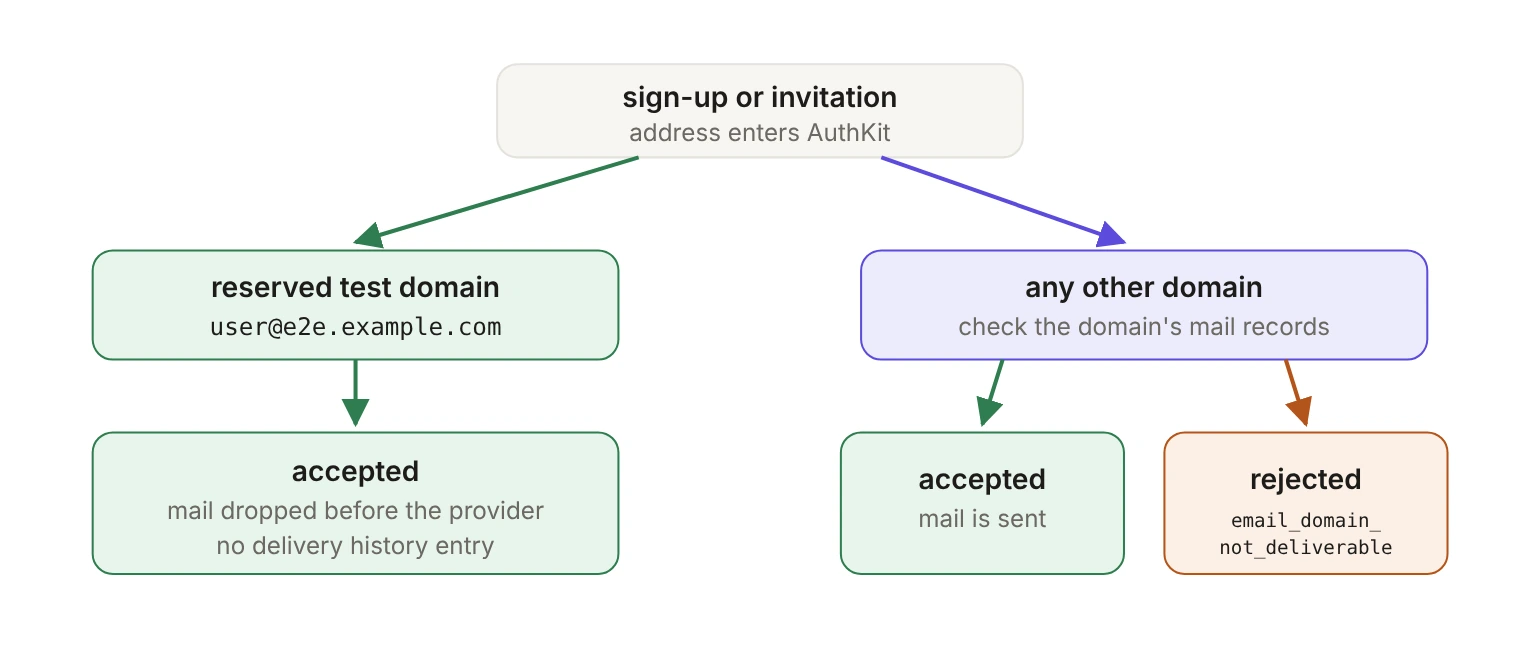
AuthKit's email deliverability check rejects sign-ups and invitations for addresses whose domain can't receive mail. Test addresses on the reserved domains example.com, example.net and example.org (and their subdomains), or on any domain ending in .test, pass the check, and WorkOS silently drops the mail sent to them. Any other invented domain, such as acme-test.io, gets rejected.
Your end-to-end suite signs up a user at qa-user@acme-test.io through AuthKit, waits for a session and asserts on the dashboard. That domain was never real, and it never mattered, because nothing checked. Since August 17, 2026, AuthKit checks: sign-ups and invitations for addresses whose domain can't receive mail are rejected at the point of entry.
The check is good for your bounce rate and inconvenient for anything that invented a domain. There's a carve-out for test addresses, and it's narrower and quieter than most people assume.
What does AuthKit's deliverability check look at?
The domain, not the mailbox. Before accepting the address, WorkOS checks whether its domain can receive mail at all: whether it has mail servers, or the address records mail falls back to when it doesn't, and whether it explicitly declares that it accepts no mail. There's no attempt to contact the mail server and ask about the specific mailbox.
That means a registered domain with working mail servers passes, even if it's a typo of a real company's domain. Verification email is still the only proof that a specific mailbox exists, and it works exactly as before. The check also doesn't screen out disposable email providers; that's what Radar's Domain protections setting is for.
This tells you which fake addresses survive. qa-user@acme-test.io fails because nobody registered acme-test.io. qa-user@example.com passes, for reasons that have nothing to do with the mailbox.
The check runs where an address first enters AuthKit: hosted sign-up (password, passkey or Magic Auth), and sending or resending an invitation from the API, the Dashboard or Widgets. It doesn't apply to users you create directly with the Create User API, so a suite that only seeds through that endpoint won't see rejections, but the moment it invites one of those users, it will.
Which test domains are exempt?
WorkOS reserves the example domains from RFC 2606 and the special-use .test top-level domain from RFC 6761 for test users. The email docs list three shapes of address:
example.com,example.netandexample.org- any subdomain of those, such as
e2e.example.com - any domain ending in
.test, such asmyapp.test
Build your fixtures on that documented list. Addresses on these domains pass the deliverability check, so Magic Auth, invitations and AuthKit sign-up keep working with them, and any mail sent to them is accepted by the API and silently dropped before it reaches the email provider.
The carve-out is safe because it's narrow: these domains can never be registered or gain mail servers, so mail to them could only ever bounce. RFC 6761 makes it a requirement on registrars, which must not grant requests to register test names to any person or entity. Nobody will ever buy example.net and start receiving your CI traffic.
One helper usually keeps a suite inside the carve-out:
One thing that's not free: dropped mail still counts as a send. WorkOS applies its sending limits before it drops the message, so a suite that fires thousands of invitations in a burst can hit rate limits even though nothing is delivered. Space out bulk seeding the way you would with real addresses.
And one pass over your fixtures tells you how much work you're in for:
Which near-miss domains get rejected?
The exemption is a literal list, not a pattern that means "looks like a test address." Lookalike domains such as notexample.com are treated like any other domain.
Plus addressing works independently of all this. AuthKit treats the root address and each plus alias as separate users, so user+signup-01@example.com is a distinct user on an exempt domain.
Why doesn't a test address show up in delivery history?
Because the mail never existed as far as the provider is concerned. For a reserved test address, the API call succeeds as if the email were sent, and no entry appears in the delivery history. Not a failed entry. No entry.
Delivery history is otherwise available in every environment, including sandbox, and lists everything sent to a user's address over the last 30 days under Users → [User] → Emails in the Dashboard. So the empty tab is confusing if you don't know the rule: the user exists, the flow returned success, and there's nothing there. The email docs' troubleshooting steps only send you to support once you've confirmed the address isn't on a reserved test domain, so check that first.
Your email setup doesn't change this. On the WorkOS email domain, a custom email domain or a custom email provider, the message is dropped before WorkOS picks a provider, so a reserved address looks identical on all three. (If you send emails yourself from WorkOS events, WorkOS sends nothing anyway.)
Two consequences for test design:
- Don't assert on delivery history for test users. A test that waits for a Submitted entry at
user@example.comwaits forever. If you need to prove a send happened, do it against a real domain you control, in a separate suite. - Don't try to read the mail. There's no inbox. Anything your suite needs from a verification or invitation email has to come from the API or an event, not from a message that was dropped before it left WorkOS.
How should your app handle a rejected domain?
The rejection comes back as a 400 with the error code email_domain_not_deliverable, on both sign-up and invitations. AuthKit's hosted sign-up page already shows the user a message. In your own code, the two paths have different people on the other end and deserve different handling.
- Sign-up is the easy one. A real person typed the address, is looking at the form and can fix it in three seconds, so show the rejection inline on the email field. What you're replacing is worse than an error message: before, that user sat on a "check your inbox" screen waiting for mail that was never going to arrive, while the send bounced and hurt your reputation.
- Invitations are where teams get sloppy. An admin pastes twelve addresses into your bulk invite form, and one of them is
jordan@acme.con. If your handler treats any non-2xx from the invitation call as a server error, the admin sees a generic failure and has no idea which address caused it. Treatemail_domain_not_deliverableas a per-address validation result: name the address, name the domain and send the other eleven invitations.
Be precise with the copy in both places. "Invalid email address" is wrong and will get argued with, because the address is syntactically fine. The accurate message is that the domain can't receive mail, so show the domain back to the user; that's where the typo is.
What should you change this week?
Search your seeds and fixtures for invented domains and move them to example.com or .test. Check whether any staging environment seeds users at a domain somebody made up in 2021. Then look at your invitation handler and decide what an admin sees when one address in a batch is rejected.
Today a made-up seed domain is a find-and-replace. Left alone, it's a red CI pipeline on a Friday, or a bulk invite that fails as one opaque error in front of a customer's admin. The reserved domains exist so you never have to invent one.
The full rules are in the email delivery docs, and if bounces are already affecting you, the email deliverability troubleshooting guide picks up from there.