One customer needs a role nobody else has: organization-scoped custom roles
Environment roles apply to every organization. A custom role belongs to one, so you can give a customer the role they asked for without touching the rest.

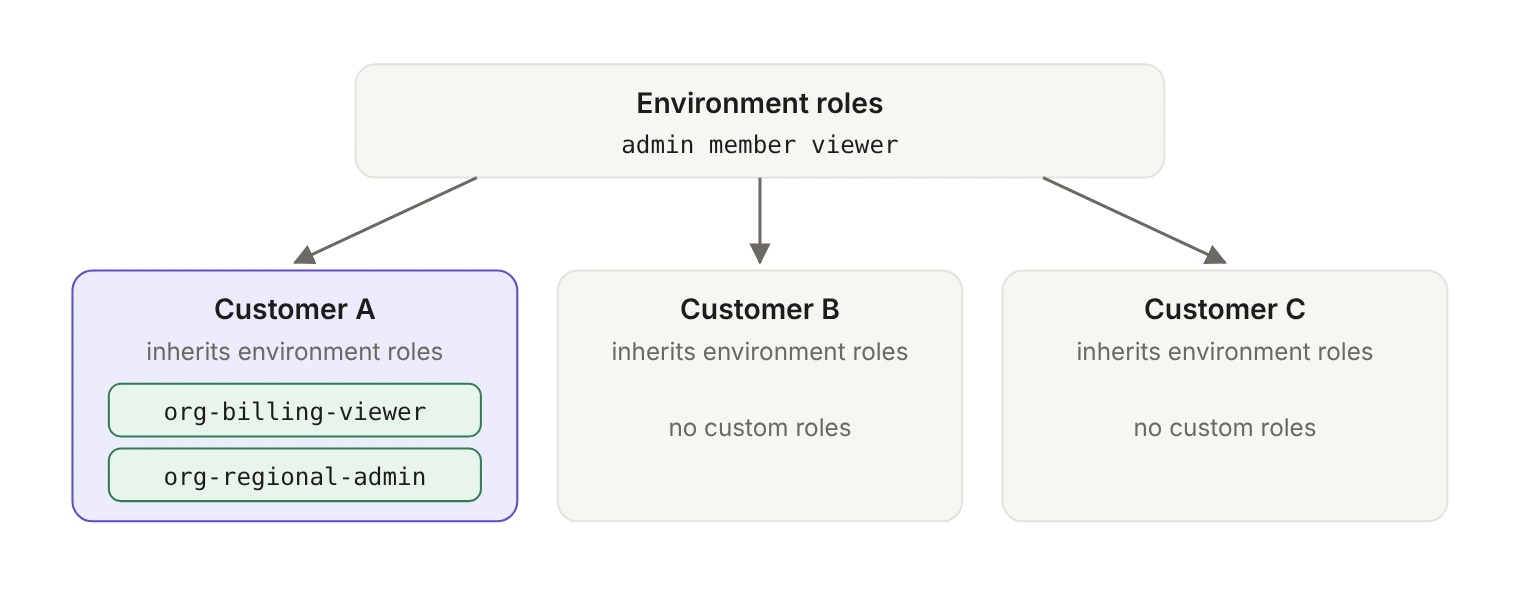
An organization-scoped custom role is a role defined at the level of a single organization, alongside the environment roles that apply across all of them. It lets you create a role with one organization's set of permissions without affecting access control for other organizations. Organizations start with no custom roles and inherit your environment roles.
Picture the request in an enterprise deal. The customer's IT lead explains that their org chart has a "Billing viewer" who reads invoices but can't change them, and a "Regional admin" who runs one geography. Your app has Admin, Member and Viewer. You could add two environment roles, but then every other tenant's role picker grows two options nobody asked for, and your support queue grows with it.
What is the difference between an environment role and an organization role?
Role configuration starts at the environment level. Every environment is seeded with a default member role that's automatically assigned to every organization member. That role can't be deleted, though any role can be set as the default. Environment roles apply across all organizations in the environment, and until you do something about it, an organization has no roles of its own and inherits them.
A custom role is the organization-level counterpart. You manage it on the Roles tab under an organization in the WorkOS Dashboard, or through the Custom Roles API. Everything downstream behaves the way roles already behave in your app: a custom role can be assigned to organization memberships, directory users and SSO profiles, and it works whether you integrate with AuthKit, SSO or Directory Sync. WorkOS shipped per-organization roles in December 2024, and they slot into the role assignment paths you already use.
The two kinds are easy to tell apart in a response body. Environment roles come back with "type": "EnvironmentRole" and custom roles with "type": "OrganizationRole". Their slug namespaces differ too: environment role slugs are unique within an environment, custom role slugs are unique within an organization.
How do you create one?
In the Dashboard, open the organization, go to its Roles tab and create the role there. The slug field is pre-filled from the name as you type, and you can edit it before you submit.
Through the API, a custom role is a POST to /authorization/organizations/:organizationId/roles. The endpoint requires only name, plus optional slug, description and resource_type_slug. Here's the Node SDK version:
The response confirms the scope with "type": "OrganizationRole". A new role has no permissions yet, because permissions are a separate request. setOrganizationRolePermissions replaces every permission on the role, so treat it as a declarative list rather than an append, and pass an empty array if you want to strip the role back to nothing:
Programmatic management of both environment and organization roles arrived with the Authorization API in February 2026, along with lifecycle events for organization roles and permissions so your own systems can stay in sync.
One sizing note while you design permissions: a user's permissions are included in their access token, so a per-customer role with a long list of fine-grained permissions makes every token for those users bigger. Group permissions at the level your code actually checks.
Why does the slug deserve a minute of thought?
Slugs are where the surprises live, mostly because they're permanent. A role slug can't be changed after creation, so the identifier you pick in a hurry during a customer call is the one your code reads a year later.
The rules, in roughly the order they trip people up:
- Every custom role has a slug, unique within its organization. Slugs may only contain lowercase letters, numbers, hyphens and underscores, and may not have leading, trailing or consecutive separators.
- When you create a role through the API,
slugis optional. If you supply one, it must begin with theorg-prefix, for exampleorg-billing-admin. That prefix distinguishes an organization-scoped role from an environment-level role. A slug that's already used by an environment role is rejected with a409. - If you omit
slug, the API generates one by combining a normalized form of the role's name with a 6-character suffix derived from the role's ID, so a role namedBilling Admingets something likebilling-admin-a1b2c3. The suffix keeps slugs unique when two roles share a name, and generated slugs don't carry theorg-prefix. - Normalization lowercases the name, turns whitespace into hyphens, drops anything outside
[a-z0-9_-]and collapses repeated separators, truncating the name portion if needed to stay inside the maximum slug length.
The practical rule: if your application code will ever branch on this role, supply the slug yourself. org-billing-viewer is a string you can grep for. billing-viewer-7f2a19 is a string you paste into a constants file and then misremember.
What changes when an organization gets its first custom role?
This is the mechanic that catches teams off guard, because it changes configuration nobody touched.
Once you create the first role for an organization, that organization gets its own default role and its own priority order, independent from the environment. Both start as copies of the environment's: the organization's default is the same role as the environment default, and its priority order matches. From then on they're the organization's own settings, managed on its Roles tab in the Dashboard, and changes to the environment's default or order no longer flow into it.
Two consequences follow:
- New environment roles land at the bottom. A role you add to the environment later becomes available to the organization and is placed at the bottom of that organization's priority order. Priority order resolves conflicts when a user belongs to multiple mapped identity provider groups, with the highest-priority role winning. It also decides which role a user keeps if you migrate the environment from multiple roles back to a single role. A high-privilege role sitting at the bottom of one customer's order will quietly lose those conflicts.
- The organization's default is now its own. If you later change the environment's default role, organizations that already have custom roles keep theirs. Open the organization's Roles tab when you need to change it.
Check both on the organization's Roles tab after you create its first custom role.
What happens when you delete a role someone is using?
Deleting an environment role that's the default for one or more organizations prompts you to choose a new default role for every affected organization. Members who held the deleted role are then assigned the new organization default. It's a reasonable prompt, and it's also the moment you learn how many customers depended on a role you considered disposable.
Custom roles are stricter. A custom role has to be free of active assignments and identity provider group role mappings before it can be deleted. If it still has assignments you get a 409 Conflict with code role_has_assignments; if it still has group role mappings you get a 409 Conflict with code role_has_group_role_mappings. Reassign the members first, then delete.
If you only need to rename a role, you don't have to delete anything. PATCH /authorization/organizations/:organizationId/roles/:slug updates a custom role's name and description. The slug stays put, which is the point.
Where do custom roles show up in the rest of your app?
Nowhere new, which is the useful part. Custom roles work in role assignment, in sessions and in the organization membership API with no extra wiring after you create them.
Listing roles for an organization returns environment roles and custom roles together, in priority order:
That single list is what you render in your own role picker for a given tenant. If you assign roles through WorkOS groups rather than one membership at a time, the same slugs apply: see assigning roles to groups instead of people. If you're still deciding how organizations map to your customers in the first place, start with modeling multi-tenant B2B apps with WorkOS organizations.
Environment role or organization role?
Where should you start?
The temptation with a feature like this is to reorganize your whole role model around it. Resist that. The environment roles you already have are the ones most of your tenants will keep using, and they inherit them for free.
Create a custom role when one customer's org chart doesn't fit, supply the slug yourself so your code has something stable to check, then open that organization's Roles tab and look at its default role and priority order before you call the work done. The role is the easy part. The configuration it forks is the part most teams forget to check.