SSO just-in-time provisioning: How to match a login to an existing user safely
Just-in-time provisioning is a resolution order in your SSO callback. Here is the order, the condition that makes the email match safe, and what to store.

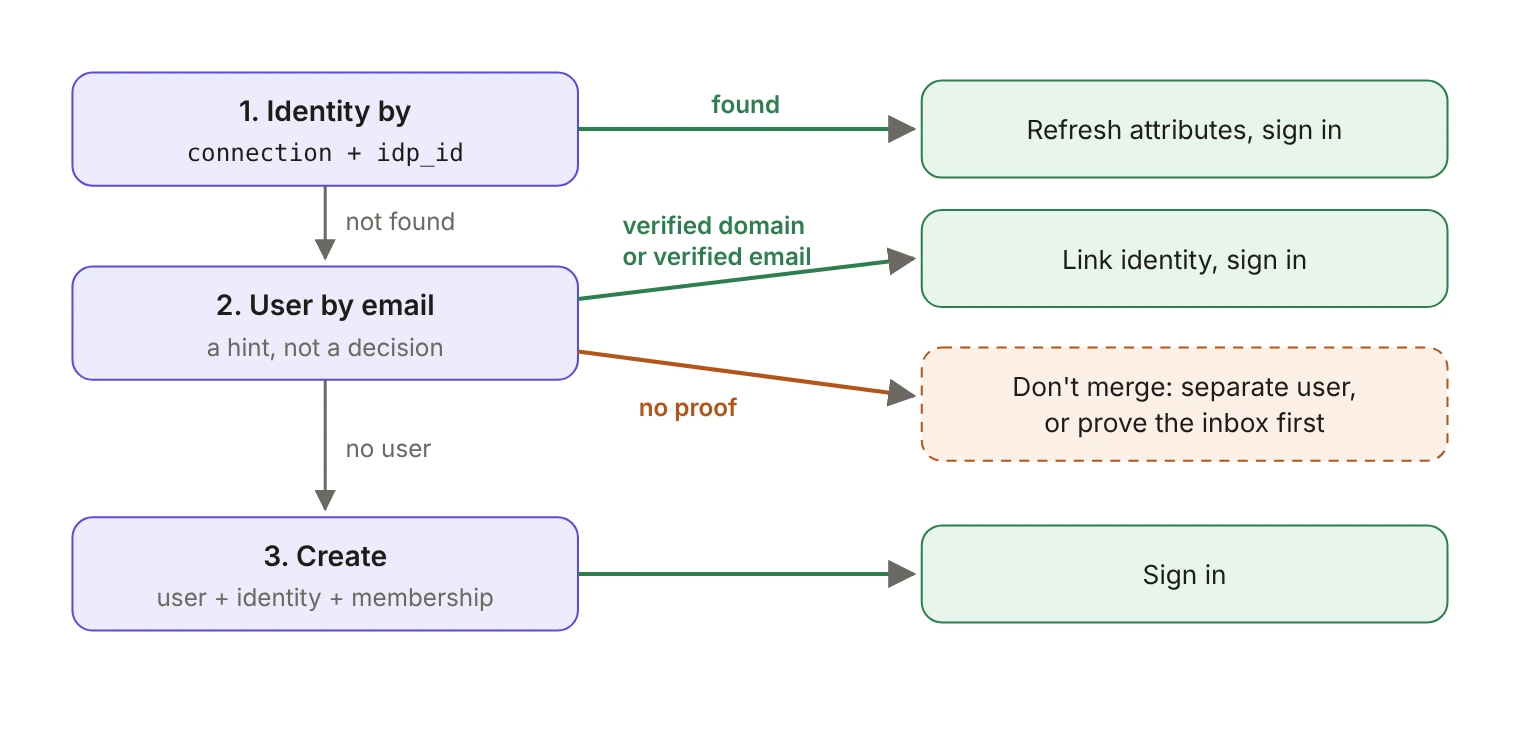
Just-in-time provisioning creates a user account in your app the first time someone signs in through SSO. In your code it's a resolution order inside the SSO callback: match the identity you've already seen, otherwise consider linking to a user you already have, otherwise create a new one. Step two is the one that decides who owns an account, so it's the one that needs a condition on it.
This guide walks through that order as code, for an app handling the SSO callback itself with the standalone WorkOS SSO API.
What does the SSO profile give you to match on?
When the user comes back from the identity provider, you exchange the code for an SSO Profile. The object carries id, organization_id, connection_id, connection_type, idp_id, email, name fields, role, roles, groups and custom_attributes. (The Node SDK returns the same fields in camelCase: idpId, connectionId and so on.)
Two of those fields are strictly required on every profile: idp_id, the user's unique identifier assigned by the identity provider, and email. Different identity providers use different ID formats, so treat idp_id as an opaque string. Name fields are configurable per environment and can be absent.
The other field that matters for matching is organization_id, which tells you which of your customers this login belongs to. WorkOS ensures the profile is unique per SSO connection via the idp_id, and you can use either connection_id or organization_id to tie the identity to a team account.
Which lookup runs first?
The identity lookup. If you've seen this exact identity before, nothing else needs deciding: find an identity with the profile id or idp_id and log in the corresponding user.
An identity here is the collection of attributes that belong to the person in the identity provider, including at least one unique identifier and profile attributes such as name and email. Model it as its own row rather than a column on your users table, because one person can hold several: a password login, a social login, and an SSO identity at each customer they work with.
This branch should run on nearly every sign-in after the first. Refresh the mutable attributes from the profile while you're here, such as names, roles and groups, then sign the user in.
When is an email match safe?
Only when something other than the identity provider's say-so backs the address up.
Use the email to find an existing user, but link that user to the incoming identity only if the organization that owns the connection has verified that email's domain. A verified domain means the organization has proven it controls the domain, which is what makes the address evidence rather than a claim. Domains added to a WorkOS organization have to be verified before SSO activates, either in the Dashboard, by the IT contact through the self-serve Admin Portal flow, or through DNS verification. The other acceptable form of proof is an identity provider that asserts the address is verified and is authoritative for that domain, which is the condition our write-up of the 2026 auto-linking CVEs lands on.
If neither holds, don't merge. Create a separate user, or park the sign-in and ask the person to prove they own the inbox before you attach the new identity to the existing account.
Scope the email lookup deliberately. Your users table almost certainly has a unique index on email, which makes findUserByEmail a global query across every customer you have. The record it returns may belong to an organization that has nothing to do with the connection this profile arrived on. Decide which of those two things you mean, and write the query that says so.
Why does the email step need a condition?
Because many identity providers let an IT contact create a user account with any email address, whether or not they control that address or its domain. The WorkOS SSO domains documentation puts the attack plainly:
WorkOS blocks the simplest version of this for you. By default it checks the profile's email domain against the organization's domains during authentication, and sends a non-matching user back to your redirect URI with a profile_not_allowed_outside_organization error. Treat that as a first line of defense, not as the check itself: your callback should still make its own linking decision, so that it stays correct however the connection is configured.
The same bug outside SSO has produced a steady run of account takeovers. Three CVEs published in 2026, in three different open source auth libraries, all come down to attaching an incoming sign-in to an existing account because the email addresses matched. OpenID Connect says the quiet part directly: claims such as email, phone_number, preferred_username and name must not be used as unique identifiers for the end user. We pulled those three apart in Three OAuth account takeovers, one bug, and the shape of the failure is identical here.
Which identifier should you store?
Store the persistent one on the identity row: idp_id, which WorkOS guarantees unique per SSO connection. The WorkOS JIT guide makes the same point about linking: use a linking field such as email to find the current user, then link the identity to that account via a persistent identifier in case of an email change later.
The failure mode when you skip this is quiet. A user changes their surname and their work address in the identity provider, then signs in again. If your identity row is keyed on email, the first lookup misses, the email lookup misses, and you hand them a duplicate account with an empty workspace. If it's keyed on idp_id scoped to the connection, the first lookup hits and the only thing that changes is the email you store alongside it.
Key the row on the pair, not on idp_id alone. Identity provider identifiers are only unique within the system that issued them, so two customers can hand you the same value.
What does the callback look like end to end?
Three details there are worth saying out loud. org.verifiedDomains has to be kept in sync with the organization's domains in WorkOS rather than maintained by hand, or the check drifts into decoration. requireInboxProof has to be a real branch, not a log line, because a check that can't stop the flow isn't a check. And linkIdentity writes only the identity row: linking isn't the moment to overwrite the stored email, roles or recovery settings on an account that already exists.
Does AuthKit do the same thing?
It runs the same kind of order with the same condition, which is the useful comparison if you're deciding whether to keep this code yourself.
When AuthKit resolves which user an incoming SSO profile belongs to, it checks for an existing link first, then for a match on a verified email address, and creates a new user if nothing matches.
The verified-domain condition is in there too. When a domain is verified and an SSO connection is configured, users signing in through that organization's IdP are automatically considered email verified if the domain matches, and users on a domain that isn't verified go through email verification before their SSO credential is linked. WorkOS attaches a new credential to an existing user only when it can verify the user has access to that inbox, and doesn't complete the authentication flow when an identity can't be safely linked. Guests on an unverified domain are the explicit exception: they must be invited to the organization before they can sign in through its IdP.
So the order isn't the differentiator. What you're choosing between is maintaining the branch above yourself, with the inbox-proof flow and the duplicate handling that hang off it, or getting that same resolution as a default.
What should you check in your own callback?
Pull up the function that handles your redirect URI and read the first two lookups. Does the identity lookup use idp_id scoped to the connection, or does it fall back to email? And does the email branch have a condition on it, or does a bare match cause a link?
The second question is the one the 2026 CVEs turned on. The decision is usually ten lines long, which is exactly why it's easy to get wrong.