What is a brute force attack?
Learn how brute force attacks work, the different types attackers use, and how to protect your app and users from them.
.webp)
A brute force attack is one of the oldest and most straightforward methods in a hacker's toolkit. Rather than exploiting a clever vulnerability, it relies on sheer persistence: trying as many username and password combinations as possible until one works. Despite being unsophisticated by design, brute force attacks remain highly effective against weak credentials and systems with no rate limiting.
In this article, you'll learn:
- What a brute force attack is and how it works
- The different types of brute force attacks
- Real-world examples and why they're still dangerous
- How to protect your application against them
- How WorkOS can help
Let's start with the basics.
What is a brute force attack?
A brute force attack is a trial-and-error method used by attackers to gain unauthorized access to accounts, systems, or encrypted data. The attacker systematically submits credentials, often using automated tools, until they find a combination that grants access.
The attack is called "brute force" because it requires no finesse. Instead of exploiting a specific flaw in the application's logic, the attacker relies on volume. Modern computers can attempt billions of combinations per second, making weak passwords easy to crack even without any insider knowledge.
Brute force attacks can target:
- Login forms for web apps or admin panels
- SSH and RDP services
- API endpoints with authentication
- Encrypted files or password hashes
How does a brute force attack work?
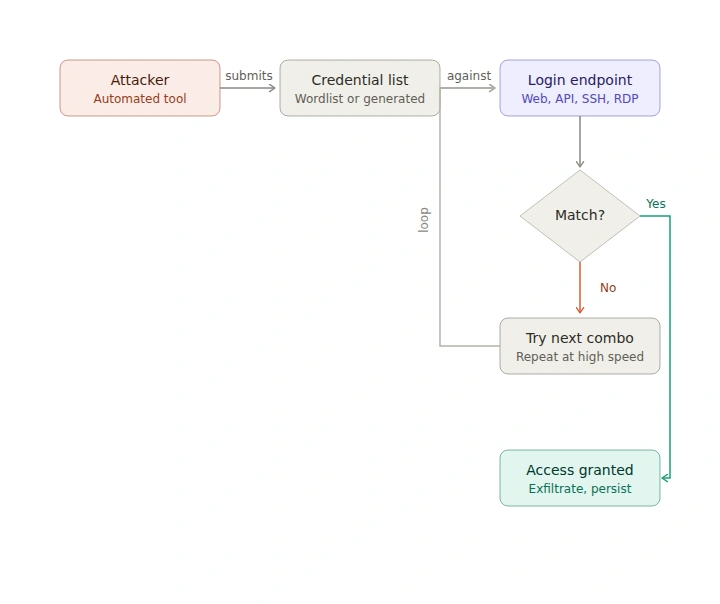
The mechanics are simple. An attacker, usually with the help of automated software, submits repeated login attempts against a target. Each attempt uses a different credential combination. The attack continues until either access is granted or the attacker gives up.
A typical attack flow looks like this:
- The attacker identifies a login endpoint on the target application.
- They use a tool (such as Hydra, Burp Suite Intruder, or a custom script) to automate credential submissions at high speed.
- The tool cycles through a list of usernames, a list of passwords, or both.
- If a combination succeeds, the attacker gains access and typically moves quickly to exfiltrate data, escalate privileges, or establish persistence.
- If the application has no lockout or rate limiting, the attacker can continue indefinitely without detection.
The speed and scale of these attacks is what makes them dangerous. Without protections in place, a determined attacker can run through hundreds of thousands of combinations in minutes.
Types of brute force attacks
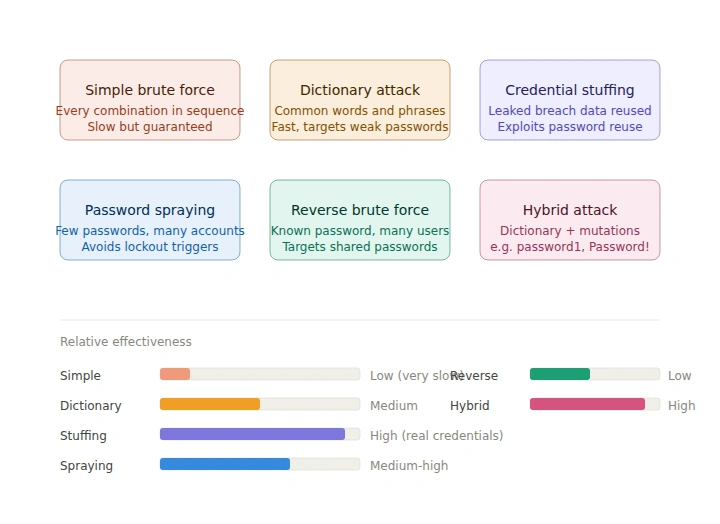
Not all brute force attacks are created equal. Attackers use different strategies depending on what they know about the target.
Simple brute force
The most basic form. The attacker tries every possible character combination in sequence, starting from short strings and working up. This is computationally expensive but guaranteed to eventually find the answer. It works best against short or simple passwords.
Dictionary attack
Instead of generating every possible combination, the attacker uses a pre-compiled list of common words, phrases, and known passwords. These lists (often called "wordlists") can contain millions of entries sourced from previous data breaches. Dictionary attacks are far faster than simple brute force and are effective against passwords based on real words.
Credential stuffing
Attackers take username and password pairs leaked from previous data breaches and try them against other services. This works because many people reuse passwords across multiple accounts. If a user's credentials were leaked from one platform, their accounts elsewhere may also be at risk.
Password spraying
Rather than targeting one account with many passwords, the attacker tries a small number of very common passwords (like Password1 or Welcome123) across a large number of accounts. This approach avoids triggering lockouts on individual accounts while still achieving a high success rate across a user base.
Reverse brute force
The attacker starts with a known password and tries it against many different usernames. This is less common but useful when an attacker has obtained a password from one breach and wants to find accounts using it elsewhere.
Hybrid attack
A combination of dictionary and simple brute force. The attacker starts with a wordlist and then appends or prepends common variations, such as numbers or symbols. For example, password might be tried as password1, password!, Password1, and so on.
Why brute force attacks are still effective
Despite being decades old, brute force attacks continue to succeed for several reasons.
- Weak passwords are still widespread. Surveys consistently show that passwords like
123456,password, andqwertyremain among the most commonly used. These are trivially easy to crack. - Password reuse is common. When credentials from one breach are used elsewhere, credential stuffing becomes highly effective. Attackers routinely cross-reference leaked databases.
- Many systems lack basic protections. Without rate limiting, account lockout policies, or anomaly detection, login endpoints are open to unlimited attempts. This is especially common in older or internally developed applications.
- Automation makes attacks cheap. Tools for running brute force attacks are freely available, highly configurable, and capable of running at massive scale. The barrier to entry for an attacker is low.
How to protect against brute force attacks
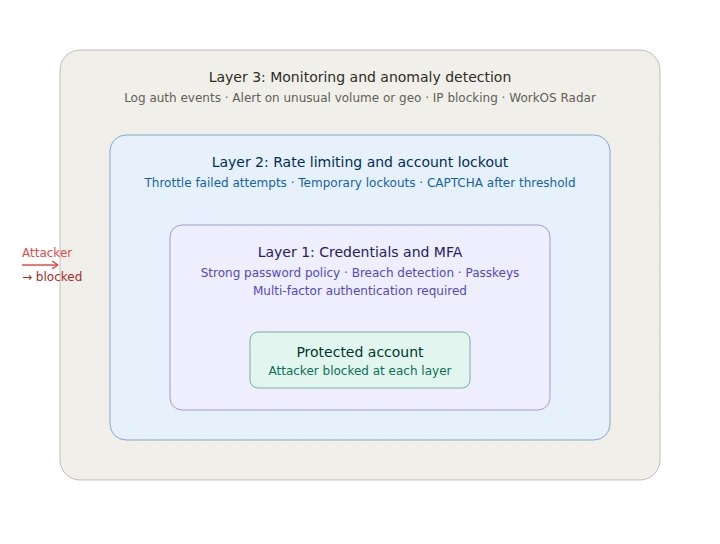
Defending against brute force attacks requires a layered approach. No single measure is sufficient on its own.
Enforce strong password policies
Require passwords to meet minimum complexity standards: a mix of upper and lowercase letters, numbers, and symbols, with a minimum length of at least 12 characters. Block passwords that appear in common breach lists using tools like the Have I Been Pwned API.
Implement rate limiting and account lockout
Limit the number of failed login attempts per account or IP address within a given time window. After a threshold is crossed, temporarily lock the account or require additional verification. Be careful to balance security with usability as overly aggressive lockouts can be used to deny service to legitimate users.
Add multi-factor authentication (MFA)
MFA is one of the most effective defenses against brute force attacks. Even if an attacker correctly guesses a password, they still cannot access the account without the second factor. Encourage users to enable MFA and require it for sensitive operations or privileged accounts.
WorkOS provides built-in MFA support that is straightforward to integrate into your application.
Use CAPTCHA on login forms
Adding a CAPTCHA challenge to login forms can slow down or block automated attack tools. CAPTCHA is particularly useful as a secondary measure after a small number of failed attempts, rather than on every login, to avoid frustrating legitimate users.
Monitor for anomalous login behavior
Log authentication events and set up alerts for unusual patterns, such as a high volume of failed attempts from a single IP, login attempts across many accounts in a short window, or logins from unusual locations or devices.
WorkOS Radar provides real-time protection against bots and abuse, including detection of credential stuffing and brute force patterns across your user base.
Use IP-based blocking and geofencing
Block or flag login attempts from known malicious IP ranges. If your user base is concentrated in certain regions, consider flagging or requiring additional verification for logins from unexpected locations.
Prefer passkeys and passwordless authentication
Passkeys and other passwordless methods eliminate the password entirely, making brute force attacks against login credentials irrelevant. WorkOS AuthKit supports passkeys alongside traditional authentication methods, giving your users a more secure and frictionless experience.
Brute force vs. credential stuffing: What's the difference?
These terms are sometimes used interchangeably, but they describe distinct attack methods.
Brute force involves generating or guessing credentials without prior knowledge. The attacker doesn't know the password and tries to discover it through repeated attempts.
Credential stuffing involves using known credentials from previous data breaches. The attacker already has a real username and password combination and is testing whether it works on a different service.
The distinction matters because they require somewhat different defenses. Brute force is best addressed with rate limiting, account lockout, and strong password requirements. Credential stuffing is best addressed with MFA, breach password detection, and behavioral anomaly detection, since the credentials themselves may be technically valid.
Final thoughts
Brute force attacks are persistent precisely because they don't require sophistication. They exploit the weakest link: predictable or reused credentials paired with systems that don't limit repeated attempts. The good news is that the defenses are well understood. Combining strong password policies, rate limiting, MFA, and behavioral monitoring makes brute force attacks dramatically harder to execute successfully.


.webp)

.webp)

.webp)




.webp)
.webp)
.webp)
.webp)
.webp)


