The building blocks of an AI agent
Tools, MCP servers, skills, orchestrators, and why auth runs through all of them.

Every few months, the vocabulary around AI agents resets. Tools become actions, actions become plugins, plugins become skills, and somewhere in there someone introduces a protocol you've never heard of and insists it changes everything.
Most of the confusion isn't about the concepts themselves. The concepts are fine. The confusion is about which layer of the stack each concept belongs to, and why that distinction matters when you're actually building something.
This article is a map and it's meant to help you orient yourself before you start picking frameworks and building your own AI agents.
The five layers
A working AI agent is a stack of five concerns. You can build a prototype that collapses them all into one script, but in production each one becomes its own problem to solve.
Here they are, from the outside in:
- User / app surface: where humans enter the loop
- Agent framework: orchestration, planning, and memory
- Tools and MCP servers: what the agent can actually do
- LLM / model : where reasoning happens
- Auth and identity : who can do what, at every layer
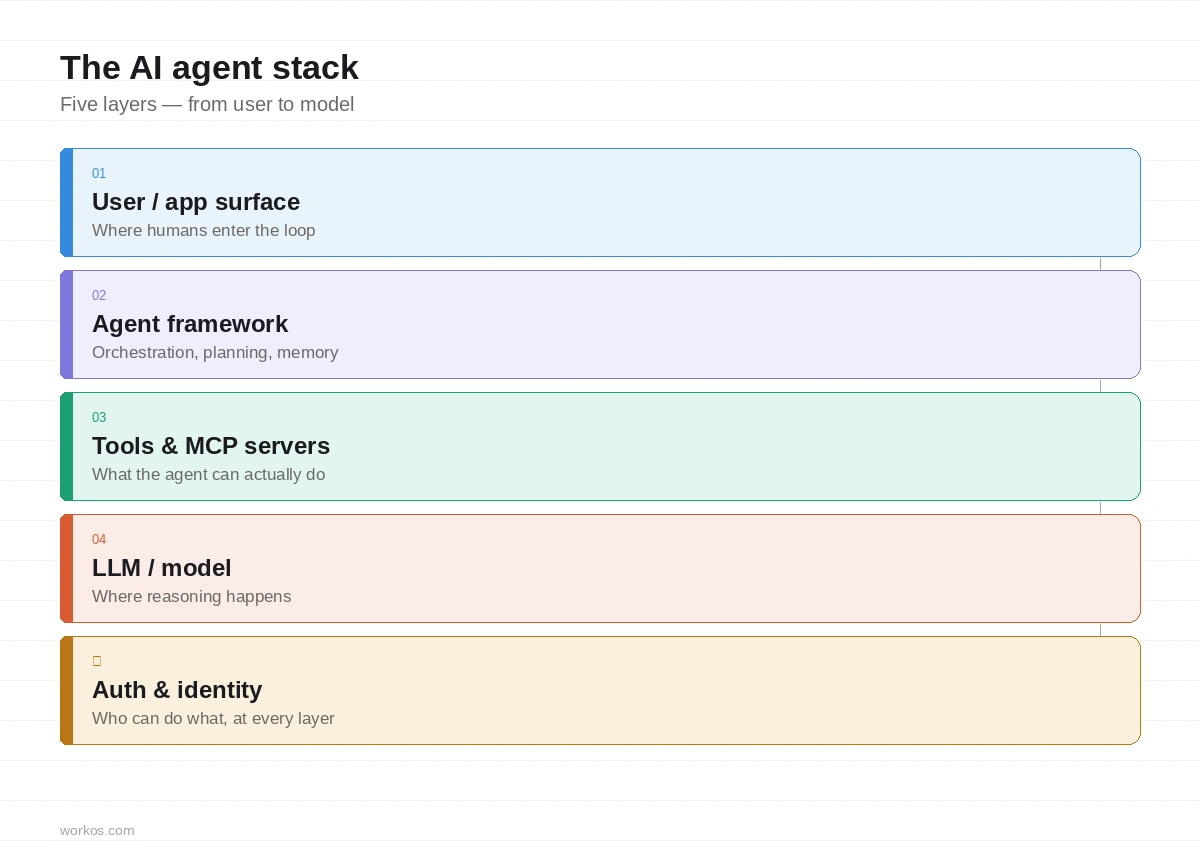
Let's go through each one.
Layer 1: User / app surface
This is the part most developers build first and think about least: the interface through which a human enters the loop. A web app, a mobile screen, a CLI, a voice interface.
The important thing about this layer is that it is the origin of the entire request chain. Every permission decision, every audit log entry, every token that flows downstream traces back to who authenticated here and what they were allowed to do.
Which means auth starts here, not at the agent.
The second important thing is the concept of human-in-the-loop (HITL). Not all agent actions should be fully autonomous. HITL is the deliberate design pattern of pausing agent execution and routing a decision to a human before continuing. Sending an email on someone's behalf. Deleting a file. Placing an order. These are actions where the cost of a mistake is high enough that a human checkpoint is worth the friction.

HITL requires async architecture. The agent parks its state, notifies the user, and resumes only after an explicit approval. If you're not building this in from the start, retrofitting it later is painful.
!!For more on this, see How to add human approval to async AI agent actions.!!
Layer 2: Agent framework
This is where most of the interesting engineering happens, and where most of the terminology confusion lives.
An agent framework has four main concerns.
- The orchestrator is the decision loop. It receives the user's goal, breaks it into steps, decides which tools to call, interprets results, and loops until the task is complete (or it runs out of context, or it gets stuck). LangChain, LlamaIndex Agents, CrewAI, and AutoGen are all orchestrators. So is a 200-line Python script you wrote yourself. The framework choice is less important than understanding what the orchestrator is responsible for.
- Memory is how agents maintain state between calls. There are two kinds. Short-term memory is the context window: everything in the current call, including conversation history, tool results, and system instructions. Long-term memory is external: a vector database the agent queries via RAG, a key-value store for structured facts, a graph database for relationships. The design of your memory layer determines what the agent knows, what it forgets, and what it hallucinates.
- The system prompt is the agent's job description. It defines the persona, the constraints, the available tools, and the output format. It is baked in before the user types anything. Getting this right is usually 80% of agent quality. It is also a security boundary: a poorly scoped system prompt is an attack surface. We'll come back to this.
- Skills are a newer concept that deserves its own explanation, so we'll cover them in the next section.
Layer 3: Tools, MCP servers, and skills
This layer is where the terminology sprawl is worst, and where a clear vocabulary matters most.
What a tool actually is
A tool is a function the LLM can decide to call. You define its name, a natural-language description, and its input parameters as a JSON schema. At inference time, the model reads the descriptions and decides whether to call any of them. If it decides to call one, it emits a structured JSON object with the function name and arguments. Your code executes it and returns the result.
For example, this is the definition of a tool that books a hotel room:
The description is the API contract. If the model can't understand what the tool does from your description, it won't call it correctly.
Tools are native to every major model API and run in-process. No network hop, low latency. This is the right choice for tools that are tightly coupled to your agent and don't need to be shared.
What MCP is and why it exists
Model Context Protocol (MCP) is a standard for exposing tools to AI agents over a network. Instead of hard-coding tools into your agent, you run a server that declares its tools, and the agent discovers them at runtime.
The problem MCP solves is not technical complexity. It's operational complexity. When tools are in-process, every update to a tool requires redeploying the agent. When tools live in MCP servers, they can be versioned, updated, and shared across many agents independently. A tool ecosystem can emerge: third parties can publish MCP servers your agent can connect to without you writing any integration code.
MCP also provides a single, consistent place to enforce authentication. Without it, each tool has its own auth model. With it, you have one protocol, one place to add OAuth 2.1, one place to audit what the agent called and when.
WorkOS ships MCP server support with OAuth 2.1 and OIDC built in, so that MCP servers can verify the identity of connecting agents before executing any tool calls.
What skills are
A skill is a packaged, reusable agent capability. It is a bundle: one or more tools, a system prompt fragment that configures them, and any other context the agent needs to use them well.
The difference between a tool and a skill is the difference between a library function and a module. A tool does one thing. A skill does a coherent set of related things, with the orchestration logic already figured out.
Skills are composable. You can give an agent a "customer support" skill that includes tools for looking up orders, reading knowledge base articles, and escalating tickets, all pre-configured to work together. You can mix skills from different providers. You can version and share them.
This is where the industry is heading: not just model marketplaces, but skill marketplaces. The agent becomes a runtime that assembles capabilities on demand.
!!WorkOS skills are available in Claude's plugin marketplace. Any Claude user can install them via /plugin and connect them directly to their agent workflow. Browse WorkOS skills →!!
What actions and plugins were
For completeness: "actions" and "plugins" are older terms for roughly the same concept. OpenAI's plugin system (2023) used an OpenAPI manifest to declare available endpoints and let the model call them. The concept was right but the implementation had problems: manifests went stale, auth was bolted on inconsistently, and discovery was manual.
MCP solves most of what plugins were trying to do. If you're starting fresh, use MCP. If you have production systems built on the plugin pattern, they'll keep working, but the ecosystem is moving.
Layer 4: LLM / model
This is the only layer where reasoning actually happens. Everything else is scaffolding around it.
The model receives the system prompt, the conversation history, the available tool definitions, and the user's message. It returns either generated text or a structured tool call. Your orchestrator handles the result and either responds to the user or executes the tool and loops.
There isn't much to say about model selection in a stack overview article, except this: the model is the only component in your stack that can be wrong about what it's doing and not know it. Every other component fails loudly. The model fails quietly, with fluent confidence.
This has security implications.
Prompt injection
When an agent reads external content (emails, documents, web pages, database rows) that content is written by people (or systems) that you don't control. An attacker can embed instructions inside that content that the model interprets as legitimate commands. This is prompt injection, OWASP's top threat for LLM applications.
The model cannot reliably distinguish between your instructions in the system prompt and an attacker's instructions in a tool result. Both are text. Both enter the same context window.
The mitigations are architectural and multi-layered:
- Treat all tool results as untrusted data.
- Validate them before acting on them.
- Use separate execution contexts for external content.
- Require explicit human approval for high-risk actions triggered by external inputs.
- Log everything so you can reconstruct what happened when something goes wrong.
Layer 5: Auth and identity
Auth isn't a layer in the same sense as the others. It doesn't sit in a neat position in the stack. It runs through all four layers above it, and the failure mode for getting it wrong is different at each one.
Here's what each concern actually involves.
AuthN: who are you?
Authentication verifies identity. For users at the app surface: passwords, passkeys, MFA, SSO. For agents at the framework layer: client credentials, mTLS, signed JWTs. For agent-to-MCP-server calls: OAuth 2.1.
Every layer in the stack must verify the identity of its caller before trusting it. Authentication that only happens at the front door is not authentication for an agent system.
AuthZ: what can you do?
Authorization determines what an authenticated identity is allowed to do.
Coarse-grained authorization uses scopes: this token can read emails, this token can write to the calendar. Scopes are easy to implement and appropriate for many use cases.
Fine-grained authorization (FGA) checks permissions at the level of individual resources: can this agent access this specific document? Can this user approve this specific transaction? FGA is relationship-based (ReBAC) and operates on a graph of who-can-do-what-to-which-object.
For AI agents, the case for FGA is stronger than it might appear. An agent that can read all documents is a blast radius problem. If it's compromised, or if it behaves unexpectedly, you want its permissions to be as narrow as possible. Scopes alone can't express "this agent can read documents in the marketing folder but not the HR folder."
Agent as principal
This is the shift that most auth systems are not yet designed for.
Traditional auth is designed for humans. There is a user, the user logs in, the user gets a token, the token represents the user. When that user's token is used to call an API, the API knows which human is responsible.
In agentic systems, the agent is also a principal. It has its own identity, its own client ID, its own permission set. It acts on behalf of a user, but it is a distinct actor in the system. Audit logs need to reflect this: not just "user X accessed document Y" but "agent Z accessed document Y on behalf of user X."
Auth systems that can only model human principals are not ready for agent workloads.
Session-scoped access
OAuth is designed for human workflows. A user connects Snowflake, Google Drive, or Salesforce to an application, and the app receives long-lived tokens it can use indefinitely. That model works fine when a human is the one acting.
It starts to break down when an agent is acting instead. Long-lived, refreshable tokens mean an agent retains access to third-party systems well beyond the task it was assigned, without any further approval required. If it misbehaves or is compromised, that access doesn't automatically go away.
The emerging answer to this is session-scoped authorization: give the agent access for the duration of a specific task, and no longer. A human approves the start of a session. During that session the agent can call the connected services it needs. When the session ends, access is revoked. The agent cannot renew it on its own.
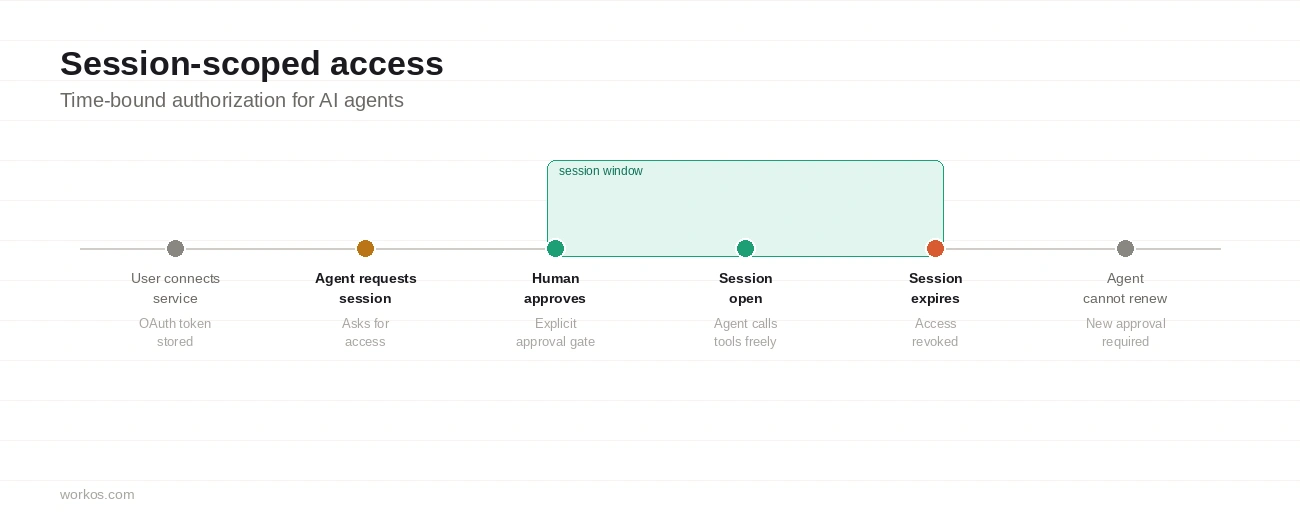
This doesn't replace OAuth or override provider scopes. It adds a control layer at the application boundary, between the agent and the long-lived credential. WorkOS's Pipes MCP is an implementation of this pattern, and it's a useful reference for how session-scoped access works in practice.
Audit trail
Every agent action should be logged with: who initiated the request (user identity), which agent executed it (agent identity), what tool was called and with what arguments, the OBO chain if delegation was involved, what was returned, and when.
This is the audit trail. It is required for regulatory compliance, for debugging, for incident response, and for user trust. Without it, you cannot answer the question "what did my agent do to that customer's data between Tuesday and Thursday?"
The audit trail is also where the human-in-the-loop and the auth model converge. When a human approved an action, that approval should appear in the trail. When an agent acted autonomously, that should be clear too.
Putting it together
Here is the map in summary form.
The most important thing this map shows is that auth is not a feature you add at the end. It is a concern that touches every layer.
- The user authenticates at layer 1.
- The agent authenticates to MCP servers at layer 3.
- The OBO chain carries identity through tool calls at layer 3.
- The audit trail is assembled from evidence collected at layers 1 through 4.
- FGA permissions are checked at layer 3 before any tool executes.
If you design your agent stack without designing your auth model in parallel, you will find yourself retrofitting it into a system that wasn't built to accommodate it. That is significantly harder than getting it right from the start.
Securing your agents and MCP servers with WorkOS
The auth layer described above is a real implementation problem, not just an architectural concern. Every agent you ship needs identity at the user surface, authorization checks before tool calls execute, and a verifiable chain of who did what and when. Building that from scratch is a significant distraction from the product you're actually trying to ship.
WorkOS covers the auth layer for agent stacks in two ways, depending on where you are in your build.
If you need the full auth stack, WorkOS handles user authentication, enterprise SSO, fine-grained authorization, and MCP server auth under one platform. Agent as principal, session-scoped access via Pipes, and audit logs are all available without stitching together separate services.
If you already have auth and just need to secure an MCP server, AuthKit's standalone MCP integration is the lighter path. AuthKit acts as a spec-compatible OAuth authorization server, so your MCP server only needs to handle two things: verifying access tokens AuthKit issues, and pointing clients to AuthKit via a standardized metadata endpoint. MCP clients that support metadata discovery will automatically fetch this metadata when they encounter a 401 from your server, then redirect the user to AuthKit to sign in, with no hardcoded client registration on your end.