Pipes Connection Sharing: Connect Slack once for the whole organization
Pipes Connection Sharing lets an admin connect a provider once for the whole organization. When it beats per-user OAuth, and what changes in your code.

A shared connection in WorkOS Pipes is a provider connection owned by an organization instead of a person. An organization admin connects the provider once, and every active member of that organization can use it without connecting a personal account. Every request through it runs with the credential the admin supplied, not the credential of the member who triggered it.
A Pipes connection normally belongs to one person. They authorize the provider, and your application acts on their behalf with their credential. Connection sharing, live in production since late September, adds a second kind of connection: one the organization owns.
The clearest case is a Slack bot. Your app posts deploy notifications into a customer's workspace. There is one bot, installed into one workspace, and the message reads the same whichever engineer on the customer's team triggered the deploy. Walking every engineer through an OAuth consent screen, one credential apiece, to end up with forty copies of the same bot identity is work with no payoff. The docs put the rule plainly: shared connections suit providers "where the organization, not the individual, owns the relationship."
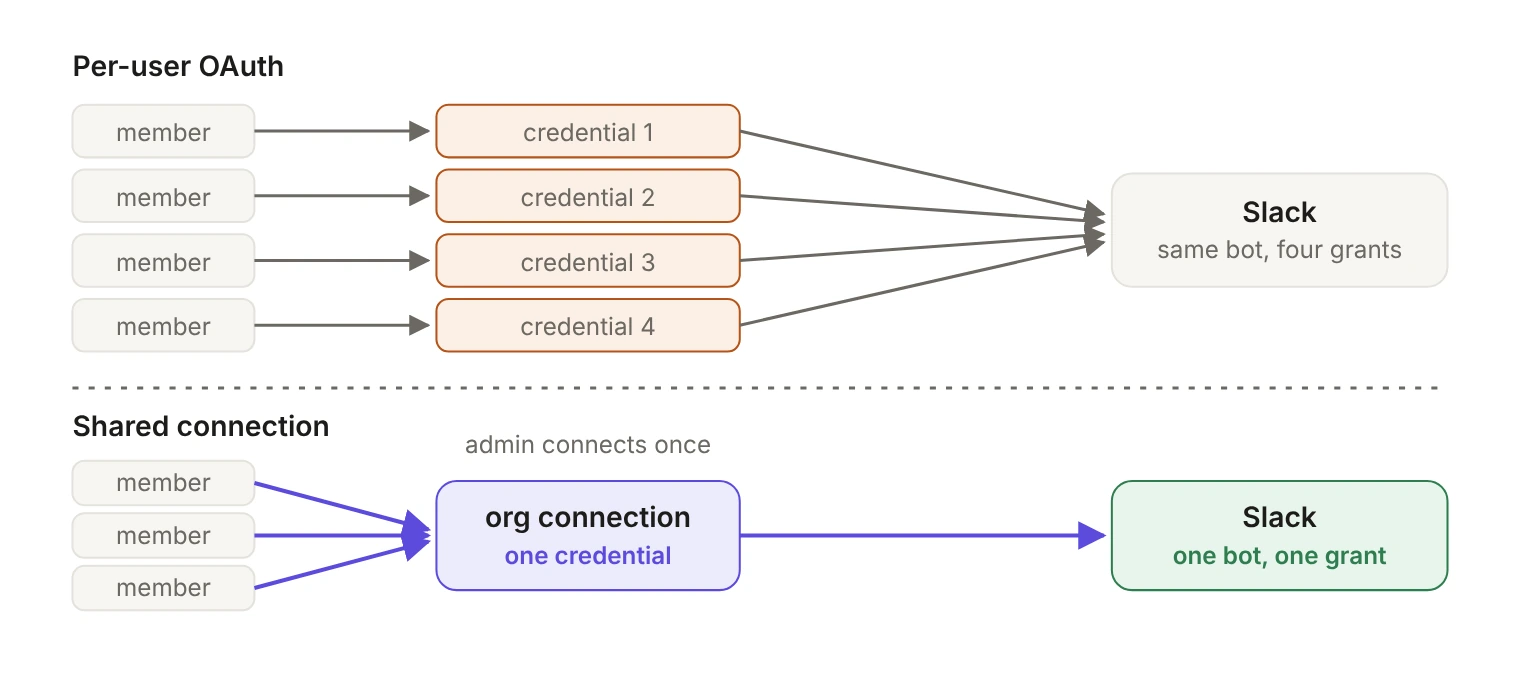
What does an organization connection own?
In the docs' words, "A connection has exactly one owner, and the owner determines who established it and who can use it." A user connection is authorized and owned by one user. It's the default, and omitting connection_owner from any API request keeps selecting it. An organization connection is "configured once for an organization and usable by any of its active members." It carries the organization_id and has no user owner.
The same provider can be offered both ways in one environment, and a member can hold their own connection alongside the organization's shared one. They're separate connected accounts, which matters later: from here on, a connection is identified by the provider and the owner, because the provider alone is ambiguous. Ownership is also fixed when the integration is created and can't change afterward.
How does an admin connect Slack once for the whole organization?
Start in the WorkOS Dashboard. When you add the provider, the Connection access step asks who connects: User, "where each user connects their own account," or Organization, "a single authorized connection shared by all the organization's users." Pick Organization. (The docs describe this step as appearing when organization connections are enabled for your environment. If you don't see it, ask support.) If you declare providers from code, the create data integration endpoint takes ownership: "organization" for the same result.
Then the admin connects from the Shared connections section of the Pipes Admin widget, which requires the widgets:pipes:manage permission. From there an admin connects a provider with OAuth, enters or rotates a shared API key or client credentials, and disconnects the shared connection.
enableSharedConnections defaults to false, and omitting it keeps the widget's existing behavior. So an admin who can't find the Slack row is usually looking at a widget missing one prop.
For a Slack bot the admin runs the ordinary OAuth flow through Slack's install screen, and the resulting connection belongs to the organization rather than to them. For API key and client credentials providers they paste the organization's credential, and pasting a new one is how rotation works. Either way, "the credential is stored against the organization; it is never sent to the browser or returned to members."
Building your own admin surface instead of embedding the widget? The authorization URL, API key and client credentials endpoints accept connection_owner: "organization" with the acting admin's user_id and the organization_id. Reading, importing and deleting a shared connection go through the /organizations/{organization_id}/connected_accounts/{slug} endpoints, where ownership comes from the path. The /user_management/users/{user_id}/connected_accounts/{slug} endpoints only manage that user's own connections.
What do members see?
Once the admin has connected, the shared connection shows up for every active member in the Shared connections section of the Pipes widget, which takes the same opt-in prop:
The section appears above Your connections, and members can't reconnect, rotate or disconnect a shared connection; those actions belong to an admin in Pipes Admin. The member-facing view also leaves out established_by_user_id and state_reason. Write your broken-connection messaging accordingly: when a shared connection stops working, point members at their admin rather than at an authorization URL.
What changes in your code when the credential isn't the caller's?
Less than you'd guess, and the part that changes is explicit. When you fetch credentials with POST /data-integrations/{slug}/credentials, connection_owner (connectionOwner in the SDKs) picks the connection, and its default of user preserves the behavior of every integration you've already shipped.
The difference between two of those parameters is easy to miss. user_id alone gets the user's own connection. user_id plus organization_id still gets the user's own connection: as the docs put it, "organization_id scopes, it does not change the owner." Only connection_owner: "organization" selects the shared connection, and then user_id names the acting member, who must be an active member of that organization. When the shared connection isn't established, the response comes back active: false with an error of not_installed or needs_reauthorization.
If you call providers through Relay, which is in early access (request it through support or Slack), the same choice is made with headers. Relay's base URL is https://api.workos.com/relay and it accepts any HTTP method. You keep the method, body and content headers of the original call, name the upstream with X-Relay-URL (or X-Relay-Provider), authenticate with your WorkOS API key, and name the user in X-Relay-User. X-Relay-Connection-Owner picks the owner and defaults to user. For an organization connection, X-Relay-User names the acting member and X-Relay-Organization is required; for a connection that isn't scoped to or owned by an organization, it must be left out.
None of those control headers reach Slack. Relay strips your Authorization header, cookies, forwarding metadata and anything prefixed X-Relay- or X-WorkOS- before forwarding. (Keeping the provider credential out of your code path is also why Relay helps with keeping credentials out of an AI agent's context.)
One behavior will generate support tickets if you don't plan for it: Relay never falls back between owners. A request for the organization's connection returns 402 relay_authorization_required when none exists, even if the acting user has a working personal connection to the same provider, and the reverse holds too. X-Relay-Organization on its own scopes the lookup of the user's own connection; it never selects a shared one. Your error handling has to know which owner it asked for, because the 402 won't tell you the other one would have worked.
When is org-wide sharing the right model?
Ask who owns the relationship with the provider. The docs' own examples are a shared Slack workspace bot, a company-wide analytics API key and a server-to-server client credentials grant. The organization owns all three.
The counter-example is close enough to be dangerous. Relay's provider table lists two Slack providers: slack, and slack-user, which acts as a person. Connecting slack-user at the organization level would mean one employee's Slack identity, including their DMs and private channels, backing every request your app makes for every member of the customer's organization. That's per-user OAuth's job. The test: if the provider's credential carries a person's identity and their individual access, keep it per-user.
Two more things to weigh. Members can't self-serve a shared connection, because every reconnect, rotation and disconnect goes through an admin. That's a feature for a company bot and a support burden for anything a member might need to fix at 2am. And organization-scoped provider overrides, where you vary enabled state, scopes and credentials per organization, "apply to the user-owned provider, not to shared connections." (Our post on giving a scheduled agent access with no signed-in session covers those per-organization overrides; they don't make a connection organization-owned.)
Whose permissions does the request run with?
Settle this before you ship. The credential behind a shared connection came from one account: the admin's OAuth grant, or the key they pasted. So every call your application makes through it carries that account's access, not the access of the member who triggered it. A member with read-only access inside your product can, through a shared connection, cause a write in the provider that the connecting account was allowed to make.
Two mitigations, both cheap:
- Scope the connecting account narrowly. A bot installation with the minimum Slack scopes, or an API key issued for your integration alone, not whatever the admin happened to have.
- Log which member acted. The platform hands you that:
user_idon the credentials request, andX-Relay-Userin Relay, name the acting member. Record it next to the provider call. When a customer asks who posted a message to their Slack channel six weeks ago, Slack's own records will point at the bot, so your application's log is likely the only place that maps the message back to a person. If you already send events to WorkOS Audit Logs, this is a natural event to add: the acting member as the actor, and the provider and connection in the metadata.
What happens when the admin who connected it leaves?
A shared credential is only as legitimate as the membership that produced it. WorkOS tracks which member established each shared connection, and when that member's organization membership ends, the connection is invalidated and its credentials are cleared. A membership ends when the user is deactivated in or removed from the organization, when Directory Sync removes them, or when the user is deleted. Picture the contractor who set up a customer's Slack connection being offboarded on a Friday, perhaps by a SCIM deprovisioning event: every member of that organization loses deploy notifications until someone notices.
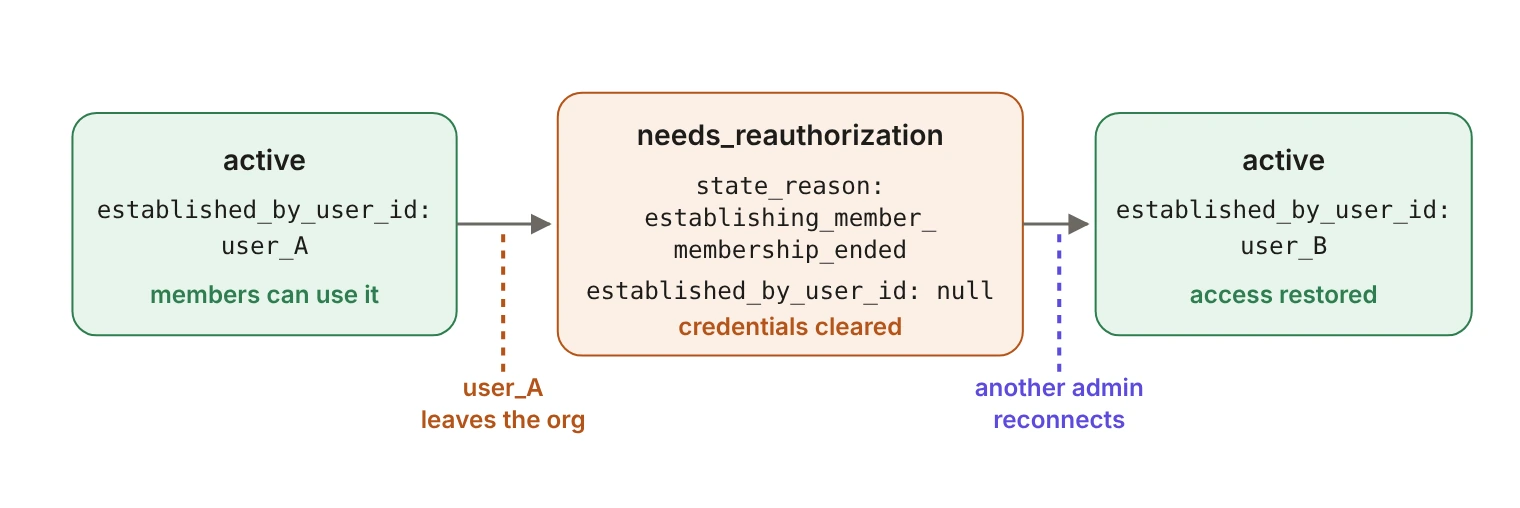
The state you branch on is explicit. state becomes needs_reauthorization and state_reason becomes establishing_member_membership_ended. established_by_user_id is set to null, but the reason stays, so you can tell a departed member apart from a connection that never had one. The docs add two rules worth building in: "New state_reason values may be added, so treat an unrecognized value as an unknown reason rather than an error," and provider errors are never reported through state_reason.
So establish shared connections with a long-lived admin or a service account, not with whichever engineer happened to be on the onboarding call. A departing contractor shouldn't be able to silently cut off a customer's integration. Pair that with a handler on needs_reauthorization that reads state_reason and tells an admin exactly what to reconnect, and the failure becomes a notification instead of a mystery.
Where should you start?
If you have a provider where every one of your customers' members clicks through the same consent screen to reach the same organization-owned account, move that one first: change the provider's access to Organization, add enableSharedConnections to both widgets, add connection_owner to the credentials call, and decide now which account owns the credential. When that admin leaves, that decision is the difference between a notification and a 2am page.