WorkOS security review: SOC 2, data stored and IPs to allow
What WorkOS stores, which IPs to allow, where data lives and what it is certified for. A security review answer sheet for IT teams approving SSO with WorkOS.

WorkOS is the service a software vendor uses to connect your identity provider to their app, so it sits in the middle of your users' sign-in. For single sign-on and directory sync, WorkOS stores what your identity provider and directory send it, and you control that through attribute mapping and group scoping. It is SOC 2 Type 2 certified, sign-in traffic reaches it through Cloudflare, and anything WorkOS sends to your systems comes from 15 fixed IP addresses.
This page answers the questions a security review usually asks, each with a link to the public WorkOS source. If you only need the short version, skip to the security review answer sheet at the end and copy it into your questionnaire.
What is WorkOS, and why is it in your sign-in flow?
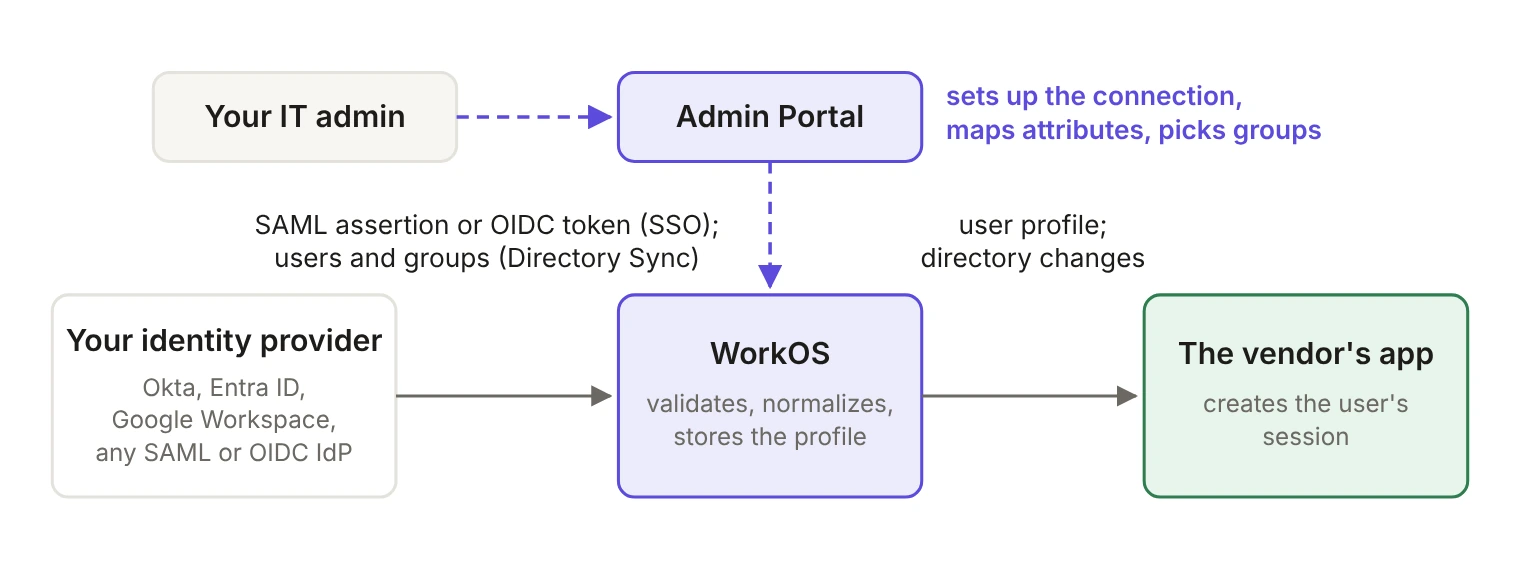
WorkOS provides enterprise features such as Single Sign-On, Directory Sync and AuthKit to software vendors through an API. When a vendor tells you they support SSO "with WorkOS", they mean your identity provider (Okta, Microsoft Entra ID, Google Workspace or any SAML or OIDC provider) talks to WorkOS, and WorkOS talks to their app.
In a sign-in, your identity provider authenticates the user and sends a SAML assertion or OIDC token to WorkOS. WorkOS validates it and passes a normalized user profile to the vendor's app, which creates the session. With Directory Sync, your directory sends users and groups to WorkOS, and WorkOS forwards the changes to the app. You set up the connection yourself in the Admin Portal, a setup page the vendor sends you, so you configure your side directly.
What data does WorkOS store?
WorkOS stores what each product needs to work, and for SSO and Directory Sync that is limited to what your identity provider and directory send. The WorkOS security page puts it this way: "The data stored by WorkOS is limited to what is sent from the identity providers."
- Single Sign-On. The SSO profile your identity provider sends: an identifier from the IdP, email, first and last name, and any extra attributes the vendor asked for and you mapped, such as groups or a department. The docs say
idp_idandemailare always required. The old WorkOS FAQ also lists the user's IP address. [VERIFY: whether SSO stores the sign-in IP address; the Profile reference doesn't list it] Unmapped raw IdP attributes are no longer returned by the API as of April 15, 2026. [VERIFY: whether WorkOS still stores raw IdP attributes internally] - Directory Sync. Whatever your directory sends: users, groups and the attributes you map. Standard fields such as
idp_id,emailandstateare always there; predefined and custom attributes are opt-in. - AuthKit. If the vendor uses AuthKit for sign-in, WorkOS also stores the user record (name, email, whether it's verified, last sign-in), sessions (including the IP address and user agent the session was created from) and MFA factors (TOTP).
You control most of this from your side. In the Admin Portal you map attributes: the vendor decides which attributes they request, and you decide which of your IdP's fields fill them. For Directory Sync you decide who is synced by assigning users and groups to the app in your directory, and some providers let you filter groups during setup, in which case only members of the synced groups are sent.
How long is data kept, and how do you delete it?
WorkOS keeps SSO profiles and directory data for as long as the connection or directory they belong to exists. Deleting an SSO connection permanently deletes its user profiles, and deleting a directory permanently deletes its users and groups. When a vendor's agreement with WorkOS ends, we delete their personal data, and backup and archive copies are deleted on our data retention schedule, as set out in our Data Processing Addendum.
Audit Logs, if the vendor uses them, have a retention period set per organization, from one month to ten years.
To request deletion of data, email support@workos.com. You can also ask the vendor to delete your connection or directory, since they're the WorkOS customer whose account holds your data.
Which IP addresses should you allow?
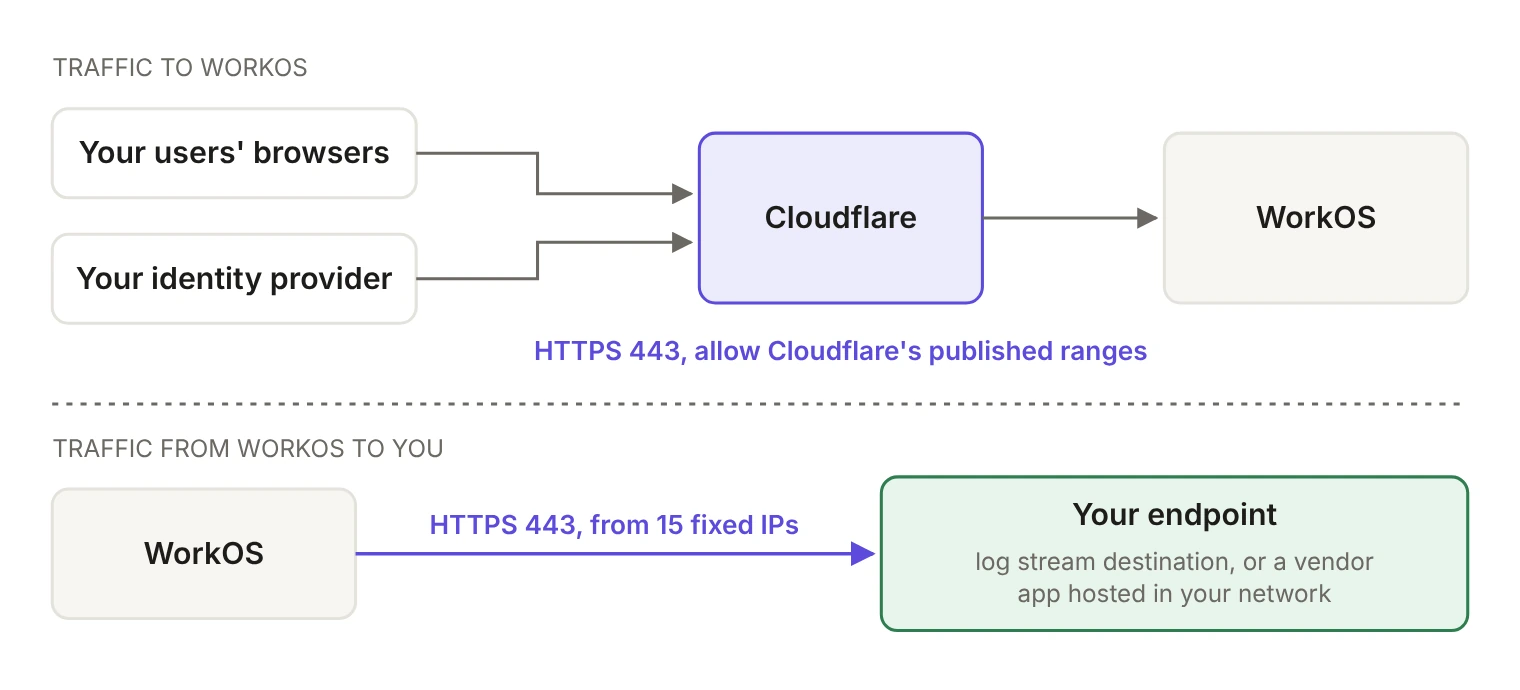
Traffic goes in two directions, and each has its own allowlist (or whitelist). All of it runs over HTTPS on port 443.
Traffic to WorkOS: sign-in pages and the API
WorkOS runs behind Cloudflare for security and reliability, so traffic to WorkOS arrives at Cloudflare's published IP ranges. To allow traffic from your network to WorkOS, allow those ranges. You'll need this if your network restricts outbound web traffic, or if a self-hosted identity provider sends SCIM or SAML traffic to WorkOS.
If you filter by hostname instead, these are the main WorkOS hosts. Each one can be replaced by a custom domain the vendor sets up:
api.workos.com, or the vendor's custom Authentication API domain. This is where your identity provider sends SAML responses and SCIM requests.<name>.authkit.app, or the vendor's custom AuthKit domain, if the vendor uses AuthKit's hosted sign-in pages.setup.workos.com, or a custom Admin Portal domain, where your IT admin sets up the connection.
Your users' browsers also need to reach your own identity provider and any social sign-in providers the vendor offers. Sign-in pages can load assets from other hosts too, so if your proxy filters strictly, test a full sign-in before you roll it out.
Traffic from WorkOS to you: webhooks, Actions and log streams
When WorkOS calls out, it uses a fixed set of 15 IP addresses. This applies to webhooks, Actions and audit log streams. The case that most often lands on an IT team is a log stream to your own SIEM; the others matter when the vendor's app runs inside your network. Here's the full list:
Webhook endpoints must use HTTPS and resolve to a public IP address, and each request carries a workos-signature header the receiver can verify.
We publish these addresses for webhooks, Actions and log streams. If WorkOS needs to reach an identity provider hosted behind your firewall, for example an OIDC token endpoint, contact support@workos.com before you set up the connection.
What about on-prem and air-gapped environments?
If the vendor's app runs inside your network, it can still use WorkOS as long as it can reach the WorkOS API. The most common setup, described in our on-prem deployment guide, is to deploy the app as you would in the cloud and add firewall rules or ACLs that allow HTTPS on port 443 to Cloudflare's published IP ranges. Start from default-deny and open only what's needed. To avoid opening any inbound access, the vendor can fetch updates with the Events API instead of receiving webhooks; that's the preferred method for on-prem deployments, because those requests start from your own infrastructure. If firewall changes aren't practical, a secure tunnel is the alternative.
A fully air-gapped network is different, because WorkOS is a cloud service and needs API connectivity. For that case, we recommend a dual implementation: the vendor keeps WorkOS for connected deployments and ships a separate package for air-gapped customers that integrates with your internal authentication, keeps the same features, and follows your environment's security policies.
What is WorkOS certified for?
WorkOS is SOC 2 Type 2 certified and compliant with GDPR and CCPA. On top of that:
- Penetration testing: we run annual third-party penetration tests.
- Code audits: external firms audit our code.
- HIPAA: we can sign a business associate agreement (BAA).
To get our SOC 2 Type 2 report, request it in the WorkOS Trust Center. If you're evaluating an app built on WorkOS, ask that vendor to sponsor your request. Under our DPA, vendors can also ask us to complete a data protection questionnaire, with audits limited to once a year.
Is data encrypted?
Yes. All traffic to and from WorkOS uses HTTPS, and our DPA commits us to encrypting personal data in transit and, where appropriate, at rest, as part of a security program consistent with our SOC 2 Type 2 certification. Our encryption controls are covered in the SOC 2 Type 2 report, available through the Trust Center.
Where is the data hosted?
WorkOS hosts customer data on AWS in the United States, in the us-east-1 region, with backups replicated to us-west-2. Our DPA covers transfers from the EEA, Switzerland and the UK with Standard Contractual Clauses.
Who else processes the data?
We publish our subprocessors list in the Trust Center. Our Data Processing Addendum covers how we handle the vendor's personal data, including subprocessors, international transfers and security incidents. It's our agreement with the vendor; your own data terms are with the vendor.
How do you report a security issue?
Email security@workos.com. Our responsible disclosure policy explains what to include, and we acknowledge reports within two business days.
For outages and incidents, check our status page, which covers AuthKit, SSO, Directory Sync, Audit Logs, the Admin Portal and the WorkOS dashboard, and lets you subscribe by email, SMS, Slack or RSS. Under our DPA, we notify the vendor of a security incident affecting their data without undue delay and within the time frame the law requires.
If you're the developer integrating WorkOS, configuration lives in the WorkOS dashboard, and the WorkOS docs cover each product in detail. Sending your customer's IT team this page should answer most of their questionnaire.
What's the short answer for a security questionnaire?
Copy this table into your review. Each answer links to the public source.