Account takeover in B2B SaaS: Where it happens and how to stop it
In B2B SaaS, one taken-over account exposes a whole customer organization. Here are the B2B-specific doors and the WorkOS controls that close each one.

Account takeover in B2B SaaS is when an attacker gains control of a user's account inside a customer organization and inherits that user's role in the tenant. Because one membership can reach a whole organization's data, B2B takeover is defended at the organization level: which sign-in methods each customer allows, how sessions end, and what gets logged.
Say a customer's admin emails to say she did not sign in from Lisbon last Tuesday. In a consumer app that is one account to lock down. In a B2B app it is a tenant: her organization's data, her colleagues' records, the integrations she connected, and the role assignments she can rewrite.
The doors that matter in B2B are the ones a multi-tenant model opens by design: organizations that mix sign-in methods, accounts that link across identity providers, support tooling that signs in as a customer, and sessions that outlast a role change. If you need the general picture first, start with what account takeover is and the four doors attackers use.
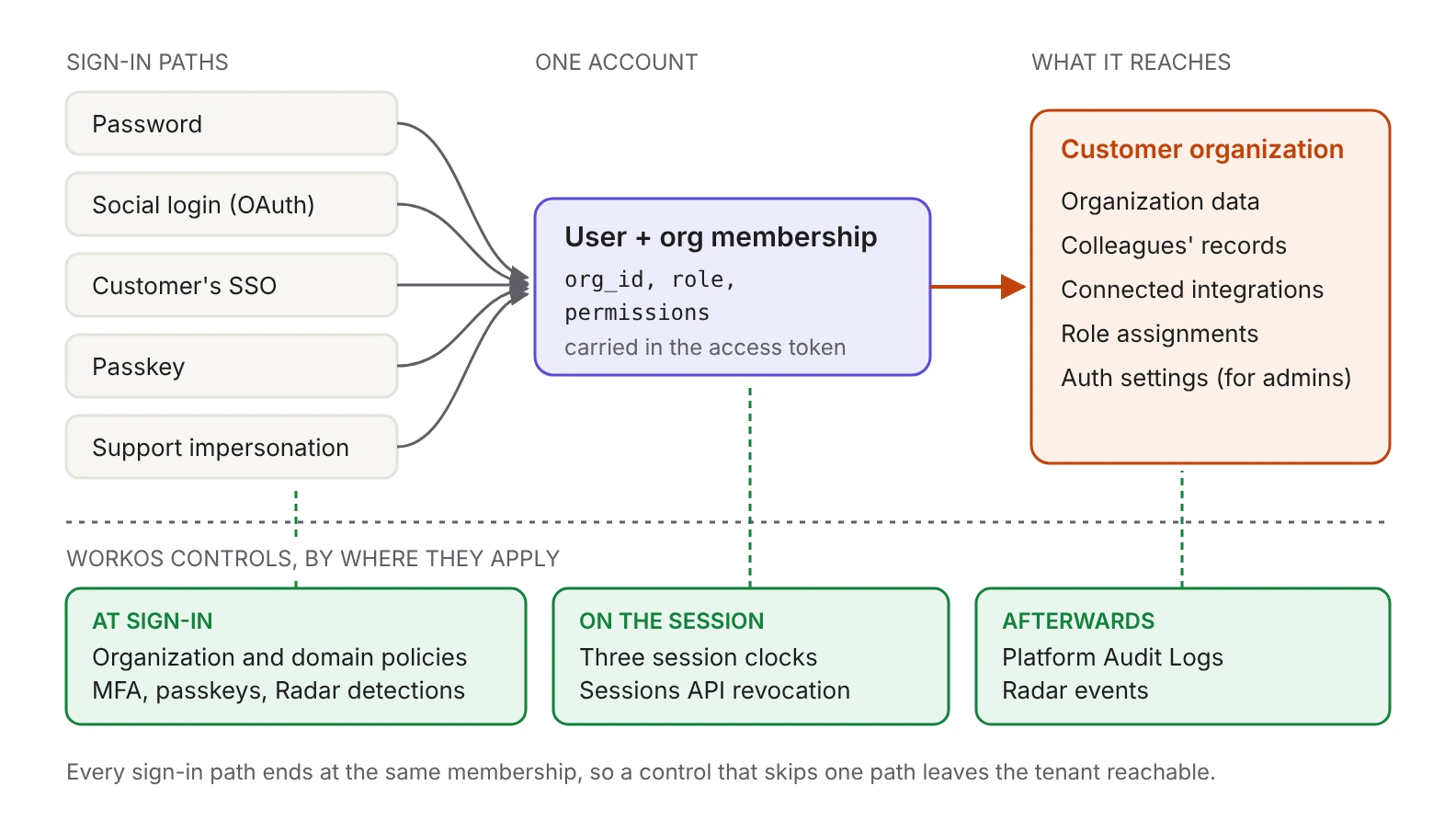
Why is account takeover different in B2B SaaS?
The blast radius is tenant-wide. A compromised membership carries a role and a set of permissions inside one organization, and AuthKit puts both in the access token as role and permissions claims alongside org_id. Whatever that role can read or change, the attacker can read or change. The handful of people per tenant who can invite members, change roles, and change the organization's own authentication settings are worth more than any ten regular seats.
Your customers also ask about this in writing. Security reviews want to know what happens when an employee's password turns up in a breach dump, how you detect an anomalous sign-in, and how fast a session dies after someone is offboarded. Those are product answers, and you want them configured before the questionnaire arrives.
Which doors are specific to B2B?
Password sign-in left enabled for an organization that moved to SSO. When an SSO connection is first set up for an organization in AuthKit, all non-SSO authentication methods for that organization are automatically disabled, and additional methods can be enabled manually if the organization prefers. That manual re-enable is the thing to watch. An organization that bought your product for SSO enforcement, then turned passwords back on for a handful of contractors, now has a password door into a tenant whose security review said there was not one. Our comparison of SSO and password logins covers when coexistence makes sense.
Linking a new credential to an existing account. Identity linking deduplicates credentials across providers using the email address as the unique identifier and access to the inbox as the source of truth. The safety sits in that second half. WorkOS attaches a new credential to an existing user only when it can verify the user has access to the inbox referenced by that credential, because some identity providers let an account be created with any email address. If it cannot link safely, the authentication flow does not complete. Linking logic that skips that step is a documented takeover path, which we walked through in three OAuth account takeovers caused by auto-linking on email.
MFA that applies to half your users. Enabling MFA in the Dashboard under Authentication and Features, set to Required, makes new and existing users enroll an authenticator app before they can sign in. The requirement does not apply to SSO users, which is correct, since an SSO user's second factor lives at their identity provider. It does mean your environment-level MFA setting is not a statement about every person in a tenant: password and social users carry your policy, SSO users carry their IdP's.
Sessions that outlast a role change. An access token carries the role it was issued with. A demotion from admin to member reaches the user at the next token refresh, so until then the old role keeps working. For offboarding, the reliable lever is ending the session rather than waiting for a clock, which the sessions section below covers.
Support impersonation. Impersonation lets your team sign in as a user to reproduce an issue, which also makes it a direct path into a tenant if it is left wide open. It is off by default in every environment, and enabling it requires the Admin role. A reason is required each time and is recorded on the session.created event, which carries an impersonator field with the team member's email and reason, while the access token carries an act claim. The session expires automatically after 60 minutes.
How do you detect a sign-in that doesn't look like your user?
Radar collects signals on user behavior during sign-in and acts on them. It works with Hosted AuthKit with no extra integration and is enabled from the Dashboard; teams calling the User Management APIs directly follow the Radar integration guide. Underneath, it fingerprints the authenticating client, which also surfaces patterns like one device being used for many accounts.
Each detection can be set to block, challenge, or notify. The three actions are different promises:
- Block fails the authentication even when valid credentials are presented.
- Challenge emails a one-time passcode the user has to enter to continue, which stops an attacker holding a working password but no access to the inbox. Radar also supports SMS challenges, and those apply to sign-up attempts only; sign-in uses email challenges.
- Notify sends an informational email to the user, an admin, or both.
The detections that map most directly onto B2B takeover:
That Lisbon sign-in is what impossible travel is built for: set to block, it never gets a session, and set to challenge, it has to pass an emailed code first. Two of the others are worth a second look in a tenant-shaped product. Unrecognized device notifications can reach an administrator as well as the user, which suits B2B, where the customer's own security team wants to see it. Stale accounts cover the seats nobody uses, such as a shared operations login or a sponsor who signed the contract and never signed in again.
Any of these can fire on a legitimate user. Notify is the low-friction way to watch a detection's behavior before you promote it, since it only sends email, and custom restrictions let you allow a known-good identifier, which is also how you cover a corporate IP range or a script you trust. Country rules resolve from the request IP and are set per environment. When something does fire, the Events tab filters by detection type, action taken, or a specific user ID or email, and each event carries device, location, user agent and IP address. For a deeper tour, see how WorkOS Radar really works, how Radar's bot detection works, and impossible travel.
How do you make MFA cover the right users?
AuthKit's built-in MFA is authenticator-app TOTP, not SMS. SMS MFA is a separate standalone API that supports US phone numbers only and leaves enrollment, challenge and verification to your application.
Environment-wide Required MFA is the blunt instrument: it enrolls every non-SSO user in the environment whether or not their organization asked for it. The per-tenant instrument is an organization policy, enforced when a member selects that organization at sign-in, which can require either the organization's SSO connection or MFA and is configured on the organization page in the Dashboard. A domain policy works differently again: it applies to every user whose email domain is in the policy, regardless of membership or which organization was selected during sign-in.
Passkeys are the other lever, and the one that removes the phishable secret rather than adding a step. They are WebAuthn credentials whose private key stays on the user's device. Progressive enrollment prompts existing password users to create one at their next sign-in; it is off by default and enabled alongside passkeys in the Dashboard. Users who skip are prompted again every two weeks and can opt out. When MFA is required, a passkey sign-in does not ask for a separate TOTP code, because AuthKit treats the passkey as both factors by requiring user verification.
Two limits to plan around: configure an AuthKit custom domain before enabling passkeys in production, since passkeys are bound to the domain they were registered on; and Hosted AuthKit has no self-service screen for users to view, rename, add, or remove passkeys after enrollment, so removal happens from the Dashboard on the user's behalf.
How long should a session live?
Maximum session length, access token duration, and inactivity timeout are three separate clocks, all configured in the Sessions tab of your application in the Dashboard. Maximum session length is the hard stop after which the user signs in again. Inactivity timeout ends a session when no refresh has happened for that long. Access token duration decides how stale a request's claims can be, and WorkOS recommends keeping it short so session changes reach your app quickly, because the tenant-scoped authorization decision rides inside the token:
A demoted admin keeps the admin role for the rest of that token's life. Our breakdown of the three clocks covers how to pick each value.
Clocks are the floor. For a suspected takeover you want an off switch: the Sessions API lists a user's active sessions and revokes them individually, session records carry auth_method, ip_address, user_agent and expires_at for triage, and a session.revoked event lets your other surfaces react. Revoking stops the session from being refreshed; access tokens already issued stay valid until they expire, which is one more reason to keep the access token duration short. Sessions are also visible per user in the Dashboard. The implementation pattern is in how to revoke sessions and sign users out everywhere.
What should you log so a takeover is investigable?
After a suspected takeover, the first question is what the account did and when it was first touched. Platform Audit Logs answer the authentication half with five event types: session.created, session.revoked, organization_membership.created, organization_membership.updated and organization_membership.deleted. Bulk revocations are written one event per session rather than as a single summary line, which is what you want when you reconstruct which devices were signed out.
Two properties decide whether this helps during an incident or only after one. Capture is off by default, enabled per environment, and enabling it does not retrieve past activity. Events are retained 30 days by default, configured per organization. Set both to the window your customers' contracts ask for, well before an incident. What the session and membership events cover has the full shape.
Checklist: B2B account takeover controls
Work the list tenant by tenant rather than globally. The organization that enforces SSO, requires MFA for its guest accounts, and runs a short inactivity timeout is making a different trade than the self-serve team of four on the same plan, and your product can hold both at once. The question to carry into your next security review is narrower than "are we secure": for each customer organization, which sign-in methods are live right now, and which control is covering each one.