AuthKit Waitlist: Run a closed beta without building a waitlist
Run a closed beta on AuthKit Waitlist: enable it per environment, then list, add, approve and deny entries from the Waitlist API, webhooks or an MCP agent.

AuthKit Waitlist replaces your AuthKit signup form with a form that adds people to a waitlist, so you can close self-service signup without losing the demand. You approve or deny each entry from the WorkOS dashboard, the Waitlist API or an AI agent, and approving someone sends them an invitation to finish signing up.
Every gated launch pulls in two directions. Signup has to be closed, because you have capacity for a few hundred users and not the thousand who will click through. Demand has to be captured anyway, because launch-day traffic doesn't come back.
The usual compromise is a separate landing page, a spreadsheet, and someone pasting addresses into an invite tool twice a week. AuthKit Waitlist folds that into the signup form you already have. It launched in June 2026 as a feature you contacted us to enable; the August 28 release made setup self-serve and added the API that makes the queue scriptable. This walks through the whole flow: turning it on, working the queue from your backend, and the behaviors that catch people on launch day.
What does enabling the waitlist change?
Enable it and the AuthKit signup form is replaced with a form that collects the user's email and adds them to the waitlist. Each entry can then be approved or denied individually: from the WorkOS dashboard, with the Waitlist API, or by asking an AI agent connected to the WorkOS MCP server.
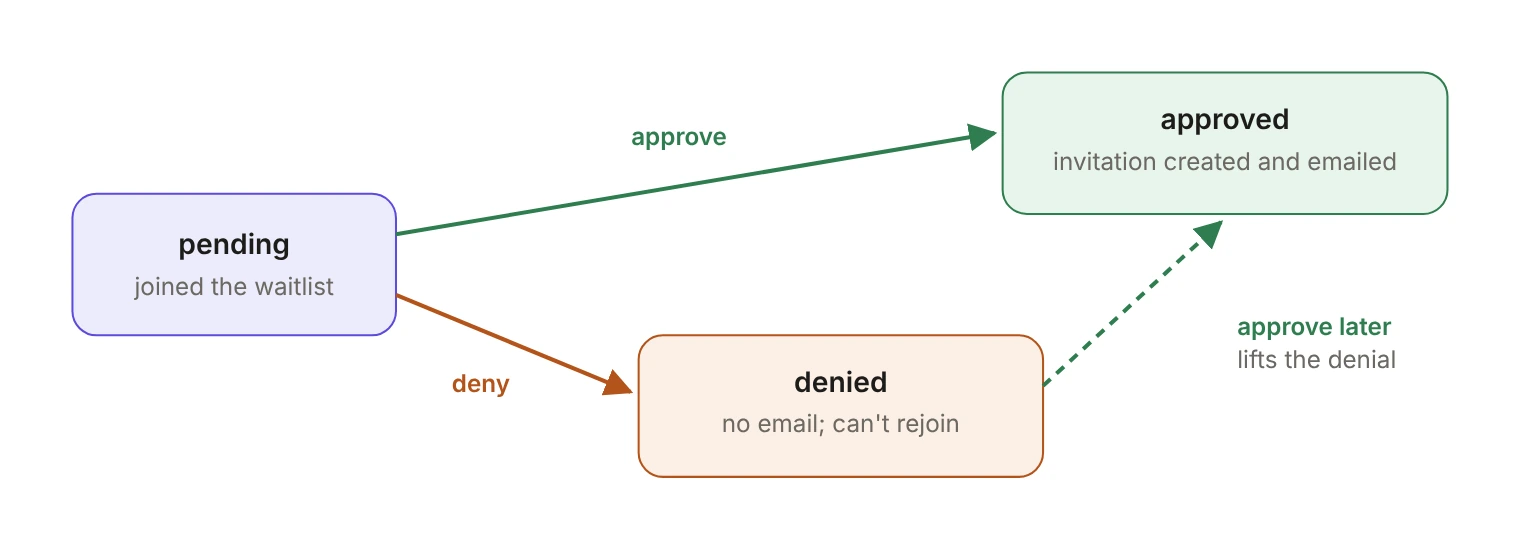
Approving an entry creates an invitation for that email address and sends the standard invitation email, with a link to complete signup. Denying marks the entry denied and doesn't notify the user; the address stays on the waitlist in the denied state, so they can't rejoin. Only pending entries can be denied, and a denial isn't final: approving a denied entry lifts the denial and sends the invitation.
Turn it on per environment under Authentication → Features in the dashboard, on the "Waitlist" card. While it's on, the environment's sign-up setting is superseded. Waitlists are scoped to an environment and each environment has a single default waitlist, so addresses collected while testing in staging never mix into the production queue.
Who can still get in while the waitlist is on?
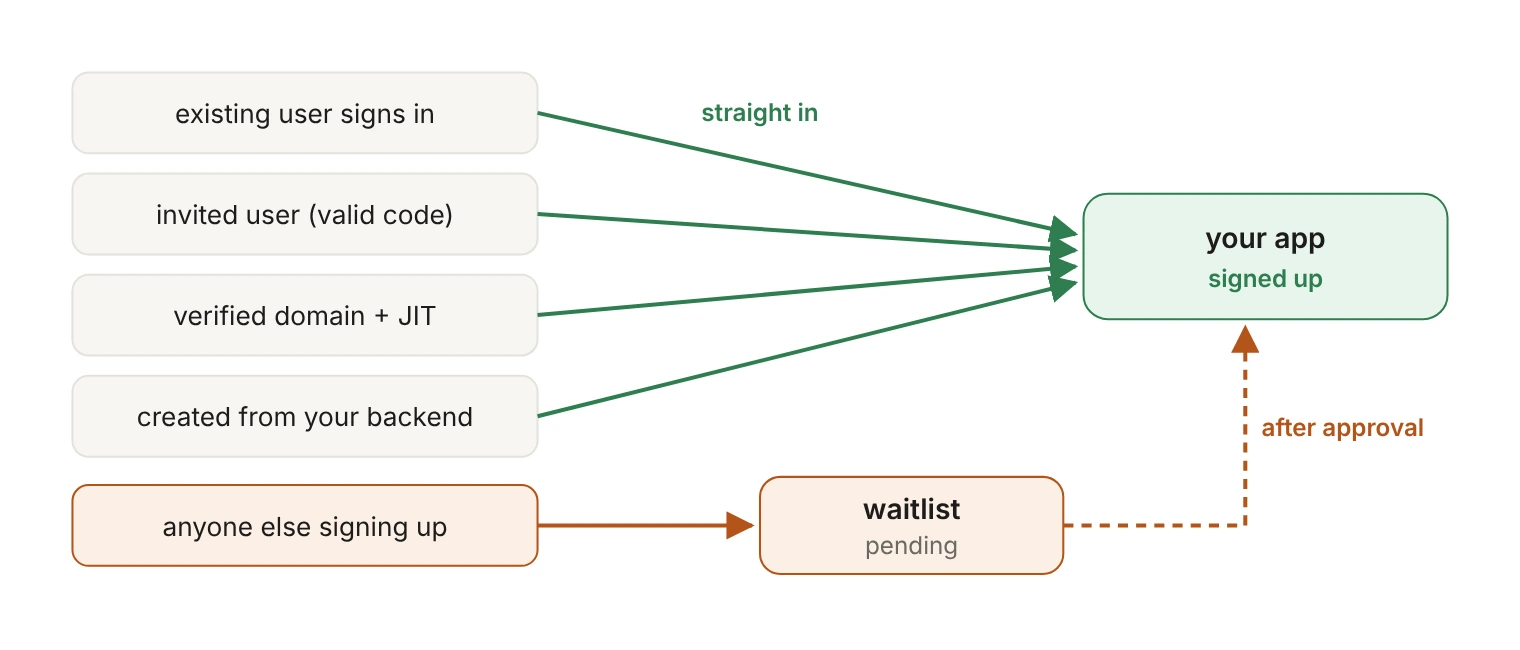
This is the part worth internalizing before launch day, because "waitlist enabled" doesn't mean "nobody new gets in." The docs are blunt about it:
Two more lanes stay open. Invited users get through: when a valid invitation code is present in the sign-in flow, registration opens for them. And if a user's email domain matches a verified domain of an organization with JIT provisioning enabled, a new user is created and added to that organization instead of joining the waitlist.
That last one is the useful default and the easiest to forget. If you've already onboarded a design-partner organization with a verified domain, their new hires will keep provisioning themselves straight past your closed beta. Usually that's exactly what you want. Confirm it is.
How do you work the queue from your backend?
Waitlist API requests authenticate with your environment's secret API key as a Bearer token, so they belong on your server, never in browser or mobile code. Anywhere a waitlist ID appears in a path, the literal ID default refers to the environment's default waitlist, so you can script against the API without looking an ID up first.
Listing entries is a plain GET:
The endpoint accepts before, after, limit (1 to 100, default 10), order, state and email, so pulling just the backlog is a state=pending filter rather than a client-side loop. (Listing the waitlists themselves isn't paginated, so those list_metadata cursors are always null.)
Adding an entry from your own form is a POST:
The body takes email, additional_fields and send_confirmation_email, which defaults to false, so API-created entries get no email unless you ask for one. Addresses are normalized and unique per environment: a create request for an address already on the list returns the existing entry unchanged (still with status 201) and doesn't send a second confirmation email. If a user with that address already exists, the request fails with user_already_exists. Together, those mean a migration script that re-runs over the same mailing list is safe.
Every entry comes back in the same shape:
Approving and denying are both POSTs against the entry ID:
The API reference covers all seven operations, with samples for cURL, .NET, Go, Java, PHP, Python, Ruby and Rust. The Python version of the create call:
What happens when an approval only half works?
Approval is three operations behind one endpoint: it changes the entry's state, creates an invitation, and sends the invitation email. Those can fail independently, and the approve reference is explicit about it: "The approval is saved even when the invitation steps fail, so instead of retrying the approval, recover based on the outcome."
Retrying the approve call is the wrong reflex, because the approval already landed. Branch on the response instead:
Write that branch once in your approval script and a half-failed batch becomes a replayable job instead of an incident.
How do you collect more than an email address?
The AuthKit waitlist form collects only an email address. To capture company size, use case or referral source, run your own form and create the entry with the API. Additional fields are stored on the entry as key/value pairs (up to 50 per entry, keys up to 40 characters, values up to 600), and they show up next to the entry in the dashboard, in CSV exports, on every entry response and in every webhook payload.
That's what makes cohort approval work. "Approve everyone from a company over 500 seats" becomes a check your script runs over additional_fields for each pending entry, followed by an approve call, rather than a judgment call someone makes one row at a time.
Run that check as a dry run before you wire it to approvals. Every approval sends a real invitation email, approvals happen one entry at a time, and pulling access back means revoking each invitation individually. A bad predicate is a mass mailing you can't recall.
If someone on the team prefers a spreadsheet, the dashboard exports the entries matching the current search, state and date filters as CSV, with the entry's ID, email, state, creation time and approval time, plus one column per additional field prefixed with additional_field_.
How can webhooks work the queue for you?
Three events fire as entries change state: waitlist_user.created, waitlist_user.approved and waitlist_user.denied. Each event's data is the waitlist entry, with the same fields the API returns. One naming quirk: "for historical reasons" the event names and the payload's object field use waitlist_user, while the API returns the same record as waitlist_entry. Match on both if you're writing a strict payload validator.
The docs suggest the obvious uses: auto-approving entries from known email domains, or notifying a Slack channel when new entries arrive. Combined with additional fields, the review queue mostly runs itself, and a person only touches the ambiguous entries.
Someone who joins through the AuthKit form also gets a confirmation email, sent only the first time that address joins. It's on by default and can be turned off per environment under Emails → Configuration. That setting governs every path into the waitlist: while it's off, API-created entries send nothing either, even when the request sets send_confirmation_email to true.
Does deleting an entry revoke access?
No. The invitation created by approval is an independent object, and "deleting the entry does not revoke an invitation created by approving it." The recipient can still use the link to sign up. To actually withdraw access, revoke the invitation.
Deleting also frees the address to join the waitlist again, unless a user with that email now exists in the environment. Denial and deletion solve different problems: denial is a sticky "no" that keeps the address from rejoining, and deletion is a clean slate.
Can an AI agent manage the waitlist?
Yes. The WorkOS MCP server at mcp.workos.com/mcp lets MCP-compatible agents act on your WorkOS workspace, and waitlist management is one of the things they can do. "Approve every pending entry from a .edu address" becomes a prompt rather than a script.
The limits are the ones you'd want on a queue that emails real people. The agent authenticates as your dashboard account and assumes your exact role and permissions. It works against one environment at a time, defaults to a sandbox environment, and only touches production when you direct it to.
What does this replace?
Before this, a closed beta meant turning sign-up off for the environment and issuing invitations by hand from the dashboard, which is fine for a dozen people and unworkable past a few hundred. You also lost the signup page as a demand funnel for the whole beta.
The waitlist keeps that page working while registration stays closed, and the API turns the list of people waiting into something your onboarding job can read on a schedule.
Enable it in a sandbox environment first, submit a test address through the form, and watch the pending entry appear. That loop takes about ten minutes, and it's the fastest way to find out which of your users will quietly go around the gate before you need that answer on launch day. The Waitlist docs cover the rest.