One app credential, a thousand tenants: What the ConnectWise breach teaches SaaS integration builders
A stolen vendor credential signed in to Microsoft 365 tenants as a trusted app. What that pattern means if your product integrates with customer accounts.

On October 15, an application signed in to Microsoft 365 tenants that had every reason to trust it. The app was ConnectWise Cloud Backup, formerly SkyKick, a backup service that managed service providers (MSPs) install in their clients' tenants. To do its job, it holds broad access to mailboxes, OneDrive, SharePoint, Teams and directory data in every tenant it is installed in. The sign-ins came from 144.172.64[.]128, a hosting provider address, and each one returned a Microsoft Graph access token. The app's legitimate traffic, according to Huntress, comes from Azure private IP space.
Huntress confirmed unauthorized sign-ins in 162 tenants as of 19:00 UTC on October 16. A later update counted almost 1,000 Entra tenants with sign-in activity from that address, over 300 of which succeeded. A successful sign-in is not the same as access, though: Inforcer found that Microsoft Graph can issue an app-only token for a tenant where the app isn't installed, and that token carries no permissions. ConnectWise published its advisory on October 16 and disabled seven of its application identities at 07:00 UTC on October 17.
If your product connects to your customers' Microsoft 365 or Google accounts, your integration probably has the same shape as this one. That's the part worth sitting with.
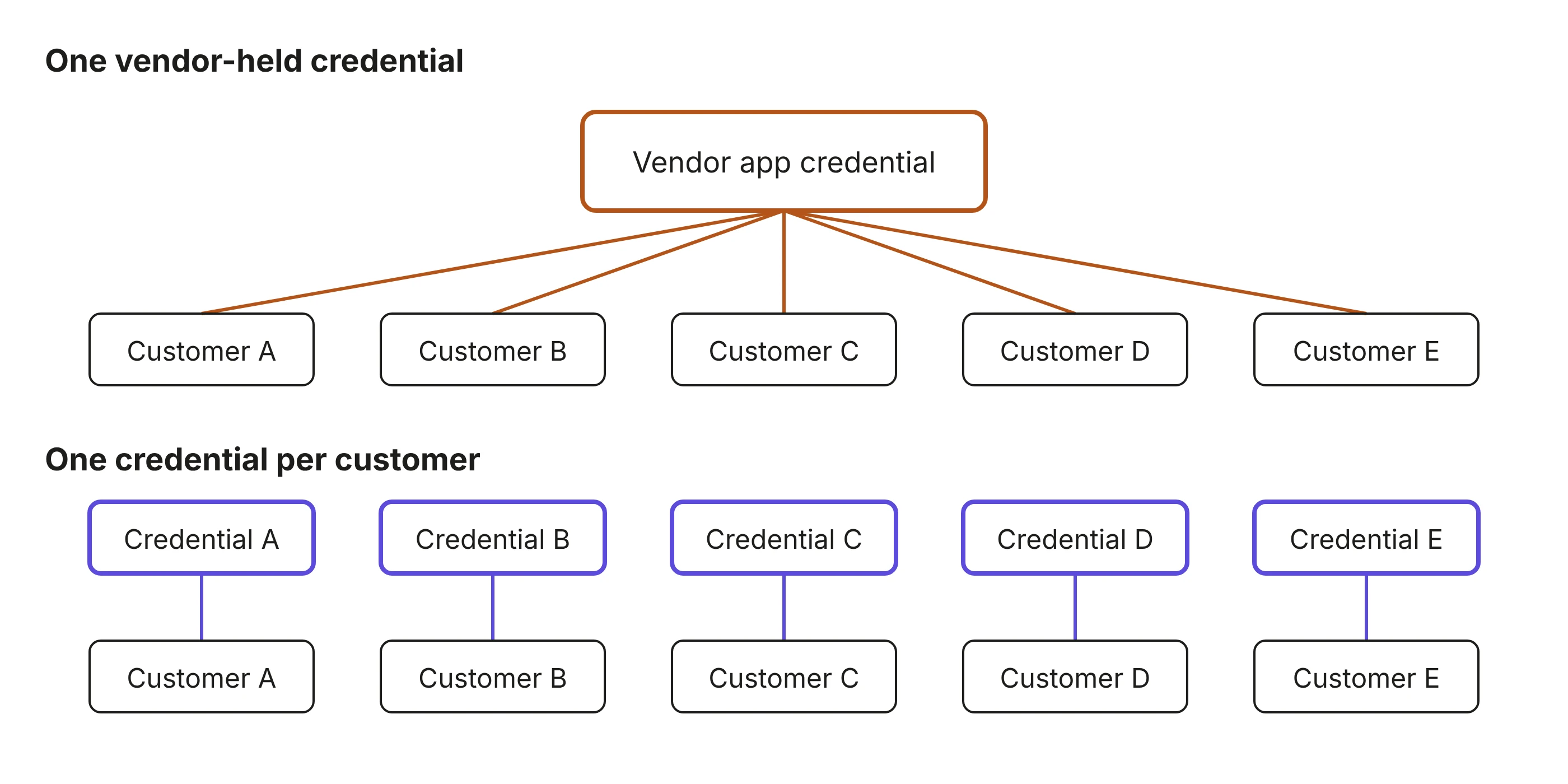
One credential works everywhere consent was granted
The mechanics are ordinary. A vendor registers a multi-tenant app once, in its own Entra tenant. When an admin consents in a customer tenant, Entra creates a service principal there carrying the application permissions that were approved. The app then proves its identity with a client secret or certificate that the publisher holds, and as Todyl put it, "that one credential works in every tenant that has granted consent."
In this case the credential type was a client assertion, which means the credential lived in the vendor's own tenant. Huntress drew the conclusion directly: "Nothing a customer did in their environment could have produced it."
Inforcer listed what follows from that design. No user is involved, so MFA, user risk and user-based Conditional Access policies don't apply. The customer can't rotate the credential, because it isn't in their tenant; their only levers are disabling the app, removing it, or removing its permissions. And consent doesn't expire, so the app keeps its access long after the subscription ends. Across the tenants Inforcer manages, its last inventory before the incident (September 27) found the backup app installed in 3,790 tenants across 663 MSPs, and only 1,359 of them, 36%, had used it in the previous three days. Roughly two thirds of that exposure came from installs nobody was using.
The customer's controls were never in the path
This is where the incident stops being an MSP story and becomes a design question for anyone shipping an integration.
App-only sign-ins involve no user, no device and no MFA prompt. Todyl describes the attacker presenting the app's secret through the OAuth 2.0 client credentials flow, and Entra issuing "an app-only access token for Microsoft Graph in each tenant the actor targeted. No user interaction was required, so user-focused controls such as MFA and conditional access for users did not apply."
The obvious counter is Conditional Access for workload identities, which can restrict where an application is allowed to sign in from. It doesn't help here. Inforcer: "Conditional Access for workload identities doesn't help here either: it only covers apps registered in your own tenant, not a vendor's multi-tenant app." Todyl reached the same conclusion, noting that "Conditional Access can't be applied to third-party multi-tenant apps, so least-privilege consent and removing unused apps are the main controls."
So the customer's identity controls, including the MFA policy they pay for and the device compliance rules they enforce, sat outside the authentication path entirely. Their exposure depended on how well the vendor protected its credential, and they had no way to inspect that.
The record of what happened is thinner than you'd expect
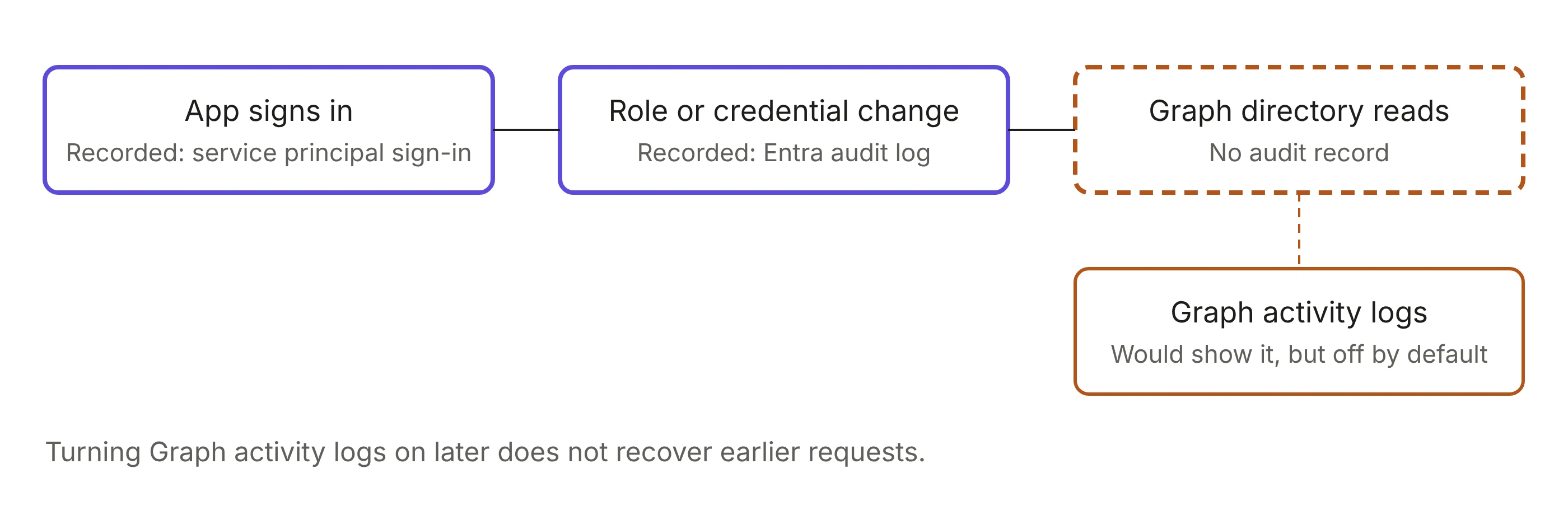
Huntress's October 19 update reached a conclusion that's uncomfortable to read if you're the vendor: "Just as important is what we did not see: The access may have been used for Microsoft Graph directory reads, which leave no audit record." Not reads that are hard to attribute. Reads that leave no entry in the audit log at all.
Where records do exist, attribution is the problem. In tenants with an active backup subscription, Todyl found read activity that "cannot be attributed to the actor or to the backup service. Both use the same application identity." The per-request source IPs that would separate them are recorded in MicrosoftGraphActivityLogs, which wasn't being collected for those tenants. Inforcer notes those logs, "the only place that shows what an app actually read," are off by default.
Containment inherits the same gap. ConnectWise was precise about what disabling its apps did: "Disabling the affected connections prevents new authentication through those connections; it does not reverse changes previously made inside a tenant." Todyl found that tokens already issued stay valid for up to 90 minutes after an app is disabled in a tenant, and Huntress warned that disabling an app doesn't remove credentials already added to other applications. In two tenants Huntress reviewed, the ConnectWise Cloud Management app for Microsoft Teams granted itself Global Administrator and then planted new client secrets on other applications, one of them Huntress's own. Inforcer summed up why that step matters: "App tokens expire within about an hour. A role assignment doesn't."
The sweep ran at machine speed
On October 21, Microsoft attributed the compromise to Storm-0940, a China-state aligned actor active since 2021 that has historically established cloud persistence by adding credentials to existing OAuth applications. ConnectWise's update the same day said that, based on the evidence available to it, including threat intelligence shared by Microsoft, a China state-aligned group appeared to be responsible, and that it "used an openly available agentic AI framework to automate and speed up its operation."
That framework is ARTEX, an open-source penetration testing framework that can use any AI model. Microsoft describes it as a multi-agent LLM system written in Go with a Next.js frontend, whose agents run a penetration test from reconnaissance through data exfiltration with little human interaction. According to Microsoft, after the unauthorized access Storm-0940 used ARTEX "to reach more than 2,250 tenants at 2,900 sign-in attempts per minute." Huntress's and Microsoft's counts differ because each sees a different slice of tenants. Across the wider campaign, Microsoft recorded multiple cases where the time from initial targeting to privileged access was less than three hours.
Microsoft's description of what that does to defenders is the part to internalize. Automated activity generates a large volume of traffic and log data that may generate alerts, but "the speed of the activity allows very little time for Defenders to respond to those alerts and remediate the actor's access in a coordinated fashion." ConnectWise made the same point from the victim's side: "Nation-state actors are increasingly targeting the software supply chain, because one trusted connection can open the door to many organizations. AI now lets them test those connections at what Microsoft calls 'machine speed'."
A shared credential has always been a concentrated risk. What changed is how quickly an attacker can turn that concentration into coverage. The time between a credential leaking and an attacker trying it against your whole customer base is now set by an agent loop, not a person working through a list.
Three decisions to revisit in your own integration
Prefer user-delegated access to app-wide access
An app-only grant is a standing, tenant-wide capability that exists whether or not anyone is using your product. A user-delegated grant is bounded by what that person can already do, and it stays inside your customer's identity controls. Some features need to run with nobody signed in, like a backup job or a nightly sync, and that's a real constraint. Even then, a background job can often act on stored per-user grants rather than a tenant-wide one (we walk through that pattern in giving a scheduled agent access with no signed-in session). Either way, app-wide access should be an explicit decision with a named owner, not the default because it was easier to build.
Delegated grants don't make the concentration disappear; they move it. Your client secret alone no longer opens every tenant, but the stored refresh tokens become the asset worth stealing. That's why where those tokens live, and which key protects them, matters as much as the grant type. We covered that layer in where your users' tokens actually live.
Ask for the scopes the feature needs, not the scopes the product might need
Todyl's reading of the backup app's consent shows what a broad grant hands an attacker: "tenant-wide read/write access to mail and attachments (including full mailbox access through Exchange Web Services), OneDrive and SharePoint files, and Teams chats, plus the ability to restore data into the tenant." Microsoft's guidance for this incident includes applying least privilege to multi-tenant application permissions and consent grants. Scope creep on a consent screen sticks around in a way scope creep in your codebase doesn't, because consent doesn't expire.
Keep your own record of what your integration did
Your customer's logs may not be able to answer the question. Directory reads leave no audit record, Graph activity logs are off by default, and where reads are recorded they carry your app's identity and nothing that separates you from someone holding your credential. If a customer asks you in six months which of their mailboxes your service touched on a given day, the only system that can answer is yours. Inforcer's longer-term advice runs the same direction from the customer's side: keep an inventory of every third-party app in every tenant with its last sign-in date, and "treat vendor apps as identities."
Where this lands in Pipes
WorkOS Pipes handles the OAuth flow, token storage and refresh for third-party connections, so it's worth being precise about which Pipes options follow the pattern this incident exposed and which don't.
By default, a Pipes provider in production uses an OAuth application you set up and control, and each user authorizes and owns their own connection. That's the delegated model from the first decision, with one app registration of yours behind every customer's connections to that provider. (WorkOS-managed shared credentials exist only for sandbox environments.)
Organization-scoped providers go further. They let one organization override whether a provider is enabled, the scopes it requests, and the OAuth credentials it uses, so that an organization's IT admin can match their own security requirements, "say, allowing only a subset of scopes, or requiring connections through the organization's own OAuth application." For a provider set to use organization credentials, each organization supplies its own client ID and secret, and until it does, that organization's users can't connect. For that provider, there's no single app credential of yours whose compromise reaches every customer.
One detail matters when you reason about how far a compromise reaches. In the docs' words, "Organization credentials decide which OAuth application the provider sees. They don't make the resulting connections organization-owned: each user who connects under them still gets a personal, organization-scoped connection." A customer-owned OAuth app with per-user grants underneath it is the combination the ConnectWise pattern lacked on both counts.
That shrinks what a compromise reaches; it doesn't eliminate it. A compromised organization-level OAuth client, or a compromised admin account that configured it, still reaches everything that organization's users granted. The difference is that the credential and the controls around it belong to the customer, so they can rotate it without waiting on a vendor advisory. And when a connection stops working, Pipes returns active: false with an error of needs_reauthorization or not_installed, which your application can branch on.
Connection sharing runs the other direction, and it's better to say so plainly. A shared connection is owned by an organization instead of a person: an admin connects once, and every request runs with the credential the admin supplied, not the credential of the member who triggered it. That's one credential serving many people, the shape this breach exposed, scoped to a single customer rather than to every customer a vendor has. Organization-scoped provider overrides also "apply to the user-owned provider, not to shared connections." The two mitigations we published alongside connection sharing are the same two this incident argues for: scope the connecting account narrowly, and log which member acted. When a customer asks who posted a message to their Slack channel six weeks ago, Slack's records will point at the bot, so your application's log is likely the only place that maps it back to a person.
WorkOS Audit Logs is built to hold that record. Your application emits an event for each provider call, with the acting member as the actor and the provider and connection in the metadata, and your customers can read it in the Admin Portal, export it as CSV, or stream it to their SIEM. (WorkOS also now records session and membership events itself, but those cover sign-ins and membership changes, not what your integration did in a provider.) The constraint is the one every team in this incident ran into from the other side. Events exist only from the moment you start writing them, and they're retained for 30 days by default unless each organization's retention is raised. The log you need during an investigation is the one you started before it.
The uncomfortable version
We argued in Token isolation is the easy half of multi-tenant OAuth that "cryptographic isolation does not stop an attacker holding a valid application credential that the API layer considers authorized, because that caller gets plaintext back, correctly." This incident is that sentence with a tenant count attached.
None of this is unique to backup vendors, or to anyone else. Any product that holds access to customer systems, ours included, carries a version of this risk, and the three decisions above apply to all of us.
Microsoft is careful to note that "the presence of an affected application, or even successful authentication, does not necessarily indicate unauthorized data access or data exfiltration." That caveat is correct, and it's also the problem. Nobody can currently prove the negative, because the evidence that would settle it was never written down.
So if you do one thing this quarter, make your own logs able to answer the question your customers' logs can't. In this incident, nobody could answer it.