OWASP Top 10 2025 A07: Authentication failures explained for SaaS teams
A practical walkthrough of OWASP A07:2025, the weaknesses it lists, the fix for each one, and which of them your auth layer should be handling already.

Security questionnaires cite it, pen test reports cite it, and the remediation ticket tends to land on whoever owns sign-in. A07 is OWASP's category for the case where an attacker tricks a system into recognizing an invalid or incorrect user as legitimate. The findings list looks intimidating. Narrowed to a checklist it is five things: passwords, MFA, recovery, sessions, and token validation.
What does A07 cover, and what changed in 2025?
The 2021 entry was called Identification and Authentication Failures, and that page notes the category was previously known as Broken Authentication, when it sat in second position. The 2025 edition renames it to Authentication Failures and keeps it at #7, a rank OWASP says the category has held since 2021 despite benefits from standardized frameworks. OWASP calls the rename a slight name change meant to more accurately reflect the 36 CWEs in the category, up from 22 in 2021. Those 36 include CWE-287 improper authentication, CWE-384 session fixation, and CWE-798 use of hard-coded credentials. The score table lists 1,120,673 total occurrences and 7,147 CVEs, with an average weighted exploit score of 7.69 against an average weighted impact of 4.44. The exploitability number is the one to read twice.
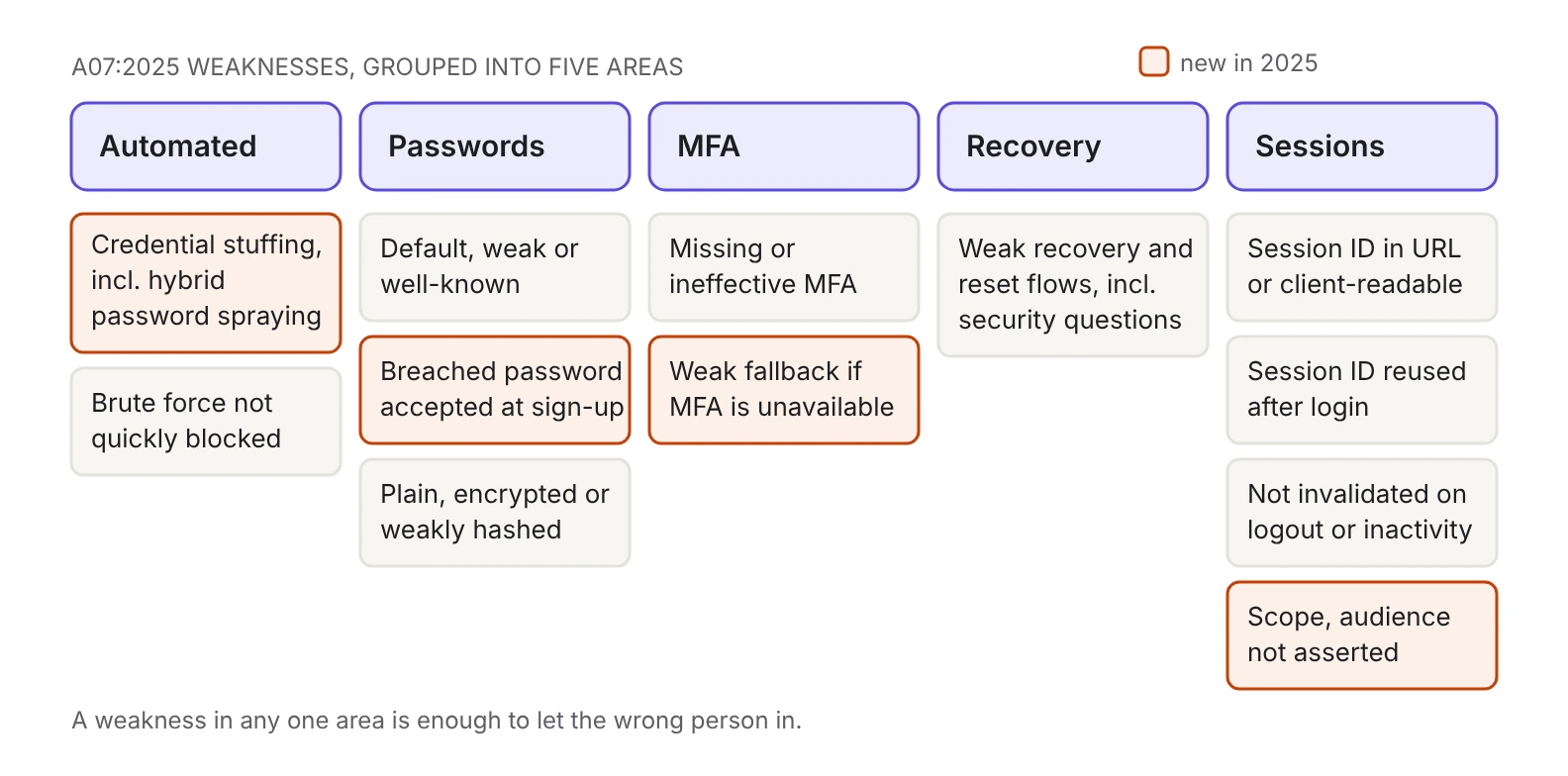
Four items on the weakness list are new relative to 2021. Credential stuffing now explicitly covers hybrid password attacks, also called password spray attacks, where the attacker works through variations or increments of spilled credentials, for instance Password1!, Password2!, Password3!. Account creation with already known-breached credentials is its own weakness now, separate from weak passwords. Weak or ineffective fallbacks when MFA is unavailable are called out alongside missing MFA. And the list closes with a line written for API-heavy products: the application "does not correctly assert the scope and intended audience of the provided credentials".
How do you defend against automated attacks?
Three weaknesses describe what your sign-in endpoint does under volume: it permits credential stuffing using a breached list of valid usernames and passwords, it permits the hybrid variant that increments known passwords, and it permits brute force or other automated, scripted attacks that are not quickly blocked. OWASP's first attack scenario adds that an application with no defense against automated threats can be used as a password oracle, a way for an attacker to find out which credentials are valid before using them. The sign-in form stops being a door and becomes a lookup service.
Two prevention items apply. Limit or increasingly delay failed login attempts, without creating a denial of service, and log all failures and alert administrators when attacks are detected or suspected. And where possible, enforce multi-factor authentication, which OWASP positions as the defense against automated credential stuffing, brute force, and stolen credential reuse. Skip the alerting half and the campaign gets caught by a customer instead of by a dashboard. For the difference between the two attack shapes, see credential stuffing vs. brute force attacks.
What does A07 require for passwords?
Three weaknesses sit here: default, weak, or well-known passwords such as Password1, or an admin username with an admin password; new accounts created with already known-breached credentials; and plain text, encrypted, or weakly hashed password stores, which OWASP cross-references to A04:2025 Cryptographic Failures.
The prevention list is unusually specific. Ship no default credentials, particularly for admin users. Test new or changed passwords against the top 10,000 worst passwords list. Validate against lists of known breached credentials at account creation and password change, with haveibeenpwned.com given as the example. Align length, complexity, and rotation policies with NIST SP 800-63B section 5.1.1 for memorized secrets; in the current revision, SP 800-63B-4, the password requirements are in section 3.1.1. Do not force rotation unless you suspect a breach, and if you do suspect one, force resets immediately. Encourage and enable password managers.
OWASP's second attack scenario explains the no-rotation rule: rotation and complexity requirements, once considered best practices, encourage users to both reuse passwords and use weak passwords. A complexity rule that walks a user from Password1! to Password2! has made the attacker's job easier, because that increment is the hybrid spray pattern OWASP describes. For what a policy should enforce instead, see the developer's guide to strong passwords, and for the storage half, picking a password hash.
What counts as an MFA failure under A07?
Two weaknesses: missing or ineffective multi-factor authentication, and weak or ineffective fallbacks used when MFA is not available. The second is new in 2025 and the harder of the two to close, because a fallback exists precisely for users who can't complete the strong factor.
OWASP's second scenario states that most successful authentication attacks occur because passwords are still the sole authentication factor, and the prevention item is to implement and enforce MFA where possible. Both "where possible" and "enforce" are doing real work in that sentence. An MFA requirement that any user can route around through a support-driven reset is a requirement in the dashboard only. MFA best practices covers enrollment and enforcement, and passkeys stop phishing, your MFA fallbacks undo it covers the failure mode of a strong factor paired with a weak backup path.
Which account recovery flows fail A07?
One weakness, and it is blunt: weak or ineffective credential recovery and forgot-password processes, such as knowledge-based answers, which OWASP says cannot be made safe.
The matching prevention item is broader than recovery. Harden registration, credential recovery, and API pathways against account enumeration attacks by returning the same messages for all outcomes. Recovery flows are an easy place to leak, because the helpful response that confirms a reset email went out and the unhelpful one that says no account was found are the same sentence in two branches of one function. Best practices for secure user authentication goes through reset and enumeration in detail, and what is account takeover covers recovery as one of the four ways attackers get in.
How should sessions and tokens be handled?
Four weaknesses cover the half of authentication that happens after the password is correct: the session identifier sits in the URL or another location the client can read, the same identifier is reused after successful login, sessions and tokens are not invalidated on logout or inactivity, and the scope and audience of provided credentials are never asserted.
OWASP's session prevention item packs five requirements into one sentence: use a server-side, secure, built-in session manager that generates a new random session ID with high entropy after login, keep session identifiers out of the URL, store them securely in a secure cookie, and invalidate them after logout, idle, and absolute timeouts. The logout requirement has an SSO-shaped trap attached. OWASP's third scenario describes a single sign-on session that cannot be closed by a single logout: one login signs you into mail, documents, and chat, but logging out ends only the current system's session, leaving the others authenticated in the same browser. If your app federates, the click and the end of the session are different events, and you have to check which one your code implements.
The token item is easy to read past. OWASP spells out the fix: verify the intended use of provided credentials, and for JWTs validate the aud and iss claims and scopes. A signature check tells you the token is authentic. It does not tell you the token was minted for your service. We have covered both claims individually, in how to validate the JWT aud claim and how to validate the JWT iss claim, and the broader rules in session management best practices.
The A07 checklist
Each row pairs a weakness from the A07 description with the prevention item OWASP gives for it.
What do AuthKit and Radar cover?
OWASP's last prevention item is a build-versus-buy recommendation: ideally use a premade, well-trusted system to handle authentication, identity, and session management, and transfer this risk by buying a hardened, well tested system. Here is what that covers if the system is WorkOS, limited to what the docs say.
- Passwords. AuthKit applies a strong password policy by default: a minimum length, rejection of low complexity passwords, and rejection of breached passwords flagged by haveibeenpwned, which is OWASP's breached-credential item in the default configuration. The policy is editable in the dashboard and enforced in both the sign-up and the password reset flows. Password history is off by default; enabling it rejects up to 10 of a user's most recent previous passwords.
- MFA. Hosted AuthKit's built-in MFA uses authenticator-app codes, not SMS; SMS-based MFA requires the standalone MFA API, which supports US phone numbers only. Setting MFA to Required makes new and existing users enroll an authenticator app before they can sign in. The requirement does not apply to SSO users, whose second factor lives at their identity provider, and a user signing in with a passkey is not prompted for a TOTP code, because AuthKit treats a passkey with user verification as both factors. To require MFA for some customers and not others, use an organization policy.
- Automated attacks. Radar collects signals on sign-in behavior and can block or challenge a suspicious attempt based on your configuration, using the device fingerprint to separate attack traffic from legitimate users. Its brute force detection targets many sign-in attempts over a short period, and a challenge sends an emailed one-time passcode, which the docs describe as effective against bots that can solve CAPTCHAs and against attackers holding stolen credentials without access to the user's inbox. The shipped detections are bot detection, brute force, impossible travel, repeat sign up, stale accounts, unrecognized device, and domain protections. For the logging half of OWASP's rate-limiting item, the Events tab lists every Radar event with device, location, user agent, and IP address.
- Sessions and tokens. The access token is a JWT your backend validates on each request against the WorkOS JWKS, carrying
iss,sub,sid,exp,iat, and, when an organization is selected,org_id,role, andpermissions. Refresh tokens may be rotated after use, so replace the old one with whatever comes back. Sign-out means reading thesidclaim, deleting your app session, and redirecting to the WorkOS logout endpoint so the session ends at WorkOS as well as in your app. That covers the WorkOS side of OWASP's single logout scenario; whether your other federated applications end their own sessions is still something to check there. Session length, access token duration, and inactivity timeout are configured per application in the dashboard, and the Sessions API revokes sessions when you need to end them early.
Where should you point the audit?
Take the weakness list, not the prevention list, into your next review. The prevention list describes a system someone designed on purpose. The weakness list describes what applications actually do, which is why every row reads like a bug you have seen: the reset flow that confirms an address exists, the session cookie that survives logout, the service that accepts any token with a valid signature. Pick the five areas above, find the function that implements each one, and read it. Where nothing in your codebase implements it, that is the ticket to open.
Sources
- OWASP Top 10:2025 A07 Authentication Failures
- OWASP Top 10:2021 A07 Identification and Authentication Failures
- OWASP Authentication Cheat Sheet, Session Management Cheat Sheet and Credential Stuffing Prevention Cheat Sheet
- NIST SP 800-63B-4 (passwords in section 3.1.1)
- WorkOS docs: Email + Password, MFA, Passkeys, Sessions, Radar
Related reading: the OWASP Top 10 for LLM applications, the OWASP Top 10 for agentic applications, and account takeover in B2B SaaS.